Debug»
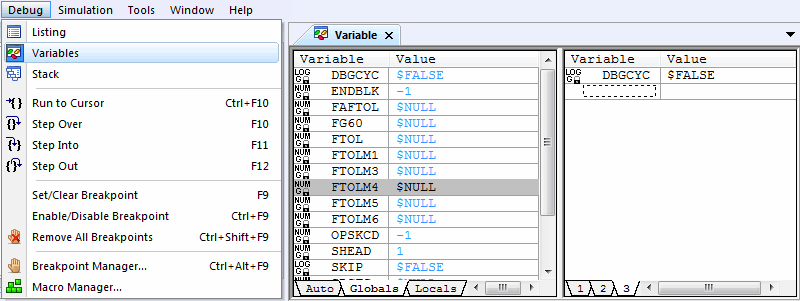
This command toggles the opening or closing of the variables window on the screen.
See the Variables Window for more information.
The Variables window is used to examine local, object, global and macro system variables. The window is organized into left and right halves.
The left half of the window has a series of four tabs. The leftmost Auto tab lists recently referenced variables to simplify debugging. The Global and Object tabs list all global and object scope variables that have been defined. Similarly, the Local tab lists all local variables defined to the current point in the active macro. The contents of the Local and Object windows depend on the macro currently selected in the Stack window (see below).
The right half of the window also has a series of tabs, which you can use to organize and view local, object, global or macro system variables of interest. Local, object and global variables are only listed once they are declared (DECLAR command) or used.
Each time GENER is paused, it will identify changed variables with a different color.
The right-mouse context sensitive menu provides quick access to various options and features of the variables window. This includes the option to list variables either alphabetically or in the order they were defined, to omit undefined ($NULL) variables and even to export a listing of the current state of each variable (there is no corresponding function to import variables).
Variables can also be viewed by placing the cursor over a variable name where it appears in the Source window. Variables can be “dragged” into the right-hand watch window from the Source window or from the list of Global, Object and Local variables in the left-hand half of the Variables window. Once there, variables can be easily traced using the right-mouse context sensitive menu.
The value of read/