Toolbars
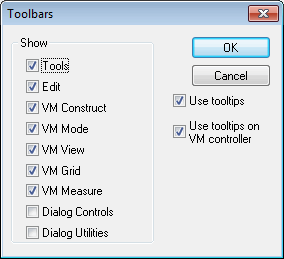
This dialog appears when Tools»
Tools: The Tools toolbar provides quick access to the Generate, Finder, Calculator and Test functions.
Edit: The Edit toolbar provides quick access to Save, Open, Do, Undo and other functions.
VM...: The Virtual Machine toolbars are very useful when developing models. They provide quick access to the Simulation menu functions.
Dialog...: The Dialog Controls toolbar provides quick access dialog controls creation functions. The Dialog Utilities toolbar provides quick access dialog control positioning, resizing and test functions. See the dialog editor section for more information.
Use tooltips...: When the Use tooltips checkbox is selected, a tooltip (i.e., small window) will appear describing the actions of toolbar buttons when the cursor is momentarily left over the button. When the Use tooltips on VM controller checkbox is selected, tooltips will appear when the cursor is momentarily left over an axis in the Axes window.