Words Manager
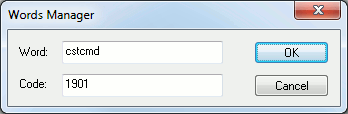
This dialog appears when adding or modifying a keyword using the Words Manager. When adding a keyword, both the name and the code value must be unique. When modifying a keyword, only the name or the code value can be changed, not both.
Word: The name of the keyword. Keyword names must start with an alphabetic character and contain no more than 6 characters. When modifying a reserved keyword, the name field can not be changed.
Code: The integer code associated with the keyword. For minor words, codes should range from 1 through 9999. Major words have no such restriction. Major words codes can be defined with two numeric values using the class:subclass format. The class: component can be omitted for 2000 class keywords.
OK: Accepts the change to the keyword.
Cancel: Ignores the change to the keyword.