By Type
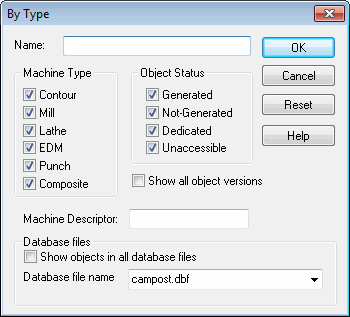
This dialog box controls which objects (PP,
Name: Enter a specific or wild-carded name to restrict the list of objects to those matching the name. For example, A* lists all objects whose names start with the letter A. To list only objects created under version 19.0, enter *.190;*
Machine Type: Show only objects matching the selected machine type(s).
Object Status: Show only objects matching the selected status.
Show all object versions: The database remembers each revision of an object. By default, only the last revision is listed. Check this box to show all revisions.
Machine Descriptor: Show only objects that match the specified machine descriptor. The machine descriptor is a shorthand notation listing the machine’s configuration. You can enter a wild card expression to restrict the listing to only those objects with a matching descriptor. For example, *3* restricts the listing to machines having 3 axes.
Show objects in all database files: When this box is checked, the listing will contain objects from all databases listed in the database navigator view.
Database file name: Restricts the listing to just those objects contained in the selected database.