The Statistics Dialog

The Simulation Statistics dialog offers to the user a list of all components in the simulation as well as useful information that can be used to debug macros or investigate simulation performance bottleneck. The runtime and model builder offer slightly different information as described bellow.

Summary

image1 This section include global information about the simulation.

  • Visuals only Entities and Triangles indicates the total number of visual entities in the simulation and the triangle count for all of them. Visual entities are simulation object used for display only and are not tested for collision and do not take part in the material removal process.

  • Colliding Entities and Triangles indicates the total number of colliding entities in the simulation and the triangle count for all of them. Colliding entities are tested for collision and take part in material removal process.

  • Safety Entities and Triangles indicates the total number of safety entities in the simulation and the triangle count for all of them. Safety entities are tested for collision but do not take part in material removal process. Safety zone and tool gouge offset are example safety entities.

  • Total Entities and Triangles indicates the total number of all entity type and their triangle count.

  • Nb of axis indicates the total number of linear, rotary and curve axis of the model.

  • Nb of tool axis indicates the total number of tool axis in the model. It includes tool change pockets.

  • Nb of head axis indicates the total number of head axis in the model. It includes head change stations.

  • Nb of stock axis indicates the total number of stock axis in the model.

  • Nb of channels indicates how many channel are defined in the model.

  • Nb of tools indicates the number of tools defined in the current simulation.

  • Nb of heads indicates the number of heads defined in the current simulation.

  • Nb of parts indicates the number of parts defined in the current simulation.
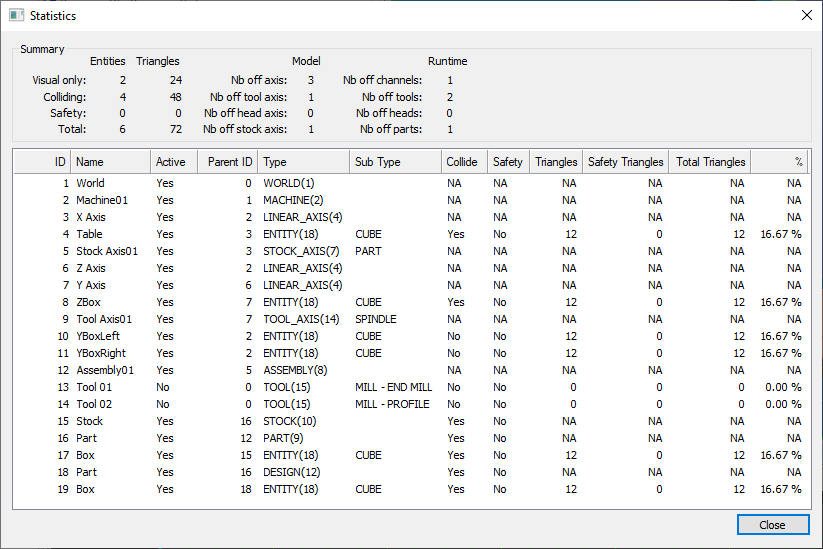
List of components

This list show all the component currently defined in the simulation as well as extra information and statistics about each of them. Note that some informations like Component ID and Parent ID are only available at runtime as they are dynamic properties not available during model creation.

  • ID The component ID as returned by $FMSID.

  • Name The component name as returned by $FMSIDN.

  • Active Yes if the Component is actually taking part in the simulation.

  • Parent ID The component parent’s ID as returned by $FMSID.

  • Type The component type and it’s numerical value as returned by $FMSIDT.

  • Sub Type The component sub type when applicable.

  • Collide Yes if the component is an entity tested for collision. No if it is a visual only entity. NA if the component is not an entity (ex: tool axis).

  • Safety Yes if the component tested for collision that also have a safety zone. No if the component is tested for collision but do not have safety zone. NA if the component is not an entity and thus cannot have a safety zone.

  • Triangles Number of triangles of the mesh if the component is an entity. NA if the component is not an entity.

  • Safety Triangles Number of triangles of the safety mesh if the component is an entity with safety. 0 if no safety zone. NA if the component is not an entity.

  • Total triangles Total number of triangles for the entity. This includes entity mesh triangles and safety mesh triangles.

  • % Percentage of the simulation total triangle count the entity is using. NA if the component is not an entity.