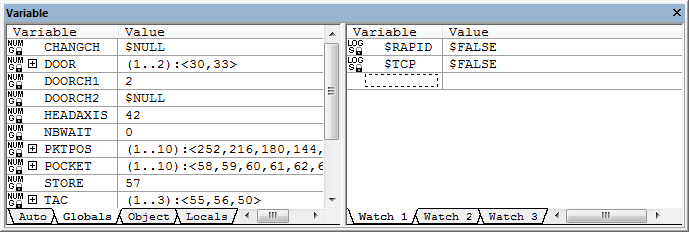
Variable
This window displays the value of variables when post processing is paused. The window is split in two parts. The left part automatically displays global, object and local variables. This list gets refreshed anytime the list of variables changes. You can look at the global, object or local variable lists by selecting the proper tab. The right part displays selected variables that you want to look at. By default you have three tabs that you can use to organize the variables to look at. You can add more tabs by using the popup context menu (right mouse click) Add Page.
By default, global, object and local variables having a value of $NULL are shown. This may give you a very long list of variables. You can use the context popup menu “Show $NULL variables” setting to prevent variables having a value of $NULL from being displayed.
You can add variables to one of the watch window tabs by double clicking
in an empty space of the window and then typing the variable name to
look at. You can select a variable name from the left side
(Global/
Arrays and sequences can be expanded to look at individual elements by pressing the + sign on the left of the variable. The type of each variable is also displayed to the left of the variable name. It could be one of the following:
LOG: Logical type
STR: String type
NUM: Numeric type
KEY: Keyword type
REC: Record type
Under the variable type will be listed the variable scope. It can be one of the following:
G: Global scope
O: Object scope
L: Local scope
When a variable gets declared, you do not have to specify its type. The variable type will simply change as you assign values to it. If you assign a string to a logical variable, the variable type will change from logical to string. But if you declare a variable as being of a specific type, then you cannot assign a value of a different type. A small lock symbol will be drawn next to the scope letter (G, O or L) of variables defined as a specific type. If the value of a variable has changed since the last pause, it will be shown in a different color.