General
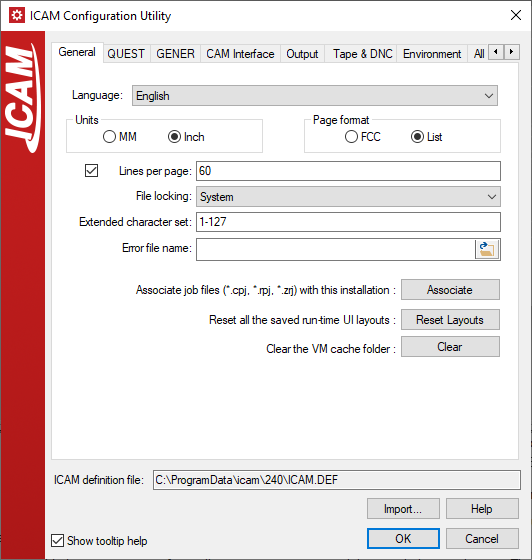
Language: Specifies the name of the default language to use for all
text output. The language name must match one of the currently loaded
languages. If the language is not specified or is invalid, all text will
be output in English. (LANGUAGE)
Units: This specifies the default unit of measure to be used before
the first UNITS command or in the absence of a UNITS command. Set it to
MM if the majority of CL files are in metric and set it to Inch if
the majority of CL files are in imperial units. (UNITS)
Page format: If List is chosen, no special codes are output except
for a form feed character at the start of each page. If FCC is chosen,
the first character of each output line will be a carriage control
indicator where a value of 1, 0, and space cause a page advance, double
space, or single space action. (PAGE_FORMAT)
Lines per page: This specifies the number of lines per page on all
output listings. If NA is specified, there will be no page breaks, and
headers will be output at the top of the program and at the top of the
program summary only. (LINES_PER_PAGE)
File locking: Database file locking uses the inherent scheme for a
given operating system. This is referred to as a System lock. If there
are problems with database file locking on a particular system, the
software can simulate native file locking by creating and managing a
File lock. It is recommended that this variable be set to System and
only changed if problems are encountered. Database file locking can be
disabled by specifying No. (FILE_LOCKS)
Extended character set: This specifies the valid range of characters
permitted in a text string. By default, GENER only recognizes characters
in the ASCII range 1-127. All (or portions) of strings containing NULL
or characters with the sign bit set will be processed as floating point
values. To have GENER recognize extended characters, specify the
additional characters by ASCII code. A range of characters can be
specified using nnn-nnn. Separate multiple specifications using a comma
(,). For example, to permit characters in the range 145 through 200 and
the NULL (0) character, specify "145-200,0". Specify "0-255" for all
characters (not recommended). (EXTENDED_CHARS)
Error file name: This specifies the path and name of a custom
diagnostic message file. If no file name is specified, the default
internal diagnostic messages are used. (ERFILE)
Associate: Use this button to associate JOB and review files extension to this version of Icam Productivity Tools. The file extensions being associated are ".CPJ", ".RPJ" and ".ZRJ". This will change the current user windows registry and does not affect the ICAM.DEF file.
Reset Layouts: Use this button to clear all the run-time UI saved window layouts for the current user. This will change the current user windows registry and does not affect the Icam DEF file.
Clear: Use this button to clear the VM cache folder. The VM cache is used to speed up the loading of some objects. This does not affect the ICAM.DEF file. Icam Support might ask you to clear the cache when diagnosing unexpected VM behavior.