Overview
The Configuration Utility contains a number of tabbed panels that define setup information for various components of the system. Follow the links below for more information.
General lists settings that are common to all Icam software modules.
QUEST lists settings that are specific to QUEST.
GENER lists settings that are specific to GENER.
CAM Interfaces lists settings that are related to the input processing of CLDATA by GENER.
Output lists settings controlling the output file naming and formatting.
Tape & DNC lists settings controlling the output formatting of MCD by GENER.
Environment is a read-only list of all Icam environment variable settings.
All Entries provides an alphabetical list of all configuration settings.
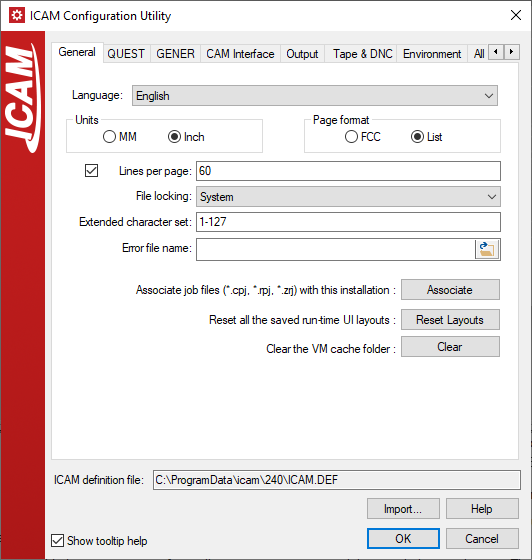
Icam definition file: Lists the path and filename of the ICAM.DEF definition file that is being used. The search order for this file is as follows:
ICAM_APPDATA_240 environment variable location, if defined
ICAM_APPDATA environment variable location, if defined
The users's roaming application data ICAM\
270 sub-directory The common (all users) application data ICAM\
270 sub-directory The installation directory (ICAM_LIB)
Import: Select a definition file whose symbol values will replace those of the current definition file.
Help: Open this online help.
OK: Exits the Configuration utility, saving all changes in the current ICAM.DEF file.
Cancel: Exits the Configuration utility, leaving the current ICAM.DEF file unchanged.
Show tooltip help: When checked, enables the popup help text that will appear when leaving the mouse cursor over a dialog control.