Register
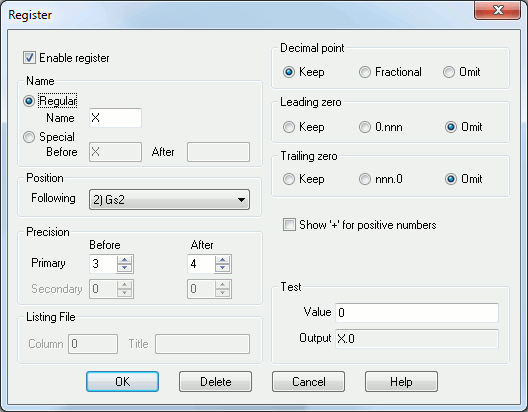
This dialog appears when modifying or adding new registers in the Register panel.
Enable register: Uncheck this option to disable the register.
Name: Defines the register (word) name as recognized by your controller. In some cases, there will be a space to enter a second name. This occurs when the control uses register names to differentiate between absolute and incremental units, as well as on some older merging lathes. If the second name field is left blank, it will default to the primary name.
Regular: Select this entry when the register name is a single uppercase letter. Enter the letter in the box provided.
Special: Select this entry when more than one character is needed for the letter address, or if the letter address is lowercase. This is considered a "special" case. You may enter zero or more characters to appear before the numeric value, as well as zero or more characters to appear following the numeric value. Special characters can be entered using their ASCII character code, using the ^nnn format (for example, ^032 can be specified to force a leading or trailing blank).
Position: Use this drop-down box to specify the new position for the register being modified. The new register position will follow the one listed in this box.
Precision: Use these boxes to specify the number of decimal digits before and after the implied or actual decimal point for the dimensional value. Different precision values can be specified as follows:
Primary: Specifies the register format to use when the output is in primary machine units.
Secondary: Specifies the register format to use when the output is in secondary machine units (if applicable).
Listing file: Normally, the tape image is output to the listing file exactly as it appears in the output tape file. As an option, the register values can be left aligned at specific character column positions in the listing file (search for a question containing the word "tabbed").
Column: Specifies the character column number in the listing file to tab to before outputting this register. If the current position in the output file is already past this position, then the register value will be output at the current position. This field can be left blank, in which case the column position defaults to the last column position defined to this point in the register list.
Title: Specifies text to appear in the heading, left justified at the column position. A heading need not be specified.
Decimal point: Specifies how the decimal point should be output for those registers that have fractional values. There are three exclusive formats:
Keep: The decimal point will always be output on registers that are defined with digits to the right of the decimal. For example, X1.2 Y3. Z.4
Fractional: The decimal point will only be output when the register has a non-zero fractional value. For example, X1.2 Y3 Z.4
Omit: Decimal points will never be output. Older controllers often used this format, and relied on the count of digits to determine the implied decimal point location. For example, X0012 Y003 Z0004
Leading zero: Specifies how leading zeroes (non-significant leading zero digits to the left of the decimal) should be output:
Keep: Leading zeroes will always be output. For example, X001.2 Y003. Z000.4
0.nnn: A single leading zero will be output for numbers that are less than 1, so that the value does not start with a decimal point. Otherwise, leading zeroes are omitted. For example, X1.2 Y3. Z0.4
Omit: Leading zeroes will never be output. For example, X1.2 Y3. Z.4
Trailing zero: Specifies how trailing zeroes (non-significant trailing zero digits to the right of the decimal) should be output:
Keep: Trailing zeroes will always be output. For example, X1.2000 Y3.0000 Z.4000
nnn.0: A single trailing zero will be output for whole numbers, so that the value does not end with a decimal point. Otherwise, trailing zeroes are omitted. For example, X1.2 Y3.0 Z.4
Omit: Trailing zeroes will never be output. For example, X1.2 Y3. Z.4
Show ‘+’ for positive numbers: Select this box to have a "+" sign output for positive numbers. By default, positive numbers are not output with a "+" sign. For example X+1.2
Test: Shows the formatted register result given various test values. Only the primary register format is shown.