CAM Interfaces
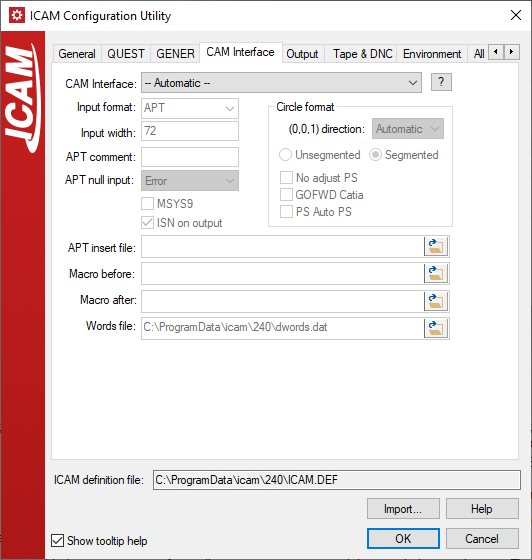
CAM Interface: Specifies either Automatic (the default) or the
name of a CAM interface kit. (INTERFACE_KIT)
Input format: Use the drop-down to select a common format, or type
the required format name. APT format supports APT like source
statements generated by most CAM systems. ICAM format supports the
Icam binary CL file format. ISO format supports ASCII CL files defined
by the ISO 3592 standard. Formats for many CAD/INPUT_FORMAT)
Input width: Specifies the maximum number of characters in the input
record when GENER inputs APT-like CL. Up to 256 characters per input
line can be specified, with a minimum of 40. This symbol can be
overridden with the CONTRL APT source command. (INPUT_FORMAT)
APT comment: Specifies an alternate comment delimiter to use when
GENER inputs APT-like source files. The delimiter can be one or more
characters in length. The setting of an alternate comment delimiter will
not affect the normal processing of the $$ comment delimiter.
(COMMENT)
APT null input: Specifies how null parameters in the input APT-like
source CL file should be treated. A null parameter occurs when two
commas appear in a row. Choices are: Error to output a diagnostic and
ignore the CLDATA record (this is the normal default); Zero to use the
value 0 for null parameters; and Ignore to ignore null parameters (this
is the default with the "catia" input format). (NULL_INPUT)
MSYS9: Specifies if the MSYS APT-like CL file command requires
special processing to convert it from a 9 parameter to 12 parameter
matrix format. Select No to process the MSYS command as-is (this is
the normal default). Select Yes to convert the 9-parameter MSYS
command matrix from Unigraphics format to a standard matrix format.
(MSYS9)
ISN on output: This specifies whether ISO 1000 class (ISN) records
should be created when the input file format is APT. A 1000 class record
identifies the input command by an ISN (internal sequence number). The
ISN number is referenced in error messages and optionally with the tape
listing as an aid to tracking the source of problems. The CONTRL command
can be used to override the default chosen here. (ISN_ON_OUTPUT)
Circle format:
(0,0,1) direction: This specifies the default circular interpolation direction used when the CL file input to GENER is APT-like. GENER selects the circular interpolation direction based on the data found in the circle record. The default automatic is clw for CIRCLE/ and cclw for SURFACE/. If this data does not conform to the standard, you may have to reverse the direction. Use clw or cclw to override the default action of automatic. Use none if the circle record does not indicate direction, in which case arcs must be less than 180 degrees. The CONTRL APT source command can be used to override the direction chosen here. (
CIR_DIR)Unsegmented / Segmented: When either iso or apt format cl files are read in, they are automatically converted to Icam's binary format. In this binary format circle records can be stored in one of two ways. With the Segmented circle record structure, a series of 5000 class records is created representing the points on the circle. The points are generated so that lines joining the points are within a tolerance. Use this method only if required for backward compatibility with macros that rely on this record structure. With the Unsegmented record structure a single 15000 class record is generated containing the circle center and radius. This is the preferred method, because the generated binary file is shorter and thus faster to process. (
CIRCLES)No adjust PS: Controls the definition of an implied part surface following each motion in an APT-like CL file. The part surface is the tool tip contact plane when interpolating circles using one of the GO*** continuous path motions commands. Clear the box to automatically assume an AUTOPS operation following each motion (this is the normal default). Select the box to inhibit the automatic definition of the part surface, relying instead only on AUTOPS and PSIS commands in the APT source file (this is the default with the "catia" input format). (
CIR_NO_ADJUST_PS)GOFWD Catia: This specifies how the GO*** continuous path motion commands are processed when read from an APT-like CL file in GENER. Clear the box to use the industry standard interpretation, which drives the circle or cylinder until the desired end condition is reached with the part or line check surface. Select the box to interpret the command based on the Dassault Systems document "Syntaxes Interpreted by APT Import", which extracts the arc data and end point from the CIRCLE and LINE or CYLNDR and PLANE definitions (this is the default with the "catia" input format). (
CIR_GOFWD_CATIA)PS auto PS: This specifies how an AUTOPS command should be processed when read from an APT-like CL file in GENER. The industry standard interpretation of AUTOPS is to establish a part surface passing through the current tool tip position and parallel to the XY plane. The part surface is the tool tip contact plane when interpolating circles using one of the GO*** continuous path motions commands. Clear the box to select the industry standard interpretation (this is the normal default). Select the box to instead establish the part surface as passing through the current tool tip position, but perpendicular to the tool axis (this is the default with the "euclid" input format). (
CIR_PS_AUTOPS)
APT insert file: Specifies the name of an APT-like input file to
read and process before GENER processes the main APT input file. An
insert file will only be processed when using one of the APT-like input
formats. If this symbol is not specified, then an insert file will not
be processed. This symbol can be overridden with the GENER /INSERT)
Macros before: This specifies the full path and file name of macros
to be matched before regular post-processor defined macros. This
parameter can be overridden with a qualifier on the GENER command line.
(MBDEF)
Macros after: This specifies the full path and file name of macros
to be matched after regular post-processor defined macros. This
parameter can be overridden with a qualifier on the GENER command line.
(MADEF)
Words file: Specifies a file containing additional major and minor
words and codes used by your CAM software. By default, Icam uses the ISO
standard words with common extensions. (WORDS)