Initialize Registers
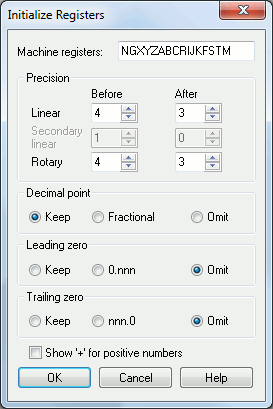
This dialog appears when the Init button is selected in the Register panel. It is used to define an initial set of registers (words) recognizable by the CNC controller. Register format information will be applied when the registers are created (by the Init dialog). These formats can be later changed at any time.
Machine registers: Enter the complete list of register names (word names) recognized by your controller. Only single letter register names are supported from this dialog. You will have to create other multi-character and type II register names using the Register panel.
Precision: Use these drop-down boxes to specify the number of decimal digits before and after the implied or actual decimal point for dimensional values. Different precision values can be specified as follows:
Linear: Specifies the register format for linear axes when output in the primary machine units.
Secondary linear: Specifies the register format for linear axes when output in the secondary machine units.
Rotary: Specifies the register format for angular axes.
Decimal point: Specifies how the decimal point should be output for those registers that have fractional values. There are three exclusive formats:
Keep: The decimal point will always be output on registers that are defined with digits to the right of the decimal. For example, X1.2 Y3. Z.4
Fractional: The decimal point will only be output when the register has a non-zero fractional value. For example, X1.2 Y3 Z.4
Omit: Decimal points will never be output. Older controllers often used this format, and relied on the count of digits to determine the implied decimal point location. For example, X0012 Y003 Z0004
Leading zero: Specifies how leading zeroes (non-significant leading zero digits to the left of the decimal) should be output:
Keep: Leading zeroes will always be output. For example, X001.2 Y003. Z000.4
0.nnn: A single leading zero will be output for numbers that are less than 1, so that the value does not start with a decimal point. Otherwise, leading zeroes are omitted. For example, X1.2 Y3. Z0.4
Omit: Leading zeroes will never be output. For example, X1.2 Y3. Z.4
Trailing zero: Specifies how trailing zeroes (non-significant trailing zero digits to the right of the decimal) should be output:
Keep: Trailing zeroes will always be output. For example, X1.2000 Y3.0000 Z.4000
nnn.0: A single trailing zero will be output for whole numbers, so that the value does not end with a decimal point. Otherwise, trailing zeroes are omitted. For example, X1.2 Y3.0 Z.4
Omit: Trailing zeroes will never be output. For example, X1.2 Y3. Z.4
Show ‘+’ for positive numbers: Select this box to have a "+" sign output for positive numbers. By default, positive numbers are not output with a "+" sign. For example X+1.2