Kinematics status
The Kinematics status window is displaying the current status of all components of the machine kinematics and transformation that may affect the computation of coordinates that are generated in the output file.
Context menu:
The right-mouse context menu provides the following choices:
Show limits: This option displays the types of transformations applied to the coordinates used to compare against the travel limits of the machine. The series of transformation are displayed along the top.
Show coordinate variables: This option displays information about different coordinates that are computed during the process. The location of the variable is giving a hint about which kinematics components are currently affecting the coordinate calculation. The following coordinate systems are available:
$XC,
$YC, $ZC : CL file coordinate system $XW,
$YW, $ZW : Local coordinate system (i.e. workpiece coordinate system) $XM,
$YM, $ZM : Machine coordinate system $XJ,
$YJ, $ZJ : Joint coordinates used for limit checking
Show inactive status: This option shows kinematics components that are currently not being used, but can be available to modify coordinate calculations.
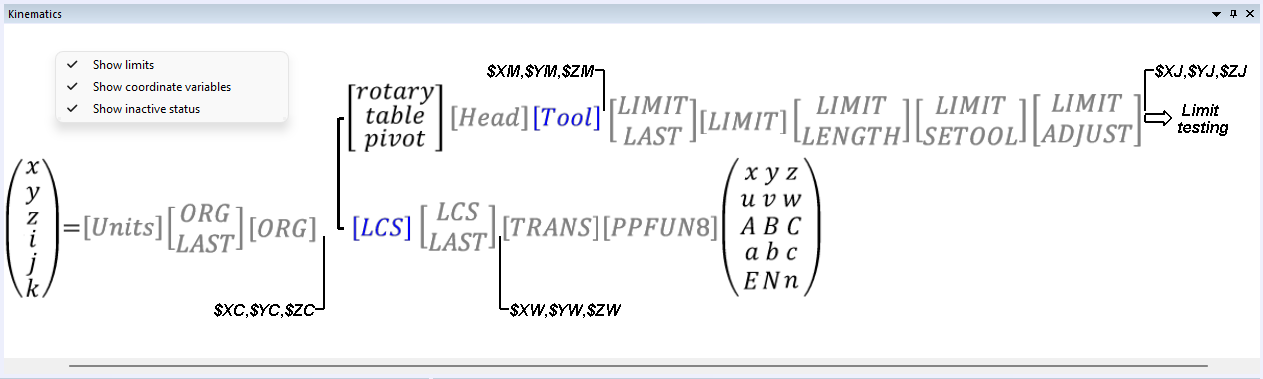
Kinematics status window:
Each element of the kinematics is displayed using one of the three
different colors. Each color is customizable in the Tool/
[Black]: The kinematics element is active.
[Blue]: Element is active and has been modified since last refresh.
[Gray]: Element is disabled.
Navigation:
Left-mouse, Middle-mouse and mouse wheel control panning.
Left / Right / Up / Down arrows and Page Up / Down also control panning.
Ctrl Space (or Ctrl .) zooms the view to "fit" the kinematics status in the window.