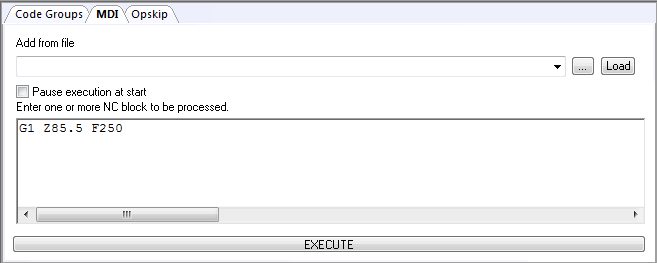
Controller » MDI tab
The MDI (manual data input) tab can be used to execute one or more blocks of MCD at the start of the program, or during program verification when the program is paused.
To use the MDI function, first type or paste one or more blocks of MCD into the edit window, with one block of MCD per input window line, then press the Execute button. You can also MDI the contents of a file by first browsing for it using the […] button and copying its contents to the edit window using the Load button. A list of recent files loaded is available in the “Add from file” drop-down.
MDI input is processed in the same way as a subprogram. You can track
the progress of MDI processing in the Source window. To do so, first
select the “Pause execution at start” checkbox in the MDI panel
to start processing of MDI in a paused state before pressing the Execute
button. MDI input might also appear in the Input trace window, depending
on the “MDI and EXEC commands” setting in the Tools»
MDI input can adversely affect the simulation results. For example, if an M2 is defined as an end-of-program code, then executing an M2 in the MDI window will prematurely end the simulation.