Tools»
The Preferences dialog can be utilized to customize CERUN operations. These customizations affect the CERUN interface – they do not affect how CERUN emulates MCD code.
General tab
The General preferences tab allows the user to customize general appearance and behavior.
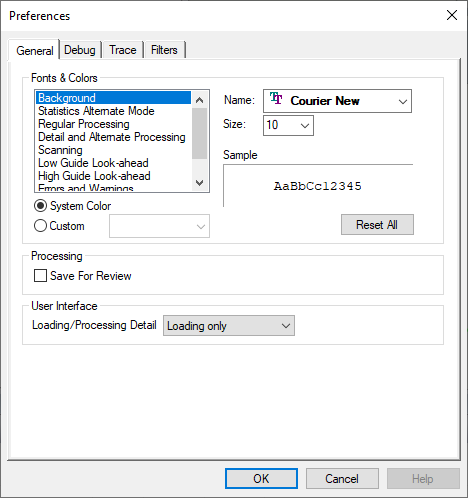
Fonts and colors used in the Trace windows
Automatic generation of a “Save for Review” zpj file on exit
Display of a “Loading…” dialog at the start of processing
Debug tab
The Debug preferences tab allows the user to customize the visual debugger appearance and behavior.
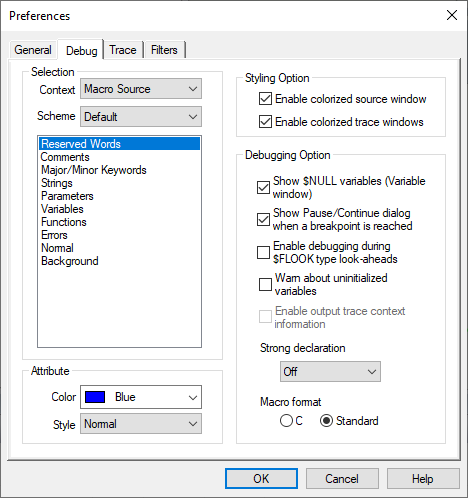
Colorization settings of text in the Source and Trace windows
Various debugging options, including:
the display of variables with $NULL value in the Variables window;
the display of a Pause/
Continue dialog when a breakpoint is encountered; and the option to diagnose uninitialized macro variables when they are used in an expression.;
Enable contextual help of codes and registers in the Output trace window
Macro strong declaration setting, uninitialized variable testing and formatting
Selection of either the C style or standard APT style representation format of macro source
Trace tab
The Trace preferences tab allows the user to customize Trace/
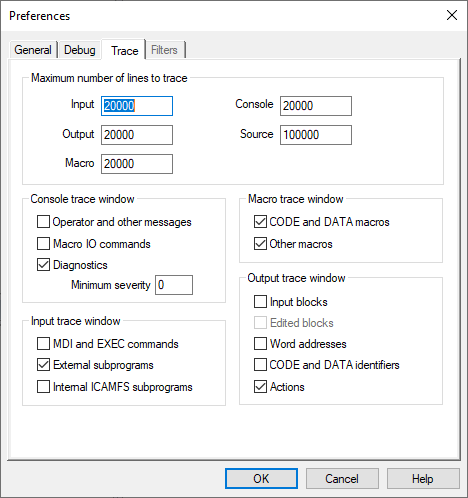
Limit number of lines written to the Trace and Source windows
Console trace window options, including:
tracing of operator and other messages;
tracing of MACRO I/
O command processing; and tracing of diagnostic messages at or above a specified minimum severity.
Macro trace window options, including:
tracing of CODE and DATA macros; and
tracing of all other macros (i.e., function, startup, shutdown and event).
Input trace window options, including:
tracing of MDI (manual data input) and macro EXEC commands;
tracing of subprograms that are included with the main program on disk; and
tracing of internal subprograms that reside in the /
/ ICAMFS storage area;
Output trace window options, including:
tracing of input blocks as they are processed;
tracing of edits made to the input blocks by the tape editor, preprocesssor and embedded macro processing;
tracing of word addresses and their values;
tracing of CODE and DATA identifiers; and
tracing of the actions generated by the block;