Progress Window
CERUN can be executed running with full interface, minimal interface or, in a background mode. The Progress Window represent CERUN minimal interface. The window shows base execution statistics like number of errors, current machining time, etc...
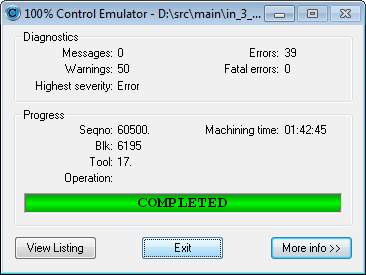
The “More info” button provides the access to the full CERUN interface. This interface can be accessed at any stage of the process. Once the control emulation is completed the “View Listing” button provides the access to the listing file.
The execution process can be terminated at any time by pressing the “Exit” button.
The minimal CERUN interface is used when the “Fast” button on the “Play” toolbar is selected or when the minimal interface is selected from the CERUN Launch panel “Show” selection.