The Reference Axis Property Dialog
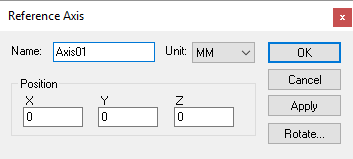 Defines a reference axis, given an XYZ origin and possible
rotation (using the Rotate button). Reference axes do not cause motion.
Instead, reference axes can be used to organize the model in the Model
Navigator.
Defines a reference axis, given an XYZ origin and possible
rotation (using the Rotate button). Reference axes do not cause motion.
Instead, reference axes can be used to organize the model in the Model
Navigator.
You can attach a group of related objects to a reference and then collapse the group (in the model navigator), which might make the model easier to understand. You can also use a reference to establish a new coordinate frame for a group of related objects.
At run-time, VM groups together into “stiff bodies” objects that are immovable in relation to each other. This optimization reduces the number of calculations required when moving the components that are attached to axes. Reference axes are preserved at run-time, so they can be used in the model when it is necessary to manipulate a group of components using the various $FMS macro functions.
A Reference Axis is defined using the following parameters:
Name: Axis names are used in the Model Navigator in QUEST. Linear, Rotary and Curve axis names also appear in (and can be controlled from) the QUEST lower right Axes window as well as the VM Controller Axes window in CERUN and GENER VM assigns default names when objects are created. You should change the default to something that is both short and meaningful.
Unit: Specifies the unit of measure for all non-rotary values (angles are always specified in degrees).
Position: Specifies the X, Y and Z axis position of the origin of the current axis in relation to the origin and rotational alignment of the parent object. When world coordinates are selected (Simulation»
Use World CS), the position of the axis is shown in world coordinates instead of relative to the parent object. When constructing an axis, the mouse pointer can be used to define the axis origin. OK button: Creates the axis as defined.
Cancel button: Ignores this axis creation request.
Apply button: Updates the simulation window to show the effects of the latest changes.
Rotate button: Use this button to rotate the entity to its required final orientation. When an entity is rotated, anything attached below this entity in the Navigator will be defined in the new frame of rotation.