⧉ All products
Icam V27 User Interface
Table of Contents:
Icam Configuration Panel
Overview
General
QUEST
GENER
CAM Interfaces
Tape & DNC
Output
Environment
All Entries
Launch Panel (GENER/
CERUN)
Launch Panel
Center tab selections
Processing
Interface
Merged PSE Processing
DEF file
OK, Cancel and other buttons
JOB Button
Job Files
Review Files
DB Manager / AUTOPOST Button
Database Manager
AUTOPOST (requires "xqs" license)
GENER Settings
CL File
Database
Post processor and Revision (Rev)
Program ID
User Parameters
Options and CAM buttons
GENER CAM Dialog
CAM System
Settings
OK, Cancel and Reset buttons
GENER Options
Tape file
Listing file
Plot file
Log file
Trace in Listing
Also include information about…
OK, Cancel and Reset buttons
Optimizer/
Force Options
Use Vericut Optimizer/
Force on CL File
Project File
Optimized CL File
User Interface
Optimizer/
Force launch button
CERUN Settings
Options
CERUN Options
Virtual Machine Settings
Preferences Settings
Enable launch panel tooltip help
Use common browse directory
Detect new/
updated files on launch
Save for review
QUEST Developer
Welcome
QUEST Overview
GENER Overview
Control Emulator Overview
Virtual Machine Overview
Users Guide
Shortcuts
Main interface
Navigator
Database Navigator
Post Processor Navigator
Control Emulator Navigator
Console View
Help
Build
Consistency
Finder
Diffs
Workspace
Database View
Comment View
Questionnaire View
Graphical Questionnaire View
Register View
RMD View
Tape Editor View
Dialog View
Dialog Editor View
Macro View
User Defined Syntax macros
User Function macros
Macro Editor View
Editing Features/
Functions
Right-Mouse Context Menu Functions
Section Controls
File Storage (Windows only)
Code Customization View (Control Emulator only)
Data Customization View (Control Emulator only)
Event Macro View (Control Emulator only)
Code Macro View (Control Emulator only)
Data Macro View (Control Emulator only)
Code Table View
Menu Bar
File
Edit
Database
View
Dialog
Tools
Help
Dialogs
About...
By Type
Calculator
Character Set
Test Result
Test
GENER Test
CERUN Test
Code Properties Dialog (Control Emulator only)
Copy
Data Properties Dialog (Control Emulator only)
Auto Refresh
Diffs
Dialog Control Properties
Dump Macros
Expression Evaluator
Finder
Generate
Generate As
G/
M Code Question Panel (Graphical Questions & Wizard)
Answer Type:
Initialize Registers
Load
New CODE Macro (Control Emulator only)
New DATA Macro (Control Emulator only)
New Macro
Open
Add/
Remove Password
QUEST Preferences
Preferences: Macro Editor
Preferences: General
Progress
Properties
Purge
Register
Rename
There are two ways of changing a post processor’s name.
Replace Macro
Replacement String
RMD Prompt
Save/
Generate
Save As
Select Configuration
Select User
Spindle Table
Spindle Table
Startup Environment
Tip of the Day
Toolbars
Unlock database
Words Manager
Words Manager
Virtual Machine
Overview
Virtual Machine Dialogs
The Chip and Split Dialog
The Collision Dialog
The Compare Dialog
The Cube Property Dialog
The Curve Axis Property Dialog
The Cylinder/
Cone Property Dialog
The Display Dialog
The Extruded Property Dialog
The Grid Dialog
The Group Dialog
Collision Groups
Collision Exclusion Groups
Selection Groups
The Head Axis Property Dialog
The Light Dialog
The Linear Axis Property Dialog
The Material Dialog
The Mesh Property Dialog
The Options Dialog
The Picture Property Dialog
The Reference Axis Property Dialog
The Revolved Property Dialog
The Rotary Axis Property Dialog
The Parts/
Fixtures Dialog
The Sphere Property Dialog
The Statistics Dialog
The Stock Axis Property Dialog
The Tools/
Holders/
Heads Dialog
Tools
Lathe Tool Type
Mill Tool Type
Probe Tool Type
Additive Tool Type
Holders
Profile Holder Type
Generic Holder Type
Heads
The Tool Axis Property Dialog
Virtual Machine Specific Menus
Simulation Menu
Simulation»
Camera»
Attach
Simulation»
Camera»
Center (Ctrl+Shift+Space)
Simulation»
Camera»
Fit (Ctrl+Space)
Simulation»
Camera
Simulation»
Camera»
Perspective
Simulation»
Camera»
Pivot (Ctrl+P) (Ctrl+Shift+P)
Simulation»
Camera»
Reset
Simulation»
Camera»
Front
Simulation»
Camera»
Speed Increase (Ctrl+'+')
Simulation»
Camera»
View Angle Increase (Shift+'+')
Simulation»
Chip and Split (Ctrl+Alt+C)
Simulation»
Compare... (Ctrl+Alt+Q)
Simulation»
Controller
Simulation»
Construct Axis»
Curve Axis
Simulation»
Construct Axis»
Head Axis
Simulation»
Construct Axis»
Linear Axis
Simulation»
Construct Axis»
Reference Axis
Simulation»
Construct Axis»
Rotary Axis
Simulation»
Construct Axis»
Stock Axis
Simulation»
Construct Axis»
Tool Axis
Simulation Menu
Simulation»
Construct Entity»
Cube
Simulation»
Construct Entity»
Extruded
Simulation»
Construct Entity»
Mesh
Simulation»
Construct Entity»
Picture
Simulation»
Construct Entity»
Revolved
Simulation»
Construct Entity»
Sphere
Simulation»
Display (Ctrl+Alt+D)
Simulation»
Grid (Ctrl+Alt+G)
Simulation»
Group Selection
Simulation»
Hide Selection (Ctrl+B) (QUEST)
Simulation»
Selection»
Hide in View (Ctrl+B) (CERUN and GENER)
Simulation»
Selection»
Hide in All Views (CERUN and GENER only)
Simulation»
Invert Hide State
Simulation»
Lights (Ctrl+Alt+L)
Simulation»
Manager
Simulation»
Materials (Ctrl+Alt+M)
Simulation»
Measure
Simulation»
Mode»
Camera
Simulation»
Mode»
Measurement
Simulation»
Mode»
Pause Gouge Detection
Simulation»
Mode»
Pause Material Removal
Mode»
Selection
Simulation»
Open Setup
Simulation»
Options (Ctrl+Alt+O)
Simulation»
Save Setup
Simulation»
Show»
Axes Marker
Simulation»
Cross Section
Simulation»
Show
Simulation»
Filters
Simulation»
Show»
Kinematics
Simulation»
Show»
Plane Grid
Simulation»
Show»
Safety Zones
Simulation»
Show»
Tool Path as Overlay (Ctrl+Shift+T)
Simulation»
Show»
Tool Path (Ctrl+T)
Simulation»
Show»
Tool Reference
Simulation»
Show»
Tool Vector
Simulation»
Show»
Wireframe
Simulation»
Show»
Workpiece Coords (Ctrl+W)
Simulation»
Show»
Workpiece Reference
Simulation»
Show All/
Rehide (Ctrl+Alt+B) (QUEST)
Simulation»
Selection»
Show All/
Rehide (Ctrl+Alt+B) (CERUN and GENER)
Simulation»
Selection»
Show All/
Rehide in All Views (CERUN and GENER only)
Simulation»
Statistics (Ctrl+Alt+O)
Simulation»
Parts/
Fixtures... (Ctrl+Alt+P)
Simulation»
Tools/
Holders/
Heads (Ctrl+Alt+T)
Simulation»
Use World CS
Simulation»
Virtual Machine
Simulation Menu
QUEST Simulation menu
GENER/
CERUN Simulation menu
Simulation Toolbars
VM Animation Toolbar
VM Annotation Toolbar
VM Construct Toolbar
VM Cross Section Toolbar
VM Grid Toolbar
VM Measure Toolbar
VM Mode Toolbar
View Toolbar
VM View Filter Toolbar
VM View Toolbar
Simulation Windows
VM Controller
VM Controller / Axes Tab
VM Controller / Fixture Compensation Tab
VM Controller / Time Line Tab
VM Controller / Tool Compensation Tab
Simulation Manager
Virtual Machine
Virtual Machine
Virtual Machine
Adding Parts, Fixtures and Stock to the Simulation
Differences between Part, Stock and Fixture Components
Virtual Machine Tooling
Adding Tooling Definitions to the Simulation
Virtual Machine Lighting
Adjusting the lighting
Virtual Machine Camera Manipulation
Navigating the Simulation Window
Camera Panning:
Camera Rotation:
Camera Roll:
Camera origin and attachment:
Camera viewpoint:
To summarize:
Virtual Machine
Simulation Input Controls
Standard Keyboard Mapping
Construction Keyboard Mapping
Mouse Mapping
Time Line Keyboard Mapping
Virtual Machine's Results
Monitoring Virtual Machine's Results
Animation Control
Head-Up Display
Tool Path Display
VM Controller Time-Line
Part vs. Stock Comparison
Virtual Machine Fixture Compensation
Setting Fixture Compensation
Virtual Machine Tool Compensation
Setting Tool Compensation
Length Compensation
Diameter Compensation
GENER User Interface
Welcome to GENER Help
Icam Post GENER Interface
Dialogs
About
Find
Goto…
Preferences...
General tab
Debug tab
Trace tab
Progress Window
Seek
Toolbars
Menus
Debug
Debug»
Breakpoint Manager
Debug»
Enable/
Disable Breakpoint (Ctrl+F9)
Debug»
Jump to Cursor (Ctrl+Shift+F10)
Debug»
Kinematics status
Debug»
Source
Debug»
Macro Manager
Debug»
Remove All Breakpoints (Ctrl+Shift+F9)
Debug»
Run to Cursor (Ctrl+F10)
Debug»
Set/
Clear Breakpoint (F9)
Debug»
Stack
Debug»
Step Into (F11)
Debug»
Step Out (Shift+F11)
Debug»
Step Over (F10)
Debug»
Variables
File
File»
New Job (Ctrl+N)
File»
Save For Review
File»
View Listing File
File»
View Tape File
File»
Exit (Alt+F4)
Help
Help Online
Help»
Package Job
Getting Product Support
Before Calling...
To contact Icam support...
Headquarters
Help Topics
Run
Run»
Details
Run»
Fast (F8)
Run»
Pause (F6)
Run»
Play (F5)
Run»
Restart (Shift+F5)
Run»
Step (F7)
Tools
Tools»
Configuration...
Tools»
Preferences...
Tools»
Find
Tools»
Toolbar...
View
View»
Input
View»
Output
View»
Macro
View»
Console
View»
Diagnostic
View
View»
Previous axes page
View»
Status bar
Windows
Window»
Load Layout
Window»
Save Layout
Window»
Style
Window»
Default Layout
Toolbars
Debug
Job
Layout
Run
View
Windows
Breakpoint Manager
The breakpoint list
Toolbar buttons
Enabling, disabling and editing
Breakpoint types
Post-processor (GENER) mode
Control Emulator (CERUN) mode
Source-line breakpoints
Persistence
Console Trace
Diagnostic
Input Trace
Kinematics status
Source
Macro Manager
The macro list
Enable / Disable button
Show / Hide button
Macro Trace
Output Trace
Stack
Variable
Synchronize
CERUN User Interface
Control Emulator
Control Emulator Pre-Processors
ABB Robot Pre-Processor
ABB Robot Pre-Processor Syntax
Fanuc Pre-Processor
Fanuc Pre-Processor Syntax
1. Pre-processor setup
2. Command Abbreviations
3. Operators
4. Arithmetic operators
5. Unconditional branching
6. Conditional branching
7. Repetition
8. Variables
9. Sub-program related
10. Other matching patterns
Heidenhain Pre-Processor
1. Pre-processor setup
2. Supported Syntax
3. Selecting a default startup syntax
4. Changing syntax during processing
5. What are the configurable options?
Heidenhain Conversational Pre-Processor Syntax
1. “FN” Functions
2. Supported arithmetic operators & functions
3. String variable declaration
4. String functions
5. Variables / Parameters
6. Program / Label / Sub-program
Heidenhain ISO Pre-Processor Syntax
1. “D” Functions
2. Supported arithmetic operators & functions
3. String variable declaration
4. String functions
5. Variables / Parameters
6. Program / Label / Sub-program
Mazak EIA/
ISO Pre-Processor
Mazak EIA/
ISO Pre-Processor Syntax
1. Pre-processor setup
2. Command Abbreviations
3. Operators
4. Arithmetic operators
5. Unconditional branching
6. Conditional branching
7. Repetition
8. Variables
9. Sub-program related
10. Other matching patterns
Okuma Pre-Processor
Okuma Pre-Processor Syntax
1. Pre-processor setup
2. Operators
3. Arithmetic operators
4. Unconditional branching
5. Conditional branching
6. Variables
7. Sub-program related
8. Other matching patterns
Fanuc Pre-Processor
OSAI 10 Series Pre-Processor Syntax
1. Pre-processor setup
2. Register default value
3. Operators
4. Arithmetic operators
5. Unconditional branching
6. Conditional branching
7. Repetition
8. Variables
9. Sub-program related
10. Other matching patterns
Siemens Pre-Processor
Siemens Pre-Processor Syntax
1. Pre-processor setup
2. Supported operators
3. Supported arithmetic operators & functions
4. Unconditional branching
5. Conditional branching
6. Repetition
7. Variables
8. Sub-program related
9. Other matching patterns
10. Misc Functions
11. System Variables
12. Frame Support
Control Emulator Pre-Processors
Z32 Syntax
CERUN Interface
Dialogs
About
CERUN Option
Find
Goto…
Preferences...
General tab
Debug tab
Trace tab
Progress Window
Seek
Toolbars
Menus
Debug
Debug»
Breakpoint Manager
Debug»
Enable/
Disable Breakpoint (Ctrl+F9)
Debug»
Jump to Cursor (Ctrl+Shift+F10)
Debug»
Source
Debug»
Macro Manager
Debug»
Remove All Breakpoints (Ctrl+Shift+F9)
Debug»
Run to Cursor (Ctrl+F10)
Debug»
Set/
Clear Breakpoint (F9)
Debug»
Stack
Debug»
Step Into (F11)
Debug»
Step Out (Shift+F11)
Debug»
Step Over (F10)
Debug»
Variables
File
File»
New Job (Ctrl+N)
File»
Save For Review
File»
View Listing File
File»
Exit (Alt+F4)
Help
Help Online
Help»
Package Job
Getting Product Support
Before Calling...
To contact Icam support...
Headquarters
Help Topics
CERUN
CERUN»
Code Groups
CERUN»
MDI
CERUN»
Opskip
CERUN»
Option
Run
Run»
Fast (F8)
Run»
Pause (F6)
Run»
Play (F5)
Run»
Restart (Shift+F5)
Run»
Step (F7)
Tools
Tools»
Configuration...
Tools»
Preferences...
Tools»
Find
Tools»
Toolbar...
View
View»
Input
View»
Output
View»
Macro
View»
Console
View»
Diagnostic
View»
Increase Margin
View»
Previous axes page
View»
Status bar
Windows
Window»
Load Layout
Window»
Save Layout
Window»
Style
Window»
Default Layout
Toolbars
Debug
Job
Layout
Run
View
Windows
Breakpoint Manager
The breakpoint list
Toolbar buttons
Enabling, disabling and editing
Breakpoint types
Post-processor (GENER) mode
Control Emulator (CERUN) mode
Source-line breakpoints
Persistence
Controller » Opskip tab
Controller » MDI tab
Controller » Code Groups tab
Console Trace
Diagnostic
Input Trace
Source
Macro Manager
The macro list
Enable / Disable button
Show / Hide button
Macro Trace
Output Trace
Stack
Variable
Synchronize
Icam V27 User Interface
⧉
QUEST Developer
Dialogs
Properties
Properties
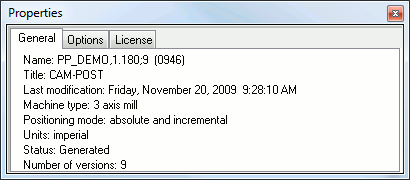
This dialog shows the properties of a database or a post processor.