Preferences: General
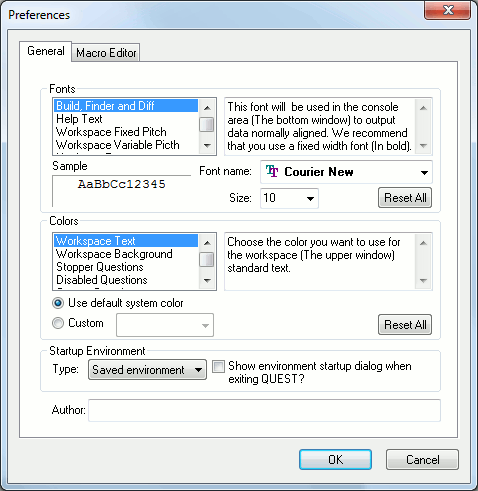
Fonts: The fonts and point size for most text that appears in the QUEST interface can be controlled from this setup panel. The scrolling list classifies text into categories, each of which can have a unique font and size. The window to the right describes how the text is used.
Font name: Name of the font used for the selected font item. Some font items will look better with a fixed width font, and others with a variable width font. Preferred font types will be listed in bold face.
Size: Size of the font used the selected font item.
Sample: Sample of what the text will look like using the font name and size.
Reset All: Resets the fonts and sizes to their original as-installed default values.
Colors: The color used for most text and background areas that appear in the QUEST interface can be controlled from this setup panel. The scrolling list classifies text and regions into categories, each of which can have a unique color. The window to the right describes where the text or region is used.
Use default system color: When selected, the text or region will default to the color defined in the Display Properties panel.
Custom: When selected, any available color can be used.
Reset All: Resets the colors to their default states.
Startup Environment: The startup environment settings are used to choose how you want the QUEST interface to be the next time you run it. You can make your choice here or, if the checkbox is checked, you will be prompted to make the choice when exiting QUEST. You can choose one of the three available choices.
Blank: QUEST will start without any opened or newly created document.
New document: QUEST will start with a newly created blank post-processor.
Saved environment: QUEST will start and reload any documents that were opened the last time you closed the session. The section you were in will also be restored.
User defined questions: This specifies the full path and file name of a user defined questions file. QUEST will use this file to present a customized question section for the user.
Post-processor author: The author’s name will be used for documentation purposes only.
OK: Applies the setup changes and saves the setup information as defined by the Save in field.
Cancel: Ignores all changes to the setup.