Preferences: Macro Editor
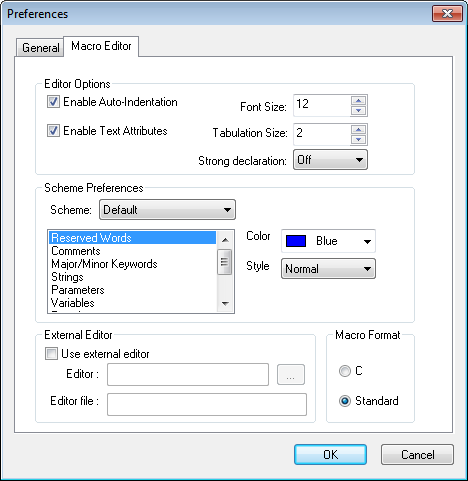
Enable Auto-Indentation: Select this checkbox to enable the
automatic indentation of macro code as you type. When auto-indentation
is active, the input point will adjust one tab stop to the right each
time a block structure is started (for example, IF/). The input point
will automatically adjust one tab back when the block structure is
completed (for example, ENDOF/
Enable Text Attributes: Allow the macro text to have colors and style as defined in the Scheme Preference fields.
FontSize: Adjust this value to change the default text size.
Tab Size: Number of characters to indent at each new block level.
Strong Declaration: There are 3 settings that control how strict the macro processor is concerning where and when variables are declared.
OFF: Variables can be declared when and wherever desired, in the same way as they always have.
PARTIAL: GLOBAL, OBJECT and FUNCTION variables can only be declared in the new Declaration Macro. LOCAL variables do not have to be declared.
FULL: Same as PARTIAL, but LOCAL variables must be declared in a macro before being used.
Scheme: Defines a list of predefined color and style schemes. The macro editor can display macro text using various colors and styles to more easily understand the code. Macro text is classified into basic categories, as listed in the window below the Scheme field. To change the attributes of text matching the category, select the category name and then change the Color and Style fields as required.
Color: The color that will be used when outputting macro text that matches the selected category.
Style: The style that will be used when outputting macro text that matches the selected category.
External Editor: An alternate editor can now be used for the
Comments and Macro sections. The editor and a temporary file used by
QUEST to hold the data to be edited, must both be specified in the
Tools»
When using the external editor to edit macros, intermediate results can be compiled by saving in the editor and then selecting the Compile button in QUEST. QUEST automatically detects when the external editor is finished, and compiles the macro or saves the new comment text. QUEST will reactivate the external editor if it is closed while editing a macro file that contains compilation errors.
Macro format: If Standard is chosen, macro code will be displayed
using uppercase characters and standard ANSI APT operators. For example
``IF/
OK: Applies the changes.
Cancel: Ignores all changes to the preferences.