Finder
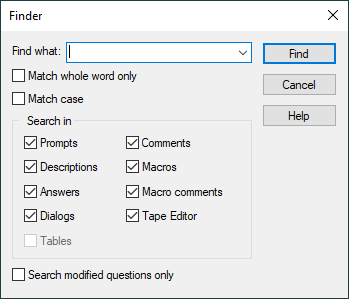
The Finder utility searches throughout the current post processor, control emulator or model, looking for questions, dialogs or other customizations that match the specified text. The results are listed in the Finder window (at the bottom right), where they can be selected to bring you directly to where the searched text was found (i.e., question, dialog…).
Find what: Text to find. Sorry, no wild cards.
Match whole word only: Only match the result if it is surrounded by punctuation or spacing.
Match case: Normally the case of letters (uppercase/
Search in: Use this option to restrict the search to text found in one or more of the following. They are all searched by default.
Prompts: in the short question prompts
Descriptions: in the detailed question descriptions
Answers: in the question responses
Dialogs: in the Dialog section (dialogs are searched using their XML format)
Tables: in the Control Emulator CODE and DATA customization tables
Comments: in the General Description / Comments section
Macros: in macro code excluding comments
Macro comments: in the comments portion of macro code
Tape Editor: in Tape Editor search and replacement strings
Search modified questions only: Select this checkbox to restrict the search to only those questions that have been modified (i.e., that are different from the basic post or internal Icam Post defaults). The search string can be empty, to list all questions whose responses are different from the default.