Expression Evaluator
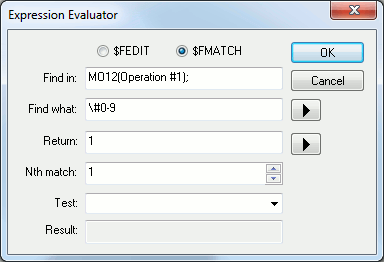
The expression evaluator is available on Windows(tm) systems from the macro editor. The text surrounding the insertion point is copied into the appropriate fields of the expression evaluator. The current expression can be modified and tested.
$FEDIT and $FMATCH: Select the type of function.
Find in: This is the string (or expression resulting in a string) that contains the raw text input to the $FEDIT or $FMATCH function.
Find what: This is the string (or expression resulting in a string) that defines the regular expression for the edit or match function.
Replace by: With $FEDIT, this is the string (or expression resulting in a string) that will replace the text that was found. With $FMATCH, this field reads Return: and defines an optional string to be returned instead of the text that was found.
Nb of times: With $FEDIT, this number (or expression resulting in a
number) defines the number of times the find/
Test: To test the expression, enter a sample string in this field, or select a recently entered test string using the drop-down list.
Result: Result of the test.