Data Properties Dialog (Control Emulator only)
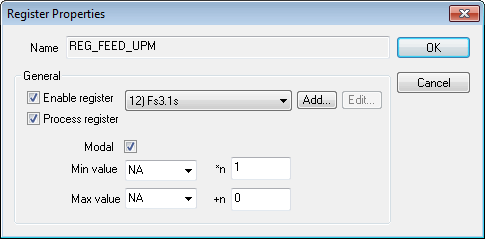
This dialog comes up when modifying one or more entries within the DATA customization section. It allow you to change the value of anyone of the customizable fields. Here is the description of those fields:
Name: Show the read-only identifier that is being modified. That field will be blank if modifying multiple entries at a time.
REG_IGNORE: If the dialog was called by adding a new data register, the name field will be a drop list instead of a non-editable text box. If the REG_IGNORE choice is selected, then the behavior of the data register will be to automatically ignore the matching register. Those data registers are actually ignored after the rest of the block have been processed. So they are usually used to avoid warnings about unused registers.
Enable register: All data registers having this column checked will be recognized by the CE processing engine. Disable if you want to ignore a specific register, even if it was added by the questionnaire data.
Process register: Having this column checked means that the register will be processed normally. If unchecked, the register will be recognized by the CE but will be ignored and discarded. This is a way to prevent specific actions for firing without outputting errors and warnings related to the register being unmatched.
Modal: A modal data register is a register that has its value saved so that actions can access it at anytime even on blocks where the data register do not appear.
Register: This field identify the register that is in use by the data register entry. Select the [Add...] button to define a new custom register if the required register format does not exist in the register drop-down list. Custom registers are identified by the string “(Custom)” in the drop-down list. Select the [Edit...] button to modify or delete the selected custom register. Take care to not delete a custom register being used for other purposes. The “--NA--” (meaning not applicable) selection can be used to define a data identifier having no MCD representation. A register like this cannot be recognized from the MCD, but it can be activated via the EXEC macro command and $FCEADD macro functions. Using the combination of NA codes and NA registers makes it possible to construct a series of MCD commands (using EXEC) that call up custom functions and provide custom data, without interfering with normal code and data processing.
Min: For a data register, the min and max values can be used has a range validation.
Max: For a data register, the min and max values can be used has a range validation.
*n: This is a factor that will be multiplied to the data register value after being matched.
+n: This is a number that will be added to the data register value after being matched.
Cancel: This button closes the Data Properties dialog without applying the changes to the item in the Data customization list.
OK: This button closes the Data Properties dialog and apply the changes.