CERUN Options
The Options button on the main launch panel is only available for selection once a MCD file has been chosen. The following panel will appear when the Options button is pressed:
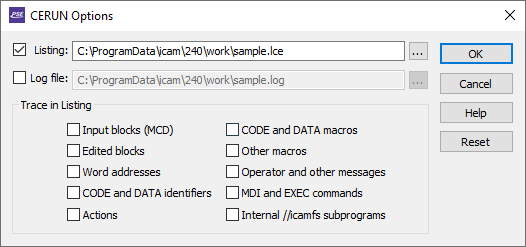
Listing file
When checked (the default), a listing file will be created containing identification information about the NC program being emulated and the control emulator and model used in the simulation, as well as diagnostic and tracing information, followed finally by a program summary. The default listing file has the same name as the MCD file with a file type of lce. You can change the listing file name for a single execution of the control emulator, but the settings will not be remembered the next time CERUN is launched.
Log file
When checked, this field will be automatically set to the default log file name. When cleared, a listing file will be created instead. You can change the name for a single execution of the CERUN, but the settings will not be remembered the next time CERUN is launched. The default log file extension can be changed to a different value using the file_ext_log DEF file setting. The default directory path can be changed to a different value using the icam_lce environment variable.
Trace in listing
Enables the tracing of various types of data to the listing file. Tracing is not output to the log file.
Input blocks (MCD): If selected, machine control data (i.e., tape) blocks will be shown in the listing file in the form “Block: mcd”. This disables the default “blocknumber! mcd” tracing of MCD in the listing file.
Edited blocks: If selected, the resultant MCD after edits by various initial processes are shown, in the form “process: edited-mcd”, where process is one of:
TapEdt: for changes done by the Tape Editor
PrePrc: for changes done by the Pre-Processor
BlkMac: for changes done by the Block Macro
EmbMac: for changes done by the Embedded Macro Processor
DelOn: for changes done due to OPSKIP (i.e., block delete) being active
DelOff: for changes done due to OPSKIP being inactive
Word addresses: If selected, the individual word addresses (i.e., registers) on the MCD block will be listed, one per line, in the form “register: value”.
CODE and DATA identifiers: If selected, the individual CODE and DATA identifiers will be listed, one per line, in the form “code_name” and “reg_name”, as they are processed.
Actions: If selected, the final actions taken by the control emulator will be listed, one per line, in the form “| description”.
Code and Data macros: If selected, macro commands originating from the control emulator CODE and DATA macros will be shown in the listing file as they are processed.
Other macros: If selected, macro commands originating from all other macros (i.e., Startup, Shutdown, Event and Function) will be shown in the listing file as they are processed.
Operator and other messages: If selected, operator messages will be echoed to the listing file.
MDI and EXEC commands: If selected, MDI (manual data input) and macro EXEC commands will be traced to the listing, in the form “mdi! mcd” or “exec: command-parameters”.
Internal /
/ icamfs subprograms: If selected, subprograms that are run from the internal / / icamfs storage area will be traced to the listing. If internal subprograms are not traced, then all other tracing is inhibited while processing internal subprograms, with the exception of Actions.
OK, Cancel and Reset buttons
Press OK to accept any changes to the Options panel and return to the main launch panel. Press Cancel to ignore your changes and return to the main launch panel. Press Reset to remove all specialized settings and reset the file names and trace options to their defaults.