Environment
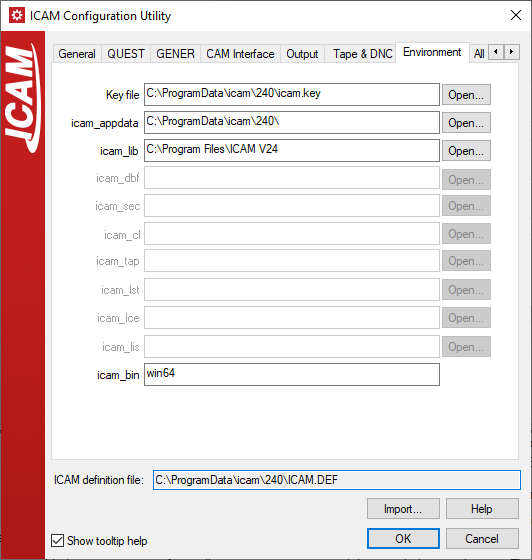
This panel shows the environment variables that are recognized by Icam software The use of environment variables is entirely optional. They are provided so that the software can be configured to suit particular needs (e.g., to use a networked database file).
Key file: This first entry is not an environment variable. It lists the ICAM.KEY file that is used to identify the Icam license server (IcamLS).
The following environment variables are dynamically set.
icam_appdata: Environment variable dynamically set when the software starts running. It points to the location where the main ICAM.DEF file is located. This is the root of the application data folder. This folder contains:
The main application ICAM.DEF file.
The dwords.dat default keywords file.
The work folder containing the campost.dbf database.
The kit folder containing new and customized interface kits.
icam_lib: Environment variable dynamically set when the software starts running. It points to the Icam Post installation directory where the software is running from. This dynamic setting means that DEF file symbols and macros can use the icam_lib environment variable to refer to the installation directory. It also means that any setting of icam_lib before running the software will be ignored.
icam_bin: Environment variable also dynamically set when the software starts running. It defines the system type of the computer running the software. The system type will match one of the Icam Post installation "bin" subdirectory names. DEF file symbols and macros can use the icam_bin environment variable to refer to the system type. Any setting of icam_bin before running the software will be ignored.
The remaining environment variables are not dynamically set.
icam_dbf: Environment variable defining the database file which is used to store post-processors. When GENER is run from the Windows command prompt, the default database is named campost.dbf and resides below the application data directory in a subdirectory named work. When GENER is run in an interactive mode (i.e., via the launch panel), the default database is remembered from the last time GENER was run interactively, unless icam_dbf is set. Do not use icam_dbf on systems running more than one version of Icam Post, since each version of Icam Post requires a different database. To use icam_dbf, set the environment variable to the full path and file name of the post-processor database.
icam_sec: Variable defining the Icam security key file for the client computer. Icam Post always looks first for a security key file named icam.key in the application data directory, then in the directory pointed to by the icam_lib dynamic variable (i.e., the Icam Post installation directory). If the key file is not found, then Icam Post will look to the icam_sec environment variable, if defined, for the full path and file name of the client computer key file.
icam_cl: Variable defining the default directory where input CL files are normally found. By default, when GENER is run in an interactive mode, the default input directory is one used when GENER was last run. When running in a batch mode, the default input directory is the current working directory. To use icam_cl, set the environment variable to the directory name where your CAM system outputs its CL files. The icam_cl setting is ignored if a path is specified with the CL name on the GENER command line.
icam_tap and icam_lst: Variables simplifying the management of Icam Post GENER output files. By default, when GENER is run in an interactive mode, all output files are created in the same directory as the input CL file. When GENER is run in a batch mode, all output files are created in the current working directory. The icam_tap variable defines the default directory where GENER will write all tape files. The icam_lst variable defines the default directory where GENER will write the listing, log and back-plotting files. The icam_tap and icam_lst settings will be ignored if directory paths are used for tape, listing, log or back-plot file specifications on the GENER command line.
icam_lce: Variable simplifying the management of Control Emulator CERUN output files. By default, when CERUN is run in an interactive mode, all output files are created in the same directory as the input MCD file. When CERUN is run in a batch mode, all output files are created in the current working directory. The icam_lce variable defines the default directory where CERUN will write the listing and log files. The icam_lce setting will be ignored if directory paths are used for listing or log file specifications on the CERUN command line.
icam_lis: Variable defining the directory where QUEST listing files
should be written. Listings are created when a post-processor or control
emulator is generated, or on demand via the File»