Model Customization
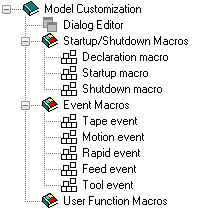
This section describes the model customization features available with QUEST. The image shows the main customization features accessible using the Navigator.
Section Overview
Section Overview
The The Dialog Editor allows you to build custom dialog boxes, which can be activated during processing to query the NC programmer for any necessary information.
Startup/
Shutdown Macros allow you to customize the actions of the model at the start and end of processing. Event Macros provide customization control at other key events in the simulation of the program.
User Function Macros are used to develop your own macro functions that can be called by other macros in the model.
Virtual Machine uses the Icam Macro language facility (see “The Macro Language”) to customize models. This is the same programming facility that is used with GENER and CERUN.