(Ctrl Alt S)
The Statistics dialog provides a list of all components in the simulation, as well as useful information that can be used to debug macros or investigate simulation performance bottlenecks. The runtime and model builder provide slightly different information, as described below.
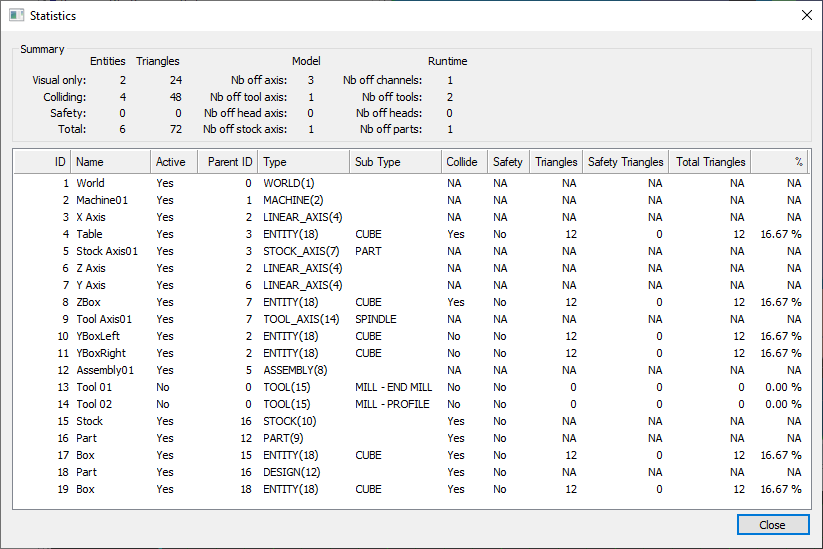
Summary
This section provides global information about the simulation.
Visual only; Entities and Triangles: indicates the total number of visual entities in the simulation and the combined triangle count for all of them. Visual entities are simulation objects used for display only; they are not tested for collision and do not take part in the material removal process.
Colliding; Entities and Triangles: indicates the total number of colliding entities in the simulation and the combined triangle count for all of them. Colliding entities are tested for collision and take part in the material removal process.
Safety; Entities and Triangles: indicates the total number of safety entities in the simulation and the combined triangle count for all of them. Safety entities are tested for collision but do not take part in the material removal process. Safety zones and tool gouge offsets are examples of safety entities.
Total; Entities and Triangles: indicates the total number of entities of all types and their combined triangle count.
Nb of axis: indicates the total number of linear, rotary and curve axes in the model.
Nb of tool axis: indicates the total number of tool axes in the model. This includes tool change pockets.
Nb of head axis: indicates the total number of head axes in the model. This includes head change stations.
Nb of stock axis: indicates the total number of stock axes in the model.
Nb of channels: indicates how many channels are defined in the model.
Nb of tools: indicates the number of tools defined in the current simulation.
Nb of heads: indicates the number of heads defined in the current simulation.
Nb of parts: indicates the number of parts defined in the current simulation.
Component List
This list shows all the components currently defined in the simulation, along with additional information and statistics for each of them. Note that some information is only available at runtime, as these are dynamic properties not available during model creation.
ID: The component ID, as returned by $FMSID (runtime-only).
Name: The component name, as returned by $FMSIDN.
Active: “Yes” if the component is taking part in the simulation (runtime-only).
Parent ID: The parent component’s ID, as returned by $FMSID(ID,n,
1) (runtime-only). Type: The component type and its numerical value, as returned by $FMSIDT.
Sub Type: The component sub type, when applicable.
- Collide: The component collision setting.“Yes” if the component is an entity tested for collision.“No” if it is a visual only entity.“NA” if the component is not an entity (e.g., tool axis).
- Safety: The component safety setting.“Yes” if the component is tested for collision and also has a safety zone.“No” if the component is tested for collision but does not have a safety zone.“NA” if the component is not an entity and thus cannot have a safety zone.
- Triangles: Number of triangles in the mesh if the component is an entity.“NA” if the component is not an entity.
- Safety Triangles: Number of triangles in the safety mesh if the component is an entity with safety enabled.“0” if there is no safety zone.“NA” if the component is not an entity.
Total Triangles: Total number of triangles for the entity. This includes entity mesh triangles and safety mesh triangles.
- %: Percentage of the simulation’s total triangle count that the entity uses.“NA” if the component is not an entity.