Compensation Functions
Compensation functions provide access to tool and fixture offset values used during simulation. These functions allow you to query and set diameter, length, fixture, and corner radius compensation parameters.
Get diameter compensation offset
Get fixture compensation offset
Get length compensation offset
Get corner radius compensation offset
Set diameter compensation values
Set fixture compensation value
Set tool length compensation value
Set corner radius compensation value
The $FMSGDCV Function
|
Returns tool diameter compensation amounts Returns: Numeric |

The $FMSGDCV function returns tool diameter compensation amounts. There are two possible forms of referencing tool diameter compensation values. If the machine supports “offset unique by tool” compensation, then n1 specifies the tool number and n2 specifies the compensation switch number for that tool. Otherwise, the value of n1 is ignored and n2 specifies the diameter compensation offset switch number. Specify 0 (zero) for both n1 and n2 to return the base diameter compensation amount
The return value is the numeric diameter compensation offset amount. A value of zero is returned if the offset is not defined.
The $FMSGFCV Function
|
Get the fixture compensation amounts Returns: Numeric or Sequence |


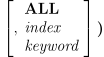
This form of the $FMSGFCV function returns a sequence of fixture compensation amounts associated with the fixture (or workpiece) compensation code n1. For example, on machines with a range of G codes, such as G54-G59, specify a number in the range 1-6 for n1; the value of n2 is ignored. On controllers that support an extended workpiece compensation range, n1 specifies the primary index and n2 specifies the secondary index. Specify 0 (zero) for both n1 and n2 to return the base fixture compensation amount.
If the ALL keyword is specified, the return value is a sequence of length 16 containing the fixture compensation values for all possible axes for the specified compensation index. Otherwise, the return value is a sequence of length 6 containing the fixture compensation values for the active axes (as defined by the $AXES system variable). A sequence of zeros is returned if the compensation index is not defined.
Similar to the above, this form of the $FMSGFCV function returns the numeric fixture compensation amount for the specified axis, identified either by an index number or by a keyword identifier. A value of zero is returned if the compensation index is not defined, or if axis is not defined in the post-processor or control emulator.


![\icamhsp{0.707mm}\bigl[,\textbf{ALL}\,\bigr]\icamhsp{0.707mm}\textbf{)}](../../_images/math/d0fc3050c7d790a6883111ac69435be10b5ff554.svg)


Axes Indices and Keywords index
keyword
Axis
1
XAXIS
Primary X axis
2
AXIS
Primary Y axis
3
ZAXIS
Primary Z axis
4
UAXIS
Secondary X axis
5
VAXIS
Secondary Y axis
6
WAXIS
Secondary Z axis
7
AAXIS,
TABLE Rotary A axis table
8
BAXIS,
TABLE Rotary B axis table
9
CAXIS,
TABLE Rotary C axis table
10
AAXIS
Rotary A axis head
11
BAXIS
Rotary B axis head
12
CAXIS
Rotary C axis head
13
QUILL
Extending linear axis
14
RAM[,
1] Primary rotary on exchangeable head
15
RAM,
2 Secondary rotary on exchangeable head
16
ORIENT
Spindle orientation
The $FMSGLCV Function
|
Get length compensation amounts Returns: Numeric or Sequence |

This form of the $FMSGLCV function returns a sequence of length compensation amounts. There are two possible forms of referencing tool length compensation values. If the machine supports “offset unique by tool” compensation, then n1 specifies the tool number and n2 specifies the compensation switch number for that tool. Otherwise, the value of n1 is ignored and n2 specifies the length compensation offset switch number. Specify 0 (zero) for both tool_id and n to return the base length compensation amount.
If the ALL keyword is specified, the return value is a sequence of length 16 containing the length compensation values for all possible axes for the specified offset switch number. Otherwise, the return value is a sequence of length 6 containing the length compensation values for the active axes (as defined by the $AXES system variable). A sequence of zeros is returned if the offset switch number is not defined.
Similar to the above, this form of the $FMSGLCV function returns the numeric length compensation amount for the specified axis, identified either by an index number or by a keyword identifier (a table of valid index numbers and keywords can be found here). A value of zero is returned if the offset switch number is not defined or if axis is not defined in the post-processor or control emulator.
Note: Currently, length compensation is supported only for the XYZ linear axes and for the ABC rotary head axes, conditional upon these axes being defined in the post-processor or control emulator.
The $FMSGRCV Function
|
Returns tool corner radius compensation amounts Returns: Numeric |

The $FMSGRCV function returns tool corner radius compensation amounts. There are two possible forms of referencing tool corner radius compensation values. If the machine supports “offset unique by tool” compensation, then n1 specifies the tool number and n2 specifies the compensation switch number for that tool. Otherwise, the value of n1 is ignored and n2 specifies the diameter compensation offset switch number. Specify 0 (zero) for both n1 and n2 to return the base corner radius compensation amount.
The return value is the numeric corner radius compensation offset amount. A value of zero is returned if the offset is not defined.
The $FMSSDCV Function
|
Sets tool diameter compensation amounts Returns: Numeric |


The $FMSSDCV function sets tool diameter compensation amounts. There are two possible forms of referencing tool diameter compensation values. If the machine supports “offset unique by tool” compensation, then n1 specifies the tool number and n2 specifies the compensation switch number for that tool. Otherwise, the value of n1 is ignored and n2 specifies the diameter compensation offset switch number. Specify 0 (zero) for both n1 and n2 to set the base diameter compensation value, which will be added to any diameter compensation offset in effect.
This function sets the tool diameter compensation amount for the specified index to value.
A value of 1 is returned if the diameter compensation amount was successfully applied, otherwise a value of 0 (zero) is returned.
The $FMSSFCV Function
|
Sets the fixture compensation amounts Returns: Numeric |

![\icamhsp{0.707mm}\raise0.16ex\hbox{$\begin{pmatrix}\!\begin{array}{l}\mathit{seq}\,\bigl[,\textbf{ALL}\,\bigr]\\\;\\\mathit{value},\!\begin{pmatrix}\!\begin{array}{l}\mathit{index}\\\mathit{keyword}\end{array}\!\end{pmatrix}\end{array}\!\end{pmatrix}$}\icamhsp{0.707mm}\textbf{)}](../../_images/math/efe56e4636f1c8d914c18fe462bc0de5c56b524a.svg)
This form of the $FMSSFCV function sets the fixture compensation amounts to be associated with the fixture (or workpiece) compensation code n1. For example, on machines with a range of G codes, such as G54-G59, specify a number in the range 1-6 for n1; the value of n2 is ignored. On controllers that support an extended workpiece compensation range, n1 specifies the primary index and n2 specifies the secondary index. Specify 0 (zero) for both n1 and n2 to set the base fixture compensation values, which will be applied in addition to any fixture compensation amount in effect. Base compensation is applied even when fixture compensation is not active.
Fixture compensation values are set for the specified index to the values defined by the sequence variable seq. If the ALL keyword is specified, use a sequence of length 16 to define the fixture compensation values for all possible axes for the specified compensation index. Otherwise, use a sequence of length 6 to define the fixture compensation values for the active axes (as defined by the $AXES system variable). A value of 1 is returned if the fixture compensation amount was successfully applied, otherwise a value of 0 (zero) is returned.
Similar to the above, this form of the $FMSSFCV function sets the fixture compensation value for the specified axis, identified either by an index number or by a keyword identifier (a table of valid index numbers and keywords can be found here). A value of 1 is returned if the fixture compensation amount was successfully applied, otherwise a value of 0 (zero) is returned.


The $FMSSLCV Function
|
Sets length compensation amounts Returns: Numeric |

![\icamhsp{0.707mm}\raise0.26ex\hbox{$\begin{pmatrix}\!\begin{array}{l}\mathit{seq}\,\bigl[,\textbf{ALL}\,\bigr]\\\;\\\bigl[\,\mathit{x},\mathit{y},\bigr]\,\mathit{z}\\\;\\\mathit{value},\!\begin{pmatrix}\!\begin{array}{l}\mathit{index}\\\mathit{keyword}\end{array}\!\end{pmatrix}\end{array}\!\end{pmatrix}$}\icamhsp{0.707mm}\textbf{)}](../../_images/math/596d3737f8401c9cc186ec1e5fc0d76d09484642.svg)
This form of the $FMSSLCV function sets length compensation amounts. There are two possible forms of referencing tool length compensation values. If the machine supports “offset unique by tool” compensation, then n1 specifies the tool number and n2 specifies the compensation switch number for that tool. Otherwise, the value of n1 is ignored and n2 specifies the length compensation offset switch number. Specify 0 (zero) for both n1 and n2 to set the base length compensation values, which will be added to any length compensation offset in effect.
Length compensation values can be set for the specified offset switch number to the values defined by the sequence variable seq. If the ALL keyword is specified, use a sequence of length 16 to define the length compensation values for all possible axes for the specified offset switch number. Otherwise, use a sequence of length 6 to define the length compensation values for the active axes (as defined by the $AXES system variable).
Alternatively, the length compensation offsets can be specified for the XYZ axes using numeric variables or constants (if x,
y is omitted they are set to zero). A value of 1 is returned if the length compensation amount was successfully applied, otherwise a value of 0 (zero) is returned.
Similar to the above, this form of the $FMSSLCV function sets the length compensation value for the specified axis, identified either by an index number, or by a keyword identifier (a table of valid index numbers and keywords can be found here). A value of 1 is returned if the length compensation amount was successfully applied, otherwise a value of 0 (zero) is returned.
Note: Currently, length compensation is supported only for the XYZ linear axes and for the ABC rotary head axes, conditional upon these axes being defined in the post-processor or control emulator.
![\icamhsp{0.707mm}\bigl[\,\mathit{x},\mathit{y},\bigr]](../../_images/math/94996f8837eb236fb2e56e4c830d479eaa01af70.svg)

The $FMSSRCV Function
|
Sets tool corner radius compensation amounts Returns: Numeric |

The $FMSSRCV function sets tool corner radius compensation amounts. There are two possible forms of referencing tool corner radius compensation values. If the machine supports “offset unique by tool” compensation, then n1 specifies the tool number and n2 specifies the compensation switch number for that tool. Otherwise, the value of n1 is ignored and n2 specifies the diameter compensation offset switch number. Specify 0 (zero) for both n1 and n2 to set the base corner radius compensation value, which will be added to any corner radius compensation offset in effect.
This function sets the tool corner radius compensation amount for the specified index to value.
A value of 1 is returned if the corner radius compensation amount was successfully applied, otherwise a value of 0 (zero) is returned.