Macro Invocation
Macros are automatically invoked (i.e., called) by the macro processor when specific events happen. There are two types of macros used by Virtual Machine:
Startup and Shutdown macros: Executed before and after key events.
Event Macros: Executed at key events.
Enable/
The MATCH macro command can be given within a macro to turn macro matching ON or OFF. It is not recommended to use this command in a VM model macro, since this command affects Icam Post and Control Emulator macro processing.
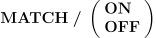
MATCH/
When macro matching is disabled, no attempt is made to invoke User-Defined, Code or Data macros that match those generated in the current macro.
Macro matching is always automatically turned back on when the current macro is exited.
Startup, shutdown and event macros are always invoked even if macro matching is turned OFF.
Outputting the Event (OUTPUT)
The OUTPUT command tells the macro processor to perform the actions associated with the current event. The syntax of the OUTPUT command is simply:

The OUTPUT command must be coded in Model Event macros only; do not code OUTPUT in a startup or shutdown macro. If the OUTPUT command is not encountered in an event macro, then the built-in processing for that event will not occur. This gives you the opportunity in an event macro to insert your own processing before, after, or even in place of the built-in processing.
Note that the OUTPUT command is also used with GENER user-defined macros and CERUN code macros to indicate where the matched command should be processed.