Flow Control in a Macro
Normally, macro statements are processed in the order in which they appear. There are several macro commands that can be used to control the sequence in which the lines of the macro are executed. These are discussed below.
The IF Block
An IF block describes one or more blocks of macro lines, where one or more conditional tests determine which block is executed, if any. The most general format of an IF block is as follows (the ELSEIF and ELSE blocks are optional):
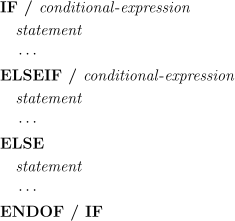
The condition of each IF and ELSEIF line is checked in turn until one
evaluates to TRUE, or there are no more to check. If an IF or ELSEIF
condition evaluates to TRUE, the following block of statements is
executed. If none of the conditions evaluate to TRUE and the last
block is preceded by an ELSE line, the last block of statements is
executed. If none of the conditions are TRUE and there is no ELSE
block, no blocks of statements get executed. After a block of
statements is executed, control passes to the statement after the
“ENDOF/
The CASE Statement
A CASE statement allows the user to branch to different macro code depending on the value of one expression. It is similar to a complex IF block. The syntax of the CASE statement is as follows:
![\begin{array}{l}
\rule{0pt}{2.5ex} \textbf{CASE / } \mathit{expression} \\
\rule{0pt}{2.5ex} \quad \textbf{WHEN / } \icamrange{1.2}{1} \Big( \,\mathit{constant} \,\big[,\textbf{THRU},\mathit{constant}\,\big] \,\Big) \\
\rule{0pt}{2.5ex} \quad \quad \mathit{statement} \\
\rule{0pt}{2.5ex} \quad \quad \cdots \\
\rule{0pt}{2.5ex} \quad \textbf{WHEN / OTHERS} \\
\rule{0pt}{2.5ex} \quad \quad \mathit{statement} \\
\rule{0pt}{2.5ex} \quad \quad \cdots \\
\rule{0pt}{2.5ex} \textbf{ENDOF / CASE}
\end{array}](../../../_images/math/6bfd1b0f77e3e9d58285e6e6fc79965c7891c909.svg)
The CASE line defines the expression that will be used for comparison
against the constants defined on the WHEN lines. If a WHEN constant
matches the CASE expression, the lines following the WHEN statement
are executed up until the next WHEN statement or the ENDOF/
The WHEN statement can list multiple constants and/
The WHILE Loop
A WHILE loop describes a block of macro lines to be executed while a given condition is TRUE. The format of a WHILE loop is as follows:
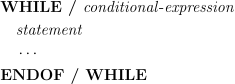
The conditional_expression is tested before entering the block of
macro lines. If the condition is FALSE, control passes to the line
following the ENDOF/
The REPEAT Loop
A REPEAT loop describes a block of macro lines to be executed until a given condition is TRUE. The format of a REPEAT loop is as follows:
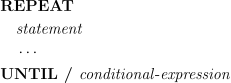
The block of statements following REPEAT is always executed at least once. When UNTIL line is reached, the conditional_expression is tested. If it is TRUE, control is passed to the line following the UNTIL line. Otherwise control is passed back to the top of the block of statements, which are executed again. The block of statements of a REPEAT loop are entered at least once, unlike those of the WHILE loop.
The DO Loop
The DO statement iterates a loop variable over a range of values, executing a block of macro statements on each iteration. The format of the DO statement is as follows:
![\begin{array}{l}
\rule{0pt}{2.5ex} \textbf{DO / } \mathit{variable}\,\mathtt{=}\,\mathit{start}, \,\mathit{end} \,\big[,\mathit{step}\,\big] \\
\rule{0pt}{2.5ex} \quad \mathit{statement} \\
\rule{0pt}{2.5ex} \quad \cdots \\
\rule{0pt}{2.5ex} \textbf{ENDOF / DO}
\end{array}](../../../_images/math/080df5ca0956c8014f7c1135618ee981b1dacb04.svg)
The step increment does not need to be specified. It defaults to
one (1). The start value, end value and step increment value
are evaluated when the DO line is first reached. The loop variable is
then assigned the start value. A test is performed on each
iteration before executing the statements. If the loop variable has
passed the end value, control passes to the statement after the
ENDOF/
If the step increment value is positive, the termination test is that the loop variable is greater than the end value. If the increment value is negative, the termination test is that the loop variable is less than the end value. For the default case in which the increment is one, the loop variable has a value of one added to it until it is greater than the end value.
Exiting Loops (EXIT)
The EXIT command is used to exit a given number of nested loop levels, transferring control to the statement immediately following the given loop. Each WHILE, REPEAT or DO loop that the EXIT statement is nested within counts as one level (note that IF and CASE statements do not count as a level).
The format of the EXIT statement is as follows:


The levels value is a whole unsigned number. If not specified, the default number of levels is 1.
Unconditional Jumps (JUMPTO)
The JUMPTO statement is used to transfer control to a labeled statement within the same macro. The label may be above or below the JUMPTO statement. The labeled statement starts with the name of the label, followed by a colon (:). Labels must be alphanumeric. They can start with either a letter or a digit, but must contain at least one letter. The format of the JUMPTO statement is as follows:

It is poor practice to jump to a label inside the body of a DO, IF, REPEAT, WHILE or CASE statements from outside that statement. Using JUMPTO to enter a DO loop is particularly inadvisable, since it may lead to unexpected behavior.
Exiting a Macro (TERMAC)
The TERMAC command can be used to exit a macro from anywhere inside the macro. There is an implicit TERMAC at the end of each macro, so it is not necessary to end a macro with a TERMAC statement. The TERMAC statement has no arguments.

Ending a Macro (ENDMAC)
The ENDMAC command is a special one that marks the end of a macro when the macro is output to a file or is listed with other macros in the macro editor. The ENDMAC statement has no arguments.

The ENDMAC command is not a “real” macro command since it is not compiled into the macro object code. Instead it simply acts as a separator to distinguish one macro from the next, where necessary.