Customizing the Model
Models can be customized using the Icam Macro language to perform special actions. The sample MHERML50 model for example contains a startup macro that closes the front door at the start of processing.
Model macros are not necessary for normal processing.
Model macros are called when certain events occur, to allow for any special processing needed to keep the model up to date. Information about the event is passed to the model macro in the form of $P variables. The following macro types are available:
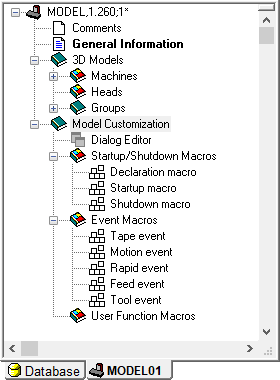
A Declaration Macro is executed once at the start of model macro processing.
A Startup Macro is executed once at the start of model processing.
A Shutdown Macro is executed once at the end of model processing.
A Tape Event macro is executed each time a block of tape (i.e., MCD) is processed.
A Motion Event macro is executed each time the model is moved.
A Rapid Event macro is executed before a positioning motion.
A Feed Event macro is executed before all other interpolation motions.
A Tool Event macro is executed whenever a tool or head is selected or changed.
User Function Macros are used to develop your own macro functions that can be called by other macros in the model.
Model macros share the same macro environment as the post-processor or control emulator, which gives them full access to system variables and user defined global variables. Model macros are somewhat restricted in that they cannot generate post-processor commands or call matching macros that in turn generate post-processor commands.
Model event macros and simulation functions are described starting here.