Axes Functions
Axes functions provide low-level access and control over the moveable joints (axes) of the model. These functions support position queries, movement commands, axis mapping, and synchronization tasks.
Get current axis position
Get current axes positions
Get current axes positions in WCS frame
Query, adjust model axes travel limits
Map a model axis to a GENER or CERUN axis
Move a model axis
Slave one axis to another
Reset model rotary axis to modulo-360 value
Update GENER or CERUN position from VM model axes
The $FMSGPOS Function
|
Returns the current position of the model axis Returns: Numeric or $NULL |

The $FMSGPOS function returns the current position of the model axis identified by id. Axis ID's are obtained using the $FMSID function. $NULL will be returned if id is not a valid axis.
The $FMSGPOSJ Function
|
Returns the current position of the model axis Returns: Numeric or Sequence |
![\textbf{{\char36}FMSGPOSJ}\textbf{(}\icamhsp{0.707mm}\begin{bmatrix}\!\begin{array}{l}\textbf{ALL}\\\textbf{ID},\mathit{id}\\\textbf{ID},\texttt{\{}\mathit{id}\;\icamrange{0.66}{0}\,\bigl[,\mathit{id}\,\bigr]\texttt{\}}\\\noalign{\vskip 0.5ex}\mathit{index}\\\mathit{keyword}\end{array}\!\end{bmatrix}\icamhsp{0.707mm}\textbf{)}](../../_images/math/ef38d42f27e733ed1261f9a99a5b6eefadb7ca6c.svg)
The $FMSGPOSJ function returns the current position of one or more model axes (the current active GENER or CERUN axes by default). Axes can be identified by id, axis numeric index in the range 1-16, or axis keyword. A value of zero is returned if the axis id is invalid, or if the index or keyword is invalid or specifies a non-controlled model axis.
If no argument is specified, returns a sequence containing the current position of the model axes corresponding to the currently active GENER or CERUN axes (i.e., those listed in the $AXES system variable). If ALL is specified, a sequence of length 16 is returned containing the position of all model axes controlled by GENER or CERUN. A zero is returned for any non-controlled axis.
Returns the current position of the model axis identified by axis ID id. Axis ID's are obtained using the $FMSID function. Zero (0) will be returned if id is not a valid axis.
Returns a sequence containing the current position of each of the model axes identified by axis ID id in the specified sequence. Axis ID's are obtained using the $FMSID function. Zero (0) will be returned for each id that is not a valid axis.
Returns the current position of the model axis identified either by an axis numeric index in the range 1-16 or by an axis keyword. A list of index values, keywords and corresponding axes can be found here. Zero (0) will be returned if index or keyword is invalid, or if it refers to an axis that does not exist in the model.
![\textbf{{\char36}FMSGPOSJ}\textbf{(}\icamhsp{0.707mm}\bigl[\,\textbf{ALL}\,\bigr]\icamhsp{0.707mm}\textbf{)}](../../_images/math/8b066e2673cdd5057f4e8412bd1d40574672a66f.svg)

![\textbf{{\char36}FMSGPOSJ}\textbf{(}\icamhsp{0.707mm}\textbf{ID},\texttt{\{}\mathit{id}\;\icamrange{0.66}{0}\,\bigl[,\mathit{id}\,\bigr]\texttt{\}}\icamhsp{0.707mm}\textbf{)}](../../_images/math/1b6ef9182174f915cc04b45862fa45008bcce9c7.svg)

The $FMSGPOSW Function
|
Returns current WCS position of model axes Returns: Numeric or Sequence |
![\textbf{{\char36}FMSGPOSW}\textbf{(}\icamhsp{0.707mm}\begin{bmatrix}\!\begin{array}{l}\textbf{ALL}\\\textbf{ID},\mathit{id}\\\textbf{ID},\texttt{\{}\mathit{id}\;\icamrange{0.66}{0}\,\bigl[,\mathit{id}\,\bigr]\texttt{\}}\\\noalign{\vskip 0.5ex}\mathit{index}\\\mathit{keyword}\end{array}\!\end{bmatrix}\icamhsp{0.707mm}\textbf{)}](../../_images/math/811dc00ed3c7c4453a6853ac079a6e18a0d380dd.svg)
The $FMSGPOSW function returns the current WCS position of one or more model axes (the current active GENER or CERUN axes by default). Axes can be identified by id, axis numeric index in the range 1-16, or axis keyword. A value of zero is returned if the axis id is invalid, or if the index or keyword is invalid or specifies a non-controlled model axis.
WCS positions are currently supported for the XYZ axes only. This function will return the same value as $FMSGPOSJ if a local coordinate system (LCS) is not in effect, or for any axis not affected by LCS.
If no argument is specified, returns a sequence containing the current WCS position of the model axes corresponding to the currently active GENER or CERUN axes (i.e., those listed in the $AXES system variable). If ALL is specified, a sequence of length 16 is returned containing the WCS position of all model axes controlled by GENER or CERUN. A zero is returned for any non-controlled axis.
Returns the current WCS position of the model axis identified by axis ID id. Axis ID's are obtained using the $FMSID function. Zero (0) will be returned if id is not a valid axis.
Returns a sequence containing the current WCS position of each of the model axes identified by axis ID id in the specified sequence. Axis ID's are obtained using the $FMSID function. Zero (0) will be returned for each id that is not a valid axis.
Returns the current WCS position of the model axis identified either by an axis numeric index in the range 1-16 or by an axis keyword. A list of index values, keywords and corresponding axes can be found here. Zero (0) will be returned if index or keyword is invalid, or if it refers to an axis that does not exist in the model.
![\textbf{{\char36}FMSGPOSW}\textbf{(}\icamhsp{0.707mm}\bigl[\,\textbf{ALL}\,\bigr]\icamhsp{0.707mm}\textbf{)}](../../_images/math/2070b9340960414863329152de8bcfb84ae64895.svg)

![\textbf{{\char36}FMSGPOSW}\textbf{(}\icamhsp{0.707mm}\textbf{ID},\texttt{\{}\mathit{id}\;\icamrange{0.66}{0}\,\bigl[,\mathit{id}\,\bigr]\texttt{\}}\icamhsp{0.707mm}\textbf{)}](../../_images/math/ce051730bff3de8fe6522bf13361e04aa011377d.svg)

The $FMSLIMIT Function
|
Query and/ Returns: Sequence |

The $FMSLIMIT function is used to query and/
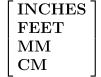
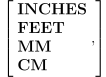
or adjust model axes travel limits. Changes to travel limits remain in effect until changed by another call to $FMSLIMIT. The use of the RECALL keyword in the $FMSLIMIT function argument list will restore all axes or just the specified axis, depending on format, to the travel limits defined by the model developer. Angular travel limits are in degrees. Linear travel limits are in current machine units, as defined by $UNIMCH, unless one of the INCHES, FEET, MM or CM modifiers is specified as the first argument of the $FMSLIMIT function call.
Individual axes can be specified using a component ID or by a GENER/
CERUN controllable axis keyword name (e.g., XAXIS, YAXIS...). A list of controllable axis keywords can be found here. On a query, the keyword POST signifies all GENER/ CERUN controllable axes; the keyword SIMUL signifies all other axes. The modifier CHANEL,ch can be used to restrict the query/ adjustment of axes to just those from the specified channel ch. All forms of the $FMSLIMIT function return a sequence. The first element is the number of axes being queried or adjusted. This is followed by 7 elements for each axis. When axes limits are adjusted, the information returned is the travel limits that were in effect before adjustment.
- 1:
Number of axes
- 2:
Component ID of the first axis
- 3:
Channel number the axis is assigned to
- 4:
GENER/
CERUN controllable axis index number (0:NA) - 5:
Limited travel? 0:unlimited, 1:limited
- 6:
Minimum travel (0:NA)
- 7:
Maximum travel (0:NA)
- 8:
Modified? 0:Model defined limit, 1:$FMSLIMIT adjusted limit
- 9-15:
Component ID, Channel number, ..., Modified of the second axis (if any)
- 16-22:
Component ID, Channel number, ..., Modified of the third axis (if any)
- ...:
repeats for additional axes
Query/
Restore Model Travel Limits
Query/
Restore Model Travel Limits Returns: Sequence
This variation of the $FMSLIMIT function returns a sequence describing the current travel limits for all model axes by default. The CHANEL, POST and SIMUL keywords will restrict the list of axes to just those for the specified channel, and/
or just those that are controlled (POST) or not controlled (SIMUL) by GENER or CERUN. Linear travel limits are reported in current machine units unless otherwise specified using one of the keywords INCHES, FEET, MM or CM. The RECALL keyword will restore the axes to the travel limits defined by the model developer. Query/
Set/ Restore Axis Component Travel Limits
Query/
Set/ Restore Axis Component Travel Limits Returns: Sequence
This variation of the $FMSLIMIT function queries the current travel limits for the axis component specified by component ID id. The first element of the returned sequence will be zero (0) if the specified component ID is not an axis, otherwise the first element will be a one (1) and the next 7 elements will describe the current axis travel as defined earlier.
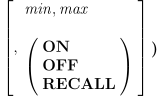
The minimum (min) and maximum (max) travel limits for the axis can optionally be set. Linear travel limits are in current machine units unless otherwise specified using one of the keywords INCHES, FEET, MM or CM. OFF can be specified for rotary axes to remove travel restrictions; ON enables the previously specified rotary limits (if any). RECALL resets the travel limits of the specified axis to those defined by the model developer.
Query/
Set/ Restore Controllable Axis Travel Limits
Query/
Set/ Restore Controllable Axis Travel Limits Returns: Sequence
This variation of the $FMSLIMIT function queries the current travel limits for the GENER or CERUN controllable axis defined by the axis keyword (a list of controllable axis keywords can be found here). The modifier CHANEL,ch can be used if necessary to identify the controllable axis from the specified channel ch. The first element of the returned sequence will be zero (0) if the specified axis is not available or invalid, otherwise the first element will be a one (1) and the next 7 elements will describe the current axis travel as defined earlier.
The minimum (min) and maximum (max) travel limits for the axis can optionally be set. Linear travel limits are in current machine units unless otherwise specified using one of the keywords INCHES, FEET, MM or CM. OFF can be specified for rotary axes to remove travel restrictions; ON enables the previously specified rotary limits (if any). RECALL resets the travel limits of the specified axis to those defined by the model developer.

![\icamhsp{0.707mm}\bigl[,\textbf{CHANEL},\mathit{ch}\,\bigr]](../../_images/math/32748238b82fb5c662ba8c590579b15df1eba8fc.svg)

![\icamhsp{0.707mm}\bigl[,\textbf{RECALL}\,\bigr]\icamhsp{0.707mm}\textbf{)}](../../_images/math/c2996cd6b7b88144f30865e120cc6f860b835677.svg)


The $FMSMAX Function
|
Mapping linear or rotary model axis Returns: Numeric (always returns 1) |



The $FMSMAX function maps a linear or rotary model axis, specified by its model axis component id, to one of the 15 standard GENER or CERUN axes being controlled by the specified channel. Great care must be taken when overriding the built-in functionality in order to map axes manually using this function.
Specify 2 for the channel argument when mapping the Z and X axes for a merging lathe side turret. Otherwise, the channel should always be 1 (one).
The GENER or CERUN axis-number is a whole number in the range 1-15, as follows:
- 1-3:
X-axis, Y-axis, Z-axis
- 4-6:
U-axis, V-axis, W-axis
- 7-9:
A-axis, B-axis, C-axis tables
- 10-12:
A-axis, B-axis, C-axis heads
- 13:
Extending axis (i.e., quill)
- 14-15:
Run-time attachable rotary heads
The axis-id parameter is one of the models linear or rotary axes, identified by its component ID. Component ID's are obtained using the $FMSID function. Use 0 (zero) to unmap an axis.
The $FMSMOVE Function
|
Moves model axes Returns: Numeric (always returns 1) |



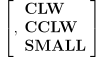
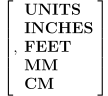

The $FMSMOVE function moves the model axis identified by axis-id (axis ID's are obtained using the $FMSID function), to the specified position in model axis units, at the specified velocity vel in model units per minute (degrees per minute for rotary axes).
The CLW, CCLW and SMALL keywords provide the ability to move a model rotary axis to its nearest modulo-360 position. If CLW is specified, the axis will rotate in a clockwise direction until it reaches the given orientation expressed in modulo 360. If CCLW is specified, the axis will instead rotate counter-clockwise to the given orientation. If SMALL is specified, the axis will rotate in whatever direction results in the smallest delta motion (CLW if equidistant).
The position can be expressed in other units than the model axis units. The specific units can be specified using the keywords INCHES, FEET, MM or CM. The keyword UNITS specifies the position in the current units.
If NEXT is specified, this axis motion will be deferred and included with the next model motion event. NOW (the default) causes the axis to move immediately. All pending NEXT motions can be processed by calling $FMSMOVE(0,0,0,
NOW).
The $FMSSLAV Function
|
Slaves or associates axes components Returns: Numeric (always returns 1) |



![\icamhsp{0.707mm}\raise0.03ex\hbox{$\Bigl[,\mathit{factor}\,\bigl[,\mathit{offset}\,\bigr]\,\Bigr]$}](../../_images/math/6d8425836634332cdb24e685a1ede60cab0cc1d4.svg)
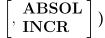
The $FMSSLAV function slaves (or associates) the axis component identified by slave-id to the axis component identified by master-id. Component ID's are obtained using the $FMSID function. Once slaved, any motion of the master axis will automatically cause the slave axis to move by an identical amount. Specify an optional signed multiplication factor to adjust the ratio of slave axis motion to master axis motion. Specify an optional signed offset to be applied after the factor. Specify INCR to apply the Δ master axis motion relative to the slave axis current position. Specify ABSOL (the default) to apply the Δ master axis motion relative to the slave axis origin.
Specify 0 (zero) as the master_id to sever the relationship with the slave_id.
The $FMSUNWIND Function
|
Resets model rotary axes to their modulo-360 value Returns: Numeric |

The $FMSUNWIND function internally resets one or more model rotary axes to their modulo-360 value. No motion is generated. Specify the axis-id using the return value from the $FMSID function. An optional modifier keyword can be specified to control the 360-degree range of the final rotary axis position, as follows:
- NORMAL:
Range [-179.9999,180] (the default)
- PLUS:
Range [0,359.9999] forces a positive result
- MINUS:
Range [-359.9999,359.9999] respects the current axis sign
Multiple model rotary axes can be reset by repeating the “axis-id[,modifier]” specification for each additional axis to be reset. This function returns a value of 1 (one) if successful; otherwise a value of 0 (zero) is returned.
The $FMSUPDPOS Function
|
Updates the GENER or CERUN axes positions Returns: Numeric |
![\textbf{{\char36}FMSUPDPOS}\textbf{(}\icamhsp{0.707mm}\bigl[\,\textbf{ALL}\,\bigr]\icamhsp{0.707mm}\textbf{)}](../../_images/math/160c68b2e5f88009776faf539db25203a9d6371e.svg)
The $FMSUPDPOS function updates the GENER or CERUN axes positions to match the model axes positions of kernel controlled axes. By default, only the current active axes are updated (as identified by the $AXES variable). Specify ALL to update all kernel axes that are associated with the model.
This function returns a value of 1 (one) if successful; otherwise a value of 0 (zero) is returned.