Channel Functions
Channels are the mechanism Virtual Machine uses to control groups of axes simultaneously, enabling concurrent operations. For example, GENER and CERUN main processing runs in channel 1, while side head processing on a merging lathe runs in channel 2. Additional channels can be created under macro control to move other axes — such as doors or tool changers — independently and concurrently with the main axes.
A channel is required only to simultaneously move model axes that are not already controlled by GENER or CERUN.
The $FMSACH Function
|
Activates or deactivates channels Returns: Numeric (always returns 1) |


![\icamhsp{0.707mm}\bigl[,\mathit{channel_{2}}\,\bigr]\icamhsp{0.707mm}\textbf{)}](../../_images/math/33161a99a10482585a88326ed550d0aa8ac19ad6.svg)
The $FMSACH function activates or deactivates a channel, based on the flag settings, as follows:
- 0:
Deactivate the channel.
- 1:
Activate channel with wait. Activate channel, stalling channel2 if channel is busy.
- 2:
Activate channel without wait. Activate channel. If busy, add new actions to the queue of pending actions.
- 3:
Activate channel with truncation. Activate channel. If busy, delete all current and pending actions.
A channel must be deactivated when there are no longer any additional actions to be processed. The deactivation only occurs after the channel has completed executing all pending actions. Leaving a channel active without sending any new actions to it will stall the simulation, since it will wait until it gets a new action for the inactive channel before continuing in parallel with any other channels
A deactivated channel must be reactivated before attempting to send new actions. The channel being activated is specified as a numeric channel, and its clock is set based on the current clock time, or from channel2 if specified. There are three methods of activating a channel. The method only makes a difference when the channel being reactivated is still busy processing queued up actions. For example, if “channel” controls a door, and you send an open door request while the door is currently closing:
Activate with wait: channel2 will stall until channel goes idle after processing all currently queued actions. New actions for both channels will be queued. For the example given, this will cause motion processing to halt until the door is completely closed, at which point motion processing and the door open processing will start together.
Activate without wait: channel2 is unaffected. New actions for channel will be added to the queue of actions. For the example given, motion processing continues uninterrupted, and the door open action will occur as soon as the door becomes closed.
Activate with truncation: channel2 is unaffected. The current action and any pending actions in the channel queue will be deleted. New actions for channel will be added to a new queue of actions. For the example given, motion processing continues uninterrupted, and the door open action occurs immediately, interrupting the close operation that was in progress.
The $FMSDCH Function
|
Deletes a channel Returns: Numeric (always returns 1) |

The $FMSDCH function seletes a channel identified by its channel number. The delete only occurs after the channel has completed executing all pending actions. Once a channel is deleted, it must not be referenced in any subsequent simulation functions. A channel should be deleted when you no longer have any long-term need for it. See the $FMSACH function (above) for channel activation/
deactivation.
The $FMSGAX Function
|
Get axis Returns: Numeric (always returns 1) |


The $FMSGAX function causes the specified linear, rotary or curve axis component to be controlled by the specified channel. The $FMSID function can be used to obtain the component ID of an axis. Connecting an axis to a channel means that motion of the axis occurs in the queue of actions for the specified channel.
The $FMSGCH Function
|
Returns the channel ID Returns: Numeric |
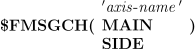
The $FMSGCH function returns the numeric channel ID that is currently in control of the linear, rotary or curve axis defined by the named axis component. A channel ID of zero is returned if the component name is unknown or has the wrong type.
The MAIN keyword argument returns the channel ID associated with the MAIN head on a merging lathe. The SIDE keyword argument returns the channel ID associated with the SIDE head on a merging lathe. A channel ID of zero is returned if the model is not a lathe type or when requesting a SIDE channel if not a merging lathe.
The $FMSNCH Function
|
Create new channel Returns: Numeric |
![\textbf{{\char36}FMSNCH}\textbf{(}\icamhsp{0.707mm}\bigl[\,\mathit{channel}\,\bigr]\icamhsp{0.707mm}\textbf{)}](../../_images/math/12639b817ca9f1d445b7f925fa70b0f8dd4b186d.svg)
The $FMSNCH function creates a new channel, returning the channel number of the channel just created. When a channel is created, it sets its “clock” to the current time. For a merging lathe, this will be the current time for the main or side head, depending on which is active. You can optionally specify a different channel, in which case the clock of the new channel is set to the same as that of the specified channel.
The $FMSRAX Function
|
Release axis associated to the channel Returns: Numeric (always returns 1) |

The $FMSRAX function causes the specified linear, rotary or curve axis component to be released by the specified channel. The $FMSID function can be used to obtain the component ID of an axis. Releasing an axis from a channel makes it available for control by a different channel.
The $FMSWCH Function
|
Synchronization of channels Returns: Numeric (always returns 1) |

The $FMSWCH function controls synchronization between channels. In its simplest form, it is used to send a mark (or signal) to a channel. If that channel is currently stalled waiting for the mark value, then it would begin processing again. Marks are integer values. Marks sent to a channel are remembered until the channel is deleted. The same mark value can be sent to different channels.
When multiple sets of parameters are given, the first two parameters (mark1,
channel1) specify a mark value to send (specify zero if a mark is not needed) and the channel that is to begin waiting. The remaining pairs of values (mark2, channel2...) specify the mark values and channels that the first channel is waiting for. For example, to have channel 2 wait for mark 7 on channel 3 and mark 7 on channel 4: status=$FMSWCH(0,2,7,3,7,4)If channels 3 and 4 had already received these mark values, then processing on channel 2 would continue uninterrupted. Otherwise, processing would stall until the following 2 function calls were made (in any order):
status=$FMSWCH(7,3)
status=$FMSWCH(7,4)