Probe and Collision Test Functions
Probe and collision test functions simulate the behavior of touch or laser probes and allow you to monitor for collision and over-travel events. These functions support probing setup, event reporting, and collision zone management.
Summary of collision/
over-travel events Laser probing
Adjust collision safety zone surrounding components
Details of probe/
collision/ over-travel events Axes positions at touch
Select the object to be used as a probe
Activate/
deactivate probing Enable/
disable collision testing on objects
The following steps are necessary for touch probing:
Call the $FMSPRID function to designate an object that will be used for touch probing.
Call the $FMSPROB function to enable probing (i.e., arm the probe).
Move the model via GENER or CERUN motion processing, or via $FMSMOVE calls.
Check for probe touch via the $VMPRCOD probe status variable.
Retrieve basic touch information via the $VMXFER and $VMP* variables.
Retrieve details via calls to the $FMSPDAT and $FMSPPOS functions.
Optionally call $FMSVCL to disable further collision checking touching objects.
Call the $FMSPROB function again to disable probing.
Call the $FMSPRID function again to disable the probe object.
The following steps are necessary for laser probing:
Call $FMSGCS to obtain the coordinate frame in which the measurement will be taken.
Call the $FMSLSR function with a point and vector that specifies the origin and direction of the light beam, and test the return value for measurement information.
The following steps are necessary to check for collisions and over-travels:
Optionally call $FMSVCL to enable/
disable collision checking on specific objects. Optionally call $FMSNEAR to adjust the collision safety zone for specific objects.
Move the model via GENER or CERUN motion processing, or via $FMSMOVE calls.
Retrieve basic collision/
over-travel event information via the $VMXFER variable. Call $FMSCEZ to obtain summary information concerning each event.
Call $FMSPDAT to obtain details concerning each event.
The $FMSCEZ Function
|
Returns information about collisions Returns: Sequence |

The $FMSCEZ function returns information about the nth collision or over-travel event that occurred on the last motion. A sequence of length 3 is returned, as follows:
- 1:
Time at start of event
- 2:
Time at end of event
- 3:
Count of interference pairs
The $VMXFER(1) system variable contains the number of collision and/
or over-travel events that occurred on the last motion. This is the upper limit for n. The count of interference pairs can be used when calling the $FMSPDAT function to get details of which axes over-traveled or which component pairs collided during the event.
The $FMSLSR Function
|
Probing function various state of Virtual Machine Returns: Sequence |


![\icamhsp{0.707mm}\bigl[,\mathtt{<\!options\!>}\,\bigr]\icamhsp{0.707mm}\textbf{)}](../../_images/math/8ac5b5d3b83127714fceda1a58ee1c6b486684d7.svg)
The $FMSLSR function projects a beam from a point in space along a specified vector, and returns a sequence of length 15 containing information about the first object that the beam intersects, as follows:
- 1:
Status: <0=
error, 0= no intersection, 1= intersection found - 2:
ID number of the intersecting object
- 3:
Name of the intersecting object
- 4–6:
XYZ coordinates of the light source point
- 7–9:
IJK direction vector of the light beam
- 10–12:
XYZ coordinates of the intersection point
- 13–15:
IJK surface normal at intersection point
Various <options> affect the operation of the $FMSLSR function:

If specified, only those component id's listed in the id-sequence variable will be checked for interference with the beam. By default all objects are tested.

If specified, those component id's listed in the id-sequence variable will not be checked for interference with the beam. By default all objects are tested.

The lcs sequence defines a homogeneous 3x4 matrix specifying the transformation between local and World coordinate systems (as can be obtained from the $FMSGCS function). The point and vector input data and the resulting measurement data are expressed in that coordinate frame. By default all data and measurements are in the model World coordinate system.
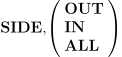
Specifies which sides of a surface are visible for measurement purposes. SIDE,
OUT is the default and indicates that only outside surfaces can be detected. SIDE, IN causes only inside surfaces to be detected. SIDE, ALL will detect all surfaces.

Provided that the beam contacts an object, fires additional beams at that object count times at the specified radius around the point. The return coordinates and normals are averaged.

Fires additional beams count times at the specified radius around the point. Returns the closest object and its surface normal.
The $FMSNEAR Function
|
Collision safety nearness Returns: Sequence |

The $FMSNEAR function gets and optionally sets the collision safety nearness zone around physical components. Nearness information is returned as a sequence of {id,value,status} tuples, one for each physical component, where id is the component ID, value is a non-negative nearness amount and status is either 0 for disabled or 1 for enabled.
Note that the $FMSVCL function can be used to enable or disable collision testing on components. This does not affect the nearness value or status of a component, however the nearness value and status will be ignored for any component that is not also enabled for collision testing.
Get Nearness for All Components
Get Nearness for All Components
Returns: Sequence
This form of the $FMSNEAR function returns a sequence of {id,value,status} nearness tuples for all collision enabled objects in the model and for all run-time components (i.e., tools, holders, parts and fixtures).
Get/
Set Nearness for Component ID
Get/
Set Nearness for Component ID Returns: Sequence
This form of the $FMSNEAR function returns a sequence of {id,value,status} nearness tuples for the component ID indicated by comp-id. If ALL is specified, then nearness information for all child components of comp-id is also returned. If a value is specified, then the nearness offset for the identified component(s) is set to the value specified. If ON or OFF is specified, then the nearness status is set for the identified component(s).
Get/
Set Nearness for Components in Group
Get/
Set Nearness for Components in Group Returns: Sequence
This form of the $FMSNEAR function returns a sequence of {id,value,status} nearness tuples for each of the member components of the group identified by group-id. If a value is specified, then the nearness offset for the components in the group is set to the value specified. If ON or OFF is specified, then the nearness status is set for the components in the group.
Get/
Set Nearness for Current Tool
Get/
Set Nearness for Current Tool Returns: Sequence
This form of the $FMSNEAR function returns the nearness tuple sequence{id,value,status} for the currently loaded tool. If a value is specified, then the nearness offset for the tool is set to the value specified. If ON or OFF is specified, then the nearness status is set for the tool. Tool nearness is used for RAPID and high feed positioning motions.



![\icamhsp{0.707mm}\bigl[,\mathit{value}\,\bigr]](../../_images/math/2ab1ab1839ca7fd2216ac3eb48b8377d7713608c.svg)

![\icamhsp{0.707mm}\bigl[,\textbf{ALL}\,\bigr]\icamhsp{0.707mm}\textbf{)}](../../_images/math/d0fc3050c7d790a6883111ac69435be10b5ff554.svg)



The $FMSPDAT Function
|
Information about interference pairs Returns: Sequence |

The $FMSPDAT function returns information about the pth interference pair of the nth collision/
over-travel event that occurred on the last motion. A sequence of length 7 is returned, as follows:
- 1:
Event type. 1=
over-travel, 2= collision, 3= measurement - 2:
ID number of the first component
- 3:
Name of the first component
- 4:
ID number of the second component (0 if over-travel event)
- 5:
Name of the second component (blank if over-travel event)
- 6:
Time at start of event
- 7:
Time at end of event (same as start time for measurement event)
The $VMXFER(1) system variable contains the number of collision and/
or over-travel events that occurred on the last motion. This is the upper limit for n. The $FMSCEZ function can be called to get the count of interference pairs for each collision/ over-travel event. This is the upper limit for p. For example, to list all collisions:
DECLAR/LOCAL,REAL,N,P
DECLAR/LOCAL,SEQUENCE,CEZ,PDAT
DO/N=1,$VMXFER(1)
  CEZ=$FMSCEZ(N)
  DO/P=1,CEZ(3)
    PDAT=$FMSPDAT(N,P)
    IF/PDAT(1).EQ.2
      ERROR/8,'Collision detected between !(*) and !(*)',$
        PDAT(3),PDAT(5)
    ENDOF/IF
  ENDOF/DO
ENDOF/DO
The $FMSPPOS Function
|
Returns the axes positions at the last probing Returns: Sequence |

The $FMSPPOS function returns the axes positions at the last point of probe contact for all moving axes. A variable length sequence is returned, as follows:
- 1:
Number of axes moved (0 if none)
- 2–4:
ID number, name and position of the first axis at the touch point
- 5–7:
ID, name and position of the second axis at the touch point
- ...:
repeats for additional axes
To simplify processing, the $VMP* macro variables can also be used to obtain the XYZ linear axes positions at the start and end (i.e., trigger point) of the probe motion.
The $FMSPRID Function
|
Sets the touch probe object Returns: Numeric |
![\textbf{{\char36}FMSPRID}\textbf{(}\icamhsp{0.707mm}\bigl[\,\mathit{id}\,\bigr]\icamhsp{0.707mm}\textbf{)}](../../_images/math/06e4c09def436501d05ced1bcfc8eb0cad03f462.svg)
The $FMSPRID function sets the touch probe object to the specified component id, which can be any component in the world (excluding in-process stock) that has a physical representation. This function returns the previously active probe object id. Specify an object id of –1 to deactivate the current probe object without specifying another.
The $FMSPRID function can be called without an argument to obtain the current probe component id.
The $FMSPROB Function
|
Activates or deactivates probing Returns: Numeric |
![\textbf{{\char36}FMSPROB}\textbf{(}\icamhsp{0.707mm}\bigl[\,\mathit{status}\,\bigr]\icamhsp{0.707mm}\textbf{)}](../../_images/math/05e39e0629580fce781347a01c5401f00c3e7e3a.svg)
The $FMSPROB function activates or deactivates probing, returning the previous probe activation status. The following values for status are permitted:
- 0:
Deactivate probing; contact with probe will cause a collision
- 1:
Activate probing; probe is armed
- 2:
Deactivate probing; ignore contact with probe
The $FMSPROB function can be called without an argument to obtain the current probe component id.
Once the probe is active, any motion that causes contact between the probe object (which must first be defined first using $FMSPRID) and another collision enabled object, will cause a probe event to be triggered. The model axes motion will be interrupted at the point of probe contact, and the probe status information will be returned in the $VMPRCOD system variable.
The following example will close the chuck jaws so that they come into contact with the raw stock or part. This example assumes there is a chuck jaw identified as “JAW” and that it can be moved with an axis identified as “JAW-AXIS”. This code should be included in the model startup macro:
DECLAR/LOCAL,REAL,JAW_ID=$FMSID('JAW')
IF/JAW_ID.GT.0
  %L01=$FMSPRID(JAW_ID) $$ set jaws as probe
  %L01=$FMSPROB(1) $$ activate probing
  %L01=$FMSMOVE($FMSID('JAW-AXIS'),0,1000) $$ close jaws
  CASE/$VMPRCOD
    WHEN/0
      ERROR/4,'No part in chuck'
    WHEN/1
      $$ get touched object and disable collision with jaw
      DECLAR/LOCAL,SEQUENCE,PDAT
      PDAT=$FMSPDAT($VMXFER(6),$VMXFER(7))
      %L01=$FMSVCL(JAW_ID,OFF,PDAT(4))
    WHEN/OTHERS
      ERROR/8,'Jaws in contact with part at start'
  ENDOF/CASE
  %L01=$FMSPROB(0) $$ deactivate probing
  %L01=$FMSPRID(-1) $$ deactivate probe
ENDOF/IF
The $FMSVCL Function
|
Collision Status Returns: Sequence |

The $FMSVCL function gets and optionally sets the collision testing status of physical components. Collision status information is returned as a sequence of {id,status} pairs, one for each physical component, where id is the component ID and status is either 0 for disabled or 1 for enabled.
The function supports three forms: a single component form that reports or changes the collision testing status of one physical object, an aggregate form that operates on all collision-enabled or disabled objects mounted at or below a specified component (or the entire World if no component is specified), and a component pair form that activates or deactivates collision testing between two specific components.
Single Component Collision Status
Single Component Collision Status
Returns: Sequence
This form of the $FMSVCL function activates, deactivates or reports on the collision testing property of the specified object id. If neither ON nor OFF is specified, then the collision property remains unchanged (i.e., the status is reported only). The function returns a sequence of two numbers. The first number is equal to the component id of the tested object. The second number indicates the status as follows:
- –2:
Not a physical object — collision testing is not applicable
- –1:
A physical object, but collision testing is not available
- 0:
Collision testing has been deactivated
- 1:
Collision testing is enabled
This function affects the collision testing status of a single physical object. Use the aggregate form of the function (described below) to affect the collision status of aggregate (i.e., container) objects such as tools, parts and fixtures.
Specify LOCK to ensure that the collision status setting will not be modified during the normal course of processing. For example, spindle activation and deactivation changes the collision status of some components of a tool. Specify AUTO at some later point to restore normal collision status processing.
The following example disables collision testing of tool “body” components attached to tool axis #1:
DECLAR/LOCAL,REAL,N
DECLAR/LOCAL,SEQUENCE,VCL=$FMSVCL($FMSID(TOOL,1,2),ALL)
DO/N=1,$FLEN(VCL),2
  IF/$FMSIDT(TOOL,VCL(N)).EQ.2 $$ is this a body component?
    %L01=$FMSVCL(VCL(N),OFF,LOCK) $$ disable collision testing
  ENDOF/IF
ENDOF/DO
Aggregate Component Collision Status
Aggregate Component Collision Status
Returns: Sequence
This form of the $FMSVCL function activates, deactivates or reports on the collision testing property of all collision enabled/
disabled objects mounted at or below the specified component id (all objects in the World if id is not specified or is zero). If neither ON nor OFF is specified, then the collision property remains unchanged (i.e., the status is reported only). Collision properties are returned in a variable length sequence containing {component ID, status(0|1)} pairs, where the collision status value (0=
off, 1= on) is reported before making any ON-OFF changes. The following macro shows how to save the collision testing state of the model and then later restore the original collision status:
$$ Save collision state
VCL=$FMSVCL(ALL)
...
$$ Restore collision state
DO/N=1,$FLEN(VCL),2
  %L01=$FMSVCL(VCL(N),$FIF(VLC(N+1).EQ.1,ON,OFF))
ENDOF/DO
Component Pair Collision Status
Component Pair Collision Status
Returns: Sequence
This form of the $FMSVCL function activates or deactivates collision testing between pairs of components as specified by their component IDs. The function returns a sequence of two numbers. The first number is equal to the component id1 of the tested object. The second number indicates the status as follows:
- –2:
The first object is not a physical body — collision testing cannot be changed
- –1:
Both are physical objects, but collision testing is not available for one or both objects
- 0:
Collision testing has been deactivated
- 1:
Collision testing is enabled
Component id1 must represent a single physical component. Do not specify an aggregate (i.e., container) component such as a tool, part or fixture.
Component id2 can represent either a physical component or an aggregate component.


![\icamhsp{0.707mm}\bigl[\,\mathit{id}\,\bigr]](../../_images/math/04c7be67019a41f96c1256e23fddb51fc34c8b1e.svg)


