Other Functions
This section lists miscellaneous VM functions that provide general-purpose capabilities not covered by the previous categories. These include utility functions for activation control, timing, simulation settings, and machine setup.
Manage Virtual Machine activation status
Set clamping force of a chuck device on the workpiece
Delay (i.e., dwell) for a specified time in seconds
Get/
Set material removal simulation (MRS) status Set master (i.e. active) spindle
Get and optionally set simulation tolerances
The $FMSADPT Function
|
Returns and optionally sets various operational states of Virtual Machine Returns: Numeric |

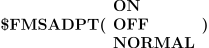
The $FMSADPT function gets and optionally sets various operational states of Virtual Machine. With no arguments, it returns the current enabled/
disabled state of the simulation. It supports three forms: an ON-OFF-NORMAL form that enables or disables simulation entirely, a PROTCT form that controls collision and overtravel detection and avoidance reporting, and a DEPTH form that enables or disables flute length optimization when material removal simulation is active. Get Simulation State
This form of the $FMSADPT function returns the enabled/
disabled state of Virtual Machine, where 1 indicates an enabled state and 0 indicates a disabled state. All other formats always return 1. Enable/
Disable Simulation
The ON-OFF-NORMAL form of the $FMSADPT function is used to enable or disable Virtual Machine. The function parameters are identical to those on the GENER ADAPTV post-processor command (see “Enable/
Disable Simulation”).
- ON:
Enables simulation, which is the default.
- OFF:
Disables simulation. While disabled, the simulation windows will no longer be updated, and most importantly, simulation diagnostics and collision avoidance motions will no longer be output. Running with OFF is equivalent to running without VM at all.
- NORMAL:
Enables simulation during regular post-processing, and disables simulation during $FLOOK and $FINFO macro function look-ahead processing (available with GENER only). This speeds look-ahead processing, but should only be used if the look-ahead functions of the post-processor are not affected by collision testing.
Enable/
Disable Collision/ Overtravel Detection and Avoidance
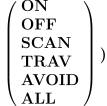
The PROTCT form of the $FMSADPT function controls collision/
overtravel reporting, as well as the automatic collision avoidance and path planning features available with graphical post-processing. The function parameters are identical to those on the GENER ADAPTV/ PROTCT post-processor command (see “Enable/ Disable Collision/ Overtravel Detection and Avoidance”).
- SCAN:
Enables reporting of collision and overtravel conditions.
- TRAV:
Enables reporting of collision and overtravel conditions. Avoids overtravel conditions if possible during path-planning (available with GENER only).
- AVOID:
Enables reporting of collision and overtravel conditions. Avoids collisions if possible during path-planning (GENER only).
- ALL:
Enables reporting of collision and overtravel conditions. Avoids collisions and overtravel conditions if possible during path-planning (GENER only).
- OFF:
Disables collision and overtravel testing altogether.
- ON:
Re-enables the last PROTCT setting. The default at the start of processing is AVOID for GENER and SCAN for CERUN.
Enable/
Disable Flute Length Optimization
The DEPTH form of the $FMSADPT function is used to enable or disable the flute length optimization (FLO) feature of Virtual Machine when material removal simulation is active. The function parameters are identical to those on the GENER ADAPTV/
DEPTH post-processor command (see “Enable/ Disable Flute Length Optimization”).
- ON:
Enables continuous testing of the cutting tool against the in-process stock. A message will be output when the tool is unloaded indicating the actual flute length required and the time at which the maximum penetration first occurred. A warning will be output if the penetration exceeds the flute length. A listing file flute length summary is also created.
- OFF:
Disables flute length optimization.
- OPTION:
Chooses between two methods of FLO. Method 1 (the default) is faster but not as accurate. Method 2 is significantly slower but more accurate.
- ADJUST:
Extends the tool length for FLO testing by the specified amount when using method 2.





![\icamhsp{0.707mm}\bigl[,\textbf{OPTION},\mathit{n}\,\bigr]](../../_images/math/7e78b0eebad53e1e5aa0d59bf2bdb59e24512739.svg)
![\icamhsp{0.707mm}\bigl[,\textbf{ADJUST},\mathit{value}\,\bigr]\icamhsp{0.707mm}\textbf{)}](../../_images/math/a0ed5955402dd35feca0ad311a21c4cc5826d59d.svg)
The $FMSCHUCK Function
|
Clamp or unclamp a DELMIA chuck device Returns: Numeric |

The $FMSCHUCK function is used to clamp or unclamp a DELMIA chuck device specified by its numeric id. The ON or OFF keyword activates or deactivates the clamping force on the workpiece. his function returns a value of 1 (one) if successful; otherwise a value of 0 (zero) is returned.
The $FMSDELAY Function
|
Add delay Returns: Numeric (always returns 0) |

The $FMSDELAY function is used to halt the machine movement in the current channel for the given amount of time. The delay (i.e., dwell) is expressed in seconds. During the delay, the HUD “Motion type” is shown as DELAY with a countdown of seconds remaining.
The $FMSMRS Function
|
MRS activation status Returns: Numeric |
![\textbf{{\char36}FMSMRS}\textbf{(}\icamhsp{0.707mm}\bigl[\,\mathit{n}\,\bigr]\icamhsp{0.707mm}\textbf{)}](../../_images/math/4deb06247916ea11110a1938b527d4676a10ff0f.svg)
The $FMSMRS function returns the current MRS activation status of the current channel. A value of 0 (zero) indicates that MRS is disabled; a value of 1 (one) indicates that MRS is enabled. You can optionally set the MRS activation status by specifying n as a whole number 0 or 1.
The $FMSMSP Function
|
Set master spindle Returns: Numeric (always returns 1) |


The $FMSMSP function sets the master (or current) spindle by giving the spindle ID number n. Spindle ID numbers are set when creating model stock, tool and rotary axes that can also represent a spindle.
An optional MILL or TURN qualifier can be given with mill-turn models to explicitly identify the spindle (i.e., milling or turning) that is being set. If omitted, VM chooses the spindle based on the current mode.
The master spindle is the one that will be controlled by the built-in spindle processing of GENER or CERUN. Use this function if it is necessary to override the default assignment of the master spindle.
The $FMSTOLER Function
|
Tolerance management Returns: Sequence |
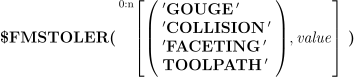
The $FMSTOLER function returns a sequence of 4 values representing the Gouge, Collision, Faceting and Tool path tolerances currently being used. These tolerances are set at the start of processing from values defined in the verification setup (.vsw) file. They can be viewed and modified on the dialog Tolerances Options tab. The tolerance units are those of the currently active kernel that called the $FMSTOLER function, as defined by the $UNITS system variable.
One or more tolerance values can be set by specifying a tolerance property name followed by the tolerance value. The sequence of tolerances returned by the function are those in effect before applying any changes. FACETING and GOUGE tolerances will be applied at the next tool change; the currently active tool will finish the operation in its current form. COLLISION and TOOLPATH tolerances are applied immediately.
Tolerances set by this function will not be saved in the vsw file at the end of processing. Note however that tolerances set using the dialog Tolerances tab are saved in the vsw file when the process ends.