The ROTABL Command [ML]
The ROTABL command is used to cause the rotation of a rotary table, rotary head, or lathe C-axis. This command is not valid for machines that do not have controllable rotary axes. The following ROTABL command functions are available:
Position Rotary Axis

![\icamhsp{0.707mm}\raise0.31ex\hbox{$\begin{pmatrix}\!,\!\begin{array}{l}\textbf{AAXIS}\\\textbf{BAXIS}\\\textbf{CAXIS}\\\textbf{AAXIS},\textbf{TABLE}\\\textbf{BAXIS},\textbf{TABLE}\\\textbf{CAXIS},\textbf{TABLE}\\\textbf{RAM}\,\bigl[,\mathit{n}\,\bigr]\end{array}\!\end{pmatrix}$}](../../_images/math/27d5beb81fb7247326f1cd32fb7d31f673cccfff.svg)

![\icamhsp{0.707mm}\bigl[,\textbf{ROTREF}\,\bigr]](../../_images/math/1c87575adb4e3f46419e7b12962d2bdf2a31f190.svg)
![\icamhsp{0.707mm}\raise0.05ex\hbox{$\begin{bmatrix}\,\bigl[,\textbf{ADJUST}\,\bigr]\begin{pmatrix}\!,\!\begin{array}{l}\textbf{NOW}\\\textbf{NEXT}\end{array}\!\end{pmatrix}\end{bmatrix}$}](../../_images/math/777cb97114e0e88af0ffaaec9ceafe8c1bc3201b.svg)
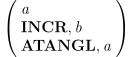
This command positions a rotary axis (not just rotary tables). The first two parameters are mandatory. The first parameter indicates the angle and must be the first option programmed in the command. The second parameter indicates the rotary axis and may be programmed anywhere in the remaining parameter list. Other parameters are optional and may be programmed in any order.
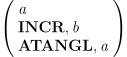
This parameter specifies the angle of rotation. If the format a is
used, the device will be positioned to the nearest modulus of the
angle specified. For example, if ROTABL/
![\begin{pmatrix}\!,\!\begin{array}{l}\textbf{AAXIS}\\\textbf{BAXIS}\\\textbf{CAXIS}\\\textbf{AAXIS},\textbf{TABLE}\\\textbf{BAXIS},\textbf{TABLE}\\\textbf{CAXIS},\textbf{TABLE}\\\textbf{RAM}\,\bigl[,\mathit{n}\,\bigr]\end{array}\!\end{pmatrix}](../../_images/math/42127c6a4fbedf3267fe1ac920d8d9176a739f90.svg)
This parameter specifies the rotary device to be rotated. See here for a table correlating axes name keywords with machine rotary axes.

The direction of the rotation of the device to reach the desired
angle can be controlled by the modifiers CLW and CCLW. Normally,
GENER determines the optimum direction of rotation from one position
to the next. If the device is capable of rotating in both directions,
the post-processor determines the shortest path, without violating
limits (if they exist) and outputs the proper angle and/
In the case of a ROTABL/
![\bigl[,\textbf{ROTREF}\,\bigr]](../../_images/math/93e41a6242074ab520ea82bf37f5d4824ede9df4.svg)
The ROTREF modifier makes the post aware of the fact that a rotation has taken place. Tool vector and positioning information will be adjusted accordingly. If ROTREF is not programmed, the angle will be output, the axis will move and the coordinate system will stay where it is. Coding a ROTABL with no ROTREF will have an effect similar to that of coding a TRANS command.
![\begin{bmatrix}\,\bigl[,\textbf{ADJUST}\,\bigr]\begin{pmatrix}\!,\!\begin{array}{l}\textbf{NOW}\\\textbf{NEXT}\end{array}\!\end{pmatrix}\end{bmatrix}](../../_images/math/11bf13a8bb7790f95aa93cf0ae59606da0285cdd.svg)
The timing of the effect of ROTREF can be controlled by the modifiers
NOW and NEXT. The modifier NOW will cause the angle and any ROTREF
actions to be done immediately. The modifier NEXT, will delay the
actions until the next motion block. A ROTABL/
Unwind Rotary Axis

![\icamhsp{0.707mm}\raise0.31ex\hbox{$\begin{pmatrix}\!\begin{array}{l}\textbf{AAXIS}\\\textbf{BAXIS}\\\textbf{CAXIS}\\\textbf{AAXIS},\textbf{TABLE}\\\textbf{BAXIS},\textbf{TABLE}\\\textbf{CAXIS},\textbf{TABLE}\\\textbf{RAM}\,\bigl[,\mathit{n}\,\bigr]\end{array}\!\end{pmatrix}$}](../../_images/math/c36120793853c2531329b638a7ffebba84c8ef98.svg)
This command will cause the CNC to logically (but not physically) unwind the specified rotary axis to its nearest modulo-360 value. See here for a table correlating axes name keywords with machine rotary axes. A diagnostic will be output if the machine does not have the ability to logically unwind the specified rotary axis.
Preferred Singular Rotary Axis


![\icamhsp{0.707mm}\bigl[,\mathit{angle}\,\bigr]](../../_images/math/7edd9efdaf99e5bb128c105133c532eb541d4d7f.svg)
This command can be used to set a preferred rotary axis position when it becomes singular. A rotary axis becomes singular when the tool is oriented parallel to the rotary axis of revolution. In this configuration, the rotary axis no longer influences tool orientation due to the loss of a degree of freedom. Many optimization features take advantage of this by positioning the rotary axis to avoid overtravel or collisions later in the program. If the optimization algorithm does not require a specific orientation for a singular axis, its position remains as it was in the last motion.
From a machining perspective, it is sometimes necessary or desirable to move the axis to a specific position, such as zero or another predefined value.
The ROTABL/
The angle option specifies the value of the preferred singular position. If not specified, the default is zero degrees. The singular preferred position always applies to the active singular axis.
ON activates the last active modal preferred position. If no value is specified and no previous value is defined, zero is assumed. This modal command remains active for all subsequent RAPID sequences.
NEXT activates a non-modal preferred singular position. This non-modal position is valid for one positioning sequence. The first motion at cutting feed cancels the active non-modal position.
OFF cancels the active preferred position, whether modal or non-modal. If ON is used later in the program, it will reinstate the last active preferred position (modal or non-modal).