Post-Processor Vocabulary
This chapter contains the individual post-processor commands and related options recognized by GENER. Commands are listed in alphabetic order below. The string of letters within the square brackets [ ] in each of the section titles identifies the NC applications that the command is applicable to, as follows:
[M] mill[L] lathe[E] wire EDM[P] punch press[C] flame, laser or other contouring[S] composite post-processor
- The AIR Command [MLPC]
- The AM Command [MLC]
- The APPLY Command [MLEPCS]
- The ARCSLP Command [MLEPC]
- The ASSIST Command [PC]
- The AUXFUN Command [MLEPC]
- The BREAK Command [MLEPC]
- The CALSUB Command [MLEPC]
- The CHANNL Command [L]
- The CLAMP Command [MLEPC]
- The CLEARP Command [ML]
- The CLRSRF Command [ML]
- The COOLNT Command [MLE]
- The COUPLE Command [L]
- The CUTCOM Command [MLEPC]
- The CYCLE Command [ML]
- The CYCLE/
ON Command - The CYCLE/
OFF Command - The CYCLE/
AUTO Command - The CYCLE/
RETURN Command - Common Cycle Parameters
- Common Cycle Options
- The DRILL Cycle
- The FACE Cycle
- The TAP Cycle
- The BORE Cycle
- The BORE-BACK Cycle
- The REAM Cycle
- The DRILL-DEEP Cycle
- The TAP-DEEP Cycle
- The DRILL-BRKCHP Cycle
- The TAP-BRKCHP Cycle
- The THRU Cycle
- The CSINK Cycle
- The MANUAL Cycle
- The CYCLE/
- The DEFSUB Command [MLEPC]
- The DELAY Command [MLEPC]
- The DISPLY Command [MLEPC]
- The END Command [MLEPC]
- The ENDSUB Command [MLEPC]
- The FEDRAT Command [MLEPC]
- The GOHOME Command [MLEPC]
- The HEAD Command [LEC]
- The HOMEPT Command [MLEPC]
- The INDPOS Command [ML]
- The INSERT Command [MLEPC]
- The LCS Command [MLEPC]
- The LEADER Command [MLEPC]
- The LIMIT Command [MLEPC]
- The LINTOL Command [ML]
- Linearization Activation
- Linearization Tool-Tip Tolerance
- Linearization Tool Length Adjustment
- Linearization Angular Tolerance
- Linearization Stepping Control
- Singularity Push-Thru
- Tool-Tip-Only Linearization
- Linearization with RTCP
- Linearization Spline Fitting
- Rotary Turn-Around
- Linearization Path Planning
- Forced Path-Planning Scan
- Singular Pre-Positioning
- Rotary Winding
- The LOAD Command [MLEP]
- The LOADTL Command [MLEP]
- The LOCATE Command [MLEPC]
- The LPRINT Command [MLEPCS]
- The MACHIN Command [MLEPCS]
- The MCHTOL Command [MLPC]
- The MODE Command [MLEPCS]
- The MOVETO Command [MLEPC]
- The MSYS Command [MLEPC]
- The OFSTNO Command [ML]
- The OPNAME Command [MLEPC]
- The OPSKIP Command [MLEPC]
- The OPSTOP Command [MLEPC]
- The OPTYPE Command [MLEPC]
- The ORIGIN Command [MLEPC]
- The PARTNO Command [MLEPC]
- The PENDWN Command [MLEPC]
- The PENUP Command [MLEPC]
- The PITCH Command [L]
- The PIVOTZ Command [EP]
- The PLOT Command [MLEPC]
- The POWER Command [PC]
- The PPRINT Command [MLEPC]
- The PREFUN Command [MLEPC]
- The RAPID Command [MLEPC]
- The RETRCT Command [ML]
- The REWIND Command [MLEPC]
- The ROTABL Command [ML]
- The SAFETY Command [MLC]
- The SAFPOS Command [MLEPC]
- The SELCTL Command [MLP]
- The SELECT Command [MLP]
- The SEQNO Command [MLEPC]
- The SHUTTR Command [PC]
- The SmartPACK Family of Commands
- Optimize Positioning with SmartPATH™
- Optimize Air-Cutting with SmartCUT
- Optimize Cutting Feed with SmartFEED
- The SPINDL Command [MLEP]
- The STOP Command [MLEPC]
- The SYNCTR Command [L]
- The THREAD Command [L]
- The TLNAME Command [ML]
- The TMARK Command [MLEPC]
- The TOOLNO Command [ML]
- The TORCH Command [PC]
- The TPRINT Command [MLEPC]
- The TRANS Command [MLEPC]
- The TURRET Command [L]
- The UNLOAD Command [MLE]
- The VTLAXS Command [M]
- Other CL File Commands Affecting Output
- The ISN Command
- The TRACUT Command
- The INDEX Command
- The COPY Command
- The BLOCK Command
- The DEFCOPY and COPY Commands
- The FROM Command
- The GODLTA Command
- The GOTO Command
- The CONT Command
- The MOVE Command
- The MOVARC Command
- The DNTCUT and CUT Commands
- The TOLER, INTOL and OUTTOL Commands
- The CUTTER Command
- The MULTAX Command
- The UNITS Command
- The TLAXIS Command
- The FINI Command
- The CONTRL Command
- The INCLUD Command
- The PPWORD Command
- The SYN Command
- The SYNEX Command
Syntax Format Conventions
Syntax Format Conventions
The syntax for post-processor commands is listed using the following format conventions:
Square brackets
![\big[ \; \big]](../../_images/math/830e998f5d33577c5e6090fbda4b6b6ba1ebac9a.svg) encase syntax that is optional.
The 0:n symbol preceding the bracketed item,
as in
encase syntax that is optional.
The 0:n symbol preceding the bracketed item,
as in ![\icamrange{0.8}{0}\,\big[,a\,\big]](../../_images/math/f908ce9f87ba6e90bb09a8281ccaffb548753c96.svg) indicates that the bracketed item a can be repeated zero or more times.
indicates that the bracketed item a can be repeated zero or more times.Parentheses
 encase syntax that lists a number of choices,
one of which is required. The parentheses are omitted when the syntax is a
simple choice among a number of keywords.
The 1:n symbol preceding the parenthesized item,
as in
encase syntax that lists a number of choices,
one of which is required. The parentheses are omitted when the syntax is a
simple choice among a number of keywords.
The 1:n symbol preceding the parenthesized item,
as in  indicates that the item a can be repeated one or more times.
Any value not contained in square brackets or parentheses must be programmed each time the post-processor command is used.
Formal keywords are shown in bold upper case, as in ON and COOLNT.
Lower case words within angled brackets identify common syntax, as in <axis>. The syntax of axis is then defined separately. This makes complex syntax more readable.
Italicized lower case words identify variable parameters supplied in the syntax, such as offset or 'name'.
Most syntax consists of zero or more fixed parameters that must be
coded in a specific order, followed by optional qualifiers that can
appear in any order. Many qualifiers are couplets, which consist of a
qualifier keyword followed by a value (either numeric or keyword).
The order of the couplet cannot be reversed; if the syntax is
“[,
Alternative forms for a command are listed separately, with the command name repeated. Consider the following example for fixture compensation:


![\icamhsp{0.707mm}\raise0.10ex\hbox{$\icamrange{2.66}{1}\!\begin{pmatrix}\!,\!\begin{pmatrix}\!\begin{array}{l}\textbf{XCOORD}\\\textbf{YCOORD}\\\textbf{ZCOORD}\end{array}\!\end{pmatrix}\,\bigl[,\mathit{offset}\,\bigr]\end{pmatrix}$}](../../_images/math/be77d43bb79f7d65c3bf45b58158b508dc869b7f.svg)

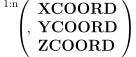
Two alternate forms are listed to show that the optional offset scalar is only permitted when using the ON command.
In the first form, the ON keyword must be coded at the start of the command. The ON keyword can then be followed by one or more axis qualifiers. The axis qualifier is a choice of XCOORD, YCOORD or ZCOORD, optionally followed by an offset number. The following commands would be valid:
CUTCOM/ON,XCOORD
CUTCOM/ON,ZCOORD,4,XCOORD,7,YCOORD,12
CUTCOM/ON,YCOORD,XCOORD,ZCOORD
The following commands however would not be valid:
CUTCOM/XCOORD                  Missing ON at start
CUTCOM/ON                      Missing axis specifier
CUTCOM/ON,4,YCOORD             Couplet order reversed
In the second form of the CUTCOM command, the OFF keyword must be coded at the start, followed by one or more axis qualifiers. The axis qualifier is a choice of XCOORD, YCOORD or ZCOORD.