The SAFETY Command [MLC]
The SAFETY command controls the safe positioning analysis feature. This command is valid for contouring machines, lathes and mills. The following SAFETY command functions are available:
Modal Safety Setting
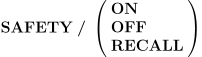
OFF turns the safe positioning feature off. All axes that are capable of positioning together on a block will do so.
ON re-enables the last specified safety setting.
RECALL restores the default state of the safe positioning feature as it was defined in QUEST by the post-processor developer.
Safe Positioning Motion Squaring


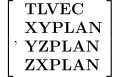
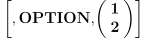
The ON keyword activates the safe positioning feature. The OPTION
couplet can be used to define the method of safe positioning.
OPTION,
NEXT is a non-modal form of safe positioning that will occur on the next motion only.
The XYPLAN, YZPLAN and ZXPLAN keywords override the default logic
that attempts to determine the traverse plane and plunge direction.
XYPLAN forces the analysis of plunge motion to be along the Z axis,
regardless of tool vector or rotary axis alignment. Similarly, YZPLAN
and ZXPLAN force the analysis of plunge motion along the X and Y axes
respectively. TLVEC (the default) uses the tool axis vector
(OPTION,
Safe Positioning Motion Splitting
![\icamhsp{0.707mm}\bigl[\,\textbf{NEXT},\bigr]](../../_images/math/a8abb0ff1b6d51ee8d6e25f2ce1959d5246c08bb.svg)
![\icamhsp{0.707mm}\raise0.94ex\hbox{$\icamrange{18.1}{0}\begin{bmatrix}\!\begin{array}{l}\mathtt{<\!axis\text{-}list\!>}\begin{bmatrix},\!\begin{array}{l}\textbf{NOW}\\\textbf{ALL}\end{array}\!\end{bmatrix}\\\;\\\textbf{RTCP}\begin{bmatrix},\!\begin{array}{l}\mathit{type}\\\textbf{ON}\\\textbf{OFF}\end{array}\!\end{bmatrix}\\\;\\\textbf{LENGTH}\begin{bmatrix},\!\begin{array}{l}\mathit{offset}\\\textbf{ON}\\\textbf{OFF}\end{array}\!\end{bmatrix}\,\bigl[,\textbf{SET},\mathit{type}\,\bigr]\\\;\\\textbf{LCS}\begin{bmatrix},\!\begin{array}{l}\textbf{ON}\\\textbf{OFF}\end{array}\!\end{bmatrix}\\\;\\\textbf{RAPID}\\\;\\\textbf{FEED},\mathit{value}\,\bigl[,\mathit{type}\,\bigr]\\\;\\\textbf{NEXT}\end{array}\!\end{bmatrix}$}](../../_images/math/b837cd1c7afd6d869ffc2d0b583b1d3014a8d20e.svg)
This axis specific form of safe positioning defines a specific order of output of the machine axes over multiple NC code blocks for the next or all subsequent positioning motions.
Specify NEXT as the first parameter on the command to define a non-modal motion split pattern that applies to the next positioning motion only. Omit the leading NEXT keyword to modally apply motion splitting to all subsequent positioning motions.
The safety split motion pattern can contain any combination of axes motions, RTCP settings, tool length compensation settings and local coordinate system settings. The interpolation mode can also be forced to rapid or a specified feed positioning velocity on individual split motion blocks.

Each occurrence of the NEXT keyword (with the exception of an optional leading NEXT) indicates a forced break to a new block of NC code. If there is nothing to be output, then NEXT has no effect.
![\icamrange{15.1}{1}\!\begin{pmatrix}\!\begin{array}{l}\textbf{XAXIS}\\\textbf{YAXIS}\\\textbf{ZAXIS}\\\textbf{UAXIS}\\\textbf{VAXIS}\\\textbf{WAXIS}\\\textbf{QUILL}\\\textbf{AAXIS}\\\textbf{BAXIS}\\\textbf{CAXIS}\\\textbf{AAXIS},\textbf{TABLE}\\\textbf{BAXIS},\textbf{TABLE}\\\textbf{CAXIS},\textbf{TABLE}\\\textbf{RAM}\,\bigl[,\mathit{n}\,\bigr]\\\noalign{\vskip 0.5ex}\textbf{LINEAR}\\\textbf{REV}\end{array}\!\end{pmatrix}\begin{bmatrix},\!\begin{array}{l}\textbf{NOW}\\\textbf{ALL}\end{array}\!\end{bmatrix}](../../_images/math/078dbf2cad6ccdbc0d243138e0415a06b260f00e.svg)
Specify a list of one or more axis keywords identifying the axes to
be moved together on a positioning motion block, followed by the NEXT
keyword, to indicate a break to a new positioning motion block.
Multiple sets of “*AXIS[,
Note that only those axes that are required to be output will be output. The SAFETY command does not force axes to be output that are not moving or that would not be output on a “normal” positioning motion. Specify ALL to force the listed axes to be output for the current block.
Each axis can be moved at most one time over the entire safe split motion. However, the current position of any axis can be output as many times as required by using the NOW keyword.

This defines a change in RTCP status equivalent to coding a MODE/
![\textbf{LENGTH}\begin{bmatrix},\!\begin{array}{l}\mathit{offset}\\\textbf{ON}\\\textbf{OFF}\end{array}\!\end{bmatrix}\,\bigl[,\textbf{SET},\mathit{type}\,\bigr]](../../_images/math/8ed23c240b788bba29be06cfea09181d93d05f06.svg)
This defines a change in tool length compensation status equivalent
to coding a CUTCOM/

This defines a change in local coordinate system (LCS) status
equivalent to coding an LCS command (see “The LCS Command [MLEPC]”).
ON is the equivalent of LCS/

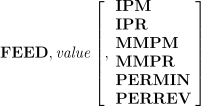
RAPID indicates that the axes on the split motion block are to be output using rapid positioning (e.g. G00). FEED indicates a positioning feed motion at the specified velocity (e.g. G01). These override the CLDATA defined velocity of the positioning move for a single split motion block only. These velocity overrides must be specified with axes definitions to have any effect.
Example:
SAFETY/NEXT, RAPID,XAXIS,YAXIS,ALL,NEXT, LENGTH,ZAXIS,ALL
The above command will apply to the next RAPID or high feed positioning motion in the program, It will force out the X and Y axes on the first block using rapid positioning, and force out the Z axis with tool length compensation on the second block at the CLDATA defined velocity (i.e., either RAPID or high feed positioning).
Safe Positioning Path Selection

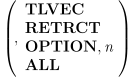

The SAFETY/
The following SAFETY/
TLVEC,
RETRCT,
OPTION,
OPTION,
ALL,
This command enables (ON) or disables (OFF) the positioning path override functionality, without affecting individual options.