The THREAD Command [L]
The THREAD command is used to turn threads on lathes. There are two different formats for the thread command.
Single Pass Thread



This format is equivalent to the following:
![\begin{array}{l}
\text{GOTO / }\mathit{start\_of\_thread} \\[0.6ex]
\textbf{COUPLE / ON} \\[0.6ex]
\text{GOTO / }\mathit{end\_of\_thread} \\[0.6ex]
\textbf{COUPLE / OFF}
\end{array}](../../_images/math/ad1a5adbcc4ab5eda13ba21cccad230ef514a59d.svg)
The minor words FACE, TAPER or TURN will be ignored by GENER, however one of the minor words must be included to indicate that this format is to be used. See “The COUPLE Command [L]” for more information on this format.
Multi-Pass Thread


![\begin{array}{l}
\hspace{.3cm}\textnormal{GOTO / } \mathit{start\_of\_thread} \\[0.6ex]
\hspace{.3cm}\textnormal{GOTO / } \mathit{end\_of\_thread} \\[0.6ex]
\big[ \; \textnormal{GOTO / } \mathit{end\_of\_chamfer} \; \big]
\end{array}](../../_images/math/d60f299657a3df130ecbfe54a916eb9622515262.svg)

The THREAD/
The <parameters> that can be included with the THREAD/
Specifying the Thread Depth
The thread depth can be defined using combinations of DEPTH, CUTS and STEP parameters.
![\bigl[,\textbf{DEPTH},\mathit{depth}\,\bigr]](../../_images/math/9b97c7f94b7d4589990800cf6805e55bee4e0cc1.svg)
This parameter specifies the total depth of the thread. The depth must be a positive number. The depth is the perpendicular distance measured from a line passing through the thread start and end points, in the direction of CUTANG. The depth must be specified if the CUTS specification does not give stepping values and is greater than 1. If a value is specified and neither CUTS or STEP is specified, then a single pass will be performed. If a value is specified and the CUTS specification is also specified with stepping values then the depth will be used as a verification of the stepping values.
![\biggl[,\textbf{CUTS},\mathit{n}\Bigl[,\mathit{step}\;\icamrange{0.66}{0}\,\bigl[,\mathit{n},\mathit{step}\,\bigr]\,\Bigr]\,\biggr]](../../_images/math/a4dd71c5313b7ce67ab618340d0738795ee24627.svg)
The cutting specification has a number of formats. The keyword CUTS
is followed by the number of passes to cut the thread. The
post-processor will determine the optimum amount of material to
remove per pass based on the depth of the thread. If desired, a
n,
![\bigl[,\textbf{STEP},\mathit{dist}\,\bigr]](../../_images/math/743a2438e3dfdce9f1c6345ea4f9575f8f9042e1.svg)
An alternate way of specifying the in-feed amount for each pass. The STEP distance is the in-feed for the first pass. Either DEPTH,dist or CUTS,n must be specified when STEP is used.
![\Bigl[,\textbf{FINCUT},\mathit{count}\,\bigl[,\mathit{dist}\,\bigr]\,\Bigr]](../../_images/math/7a0a62301ada754f6f890c7b81e92675e05f002e.svg)
The dist is the amount of stock remaining before making count
finish cuts. The DEPTH,depth value includes the finish pass
allowance. Non finishing cuts go to a depth of depth-dist. Finish
passes all occur at the full thread depth. Specifying a finishing
allowance with zero cuts (e.g., FINCUT,
The CUTS, STEP and DEPTH when used together can define conflicting requirements. The following combinations are permitted.
[DEPTH,d,] CUTS,c,STEP,s
[DEPTH,d,] CUTS,c,s
Constant step depth, c cuts at s in-feed per cut.
DEPTH if specified must match
c*s+finishDEPTH,d,CUTS,c
In-feed determined by OPTION value.
c cuts over total depth d less the finish allowance.
DEPTH,d,STEP,s
In-feed determined by OPTION value. First step is s.
DEPTH,d
Single pass at full depth.
CUTS,
1 Single pass at thread contour.
Specifying the Thread Entry
![\bigl[,\textbf{CUTANG},\mathit{angle}\,\bigr]](../../_images/math/4069aa8f7c93ac7aff7d92ff6004b464acc480c6.svg)
This parameter specifies the plunge line of the tool at the start of the threading. The angle is measured from the positive X-axis from a CL file point of view. A value between –360 and 360 degrees may be specified. The angle specified must be greater than 10 degrees offset from a line through the thread start and end points, or the thread cycle will abort. If the CUTANG parameter is omitted, a default entry angle will be computed from the initial position moving along the X or Z axis towards the thread contour. The in-feed will be along the X axis if the thread contour defines a turn or tapered turn thread; the in-feed will be along the Z axis if the thread contour defines a face or tapered face thread.
Note
For machines supporting CNC threading cycles, the CUTANG value must define an entry angle along the X or Z axis (i.e., be evenly divisible by 90 degrees) to allow the CNC cycle to be used. Use the TLANGL and OPTION parameters to obtain an angled entry.
![\bigl[,\textbf{TLANGL},\mathit{angle}\,\bigr]](../../_images/math/b2807a07dbe5b4b5a60950966588805302254551.svg)
This parameter specifies the tool nose angle. The angle is used for in-feed options 1 – 4 to determine the angle of entry relative to the CUTANG and to determine the alternating edge offset amount. The default tool nose angle is 60 degrees or the fixed machine default, if applicable.
![\bigl[,\textbf{OPTION},\mathit{n}\,\bigr]](../../_images/math/6ffd3cd9710d1c31dc60d395c20c8eea78d4f242.svg)
Specifies the in-feed pattern. Supported patterns are:
- 0:
constant amount, along CUTANG (default)
- 1:
constant amount, single edge
- 2:
constant amount, alternating edges
- 3:
constant depth, single edge
- 4:
constant depth, alternating edges
Option 0 is the default for any post-processor that does not support CNC threading cycles. With option zero, the in-feed direction is along the CUTANG angle. Provided that individual steps were not specified with the extended CUTS syntax, then each step depth will be decremented by a constant amount as the thread cycle progresses.
Options 1 and 2 specify a constant cross section in-feed step. When the CUTANG angle is parallel to a major datum, the in-feed angle can be along one edge (option 1) or can alternate between edges (option 2). Option 3 and 4 specify a constant depth in-feed step. When the CUTANG angle is parallel to a major datum, the in-feed angle can be along one edge (option 3) or can alternate between edges (option 4).
With options 1–4, the in-feed angle is 1/TAN(angle/. The
alternating edge method only offsets the tool on even numbered cuts.
Specifying the Thread Chamfer and Exit
The chamfer can be defined by including a third GOTO motion in the
series of motions between THREAD/
![\begin{array}{l}
\hspace{.3cm}\textnormal{GOTO / } \mathit{start\_of\_thread} \\[0.6ex]
\hspace{.3cm}\textnormal{GOTO / } \mathit{end\_of\_thread} \\[0.6ex]
\big[ \; \textbf{GOTO / } \mathit{end\_of\_chamfer} \; \big]
\end{array}](../../_images/math/142d26faa097673efd333f0016b9ce7addd1ef27.svg)
The above portion of the thread block is used to determine the path and direction of cut that the tool will take when cutting the thread. The delta motion between the thread end point and the end of chamfer point, is applied at the end of each cut, which is expected to be the thread chamfer.
![\Bigl[,\textbf{ATANGL},\mathit{angle}\,\bigl[,\mathit{height}\,\bigr]\,\Bigr]](../../_images/math/57529cdb29af848aee5a69cca498fbb35254c854.svg)
The ATANGL option specifies the pullout angle and height at the
end of the thread. On turning threads and turn taper threads, the
angle is measured off the machine X axis. On face and face taper
threads, the angle is measured off the machine Z axis. Angles between
–80 and 80 degrees are allowed, where zero will cause a straight
pull-out along the axis. The height is the perpendicular distance
measured from the thread end point in the opposite direction of
CUTANG. If the height is not given then it will be calculated as
pitch/ which generates a retract of the full depth of a
thread using a 60 degree thread cutter. Specify ATANGL,
![\Bigl[,\textbf{CHAMFR},\mathit{length}\,\bigl[,\mathit{angle}\,\bigr]\,\Bigr]](../../_images/math/719ca4844a332034d2203a3872061f499f4af0da.svg)
The CHAMFR option specifies the thread chamfer length and angle.
Angles between 10 and 80 degrees are allowed. The length is the
additional chamfer distance measured from the thread end point along
the thread axis. A length of zero indicates that no chamfer is
required. A negative length will start the chamfer the specified
distance before the thread end point. The angle defaults to 45
degrees if omitted. Specify CHAMFR,
![\Bigl[,\textbf{RETURN}\,\bigl[,\mathit{height}\,\bigr]\,\Bigr]](../../_images/math/9c3a2ca2a09be05b7f468029453cddeacfe4d921.svg)
This option specifies the retract height above the thread end point
between each cut. If the height is omitted, then the tool will
retract to the initial point X axis value for turning and turn taper
threads, or to the initial point Z axis value for face and face taper
threads. If both the RETURN option and thread chamfer are omitted, a
default return height will be calculated as pitch/ which
generates a retract of the full depth of a thread using a 60 degree
thread cutter.
When emulating threads using linear and thread interpolation, chamfers outside the range of 30 to 60 degrees will be cut using linear instead of thread interpolation.
Specifying the Thread Size
The following options override those that may have been specified on a preceding PITCH command.
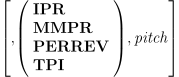
The thread pitch can be specified as the number of threads per inch (TPI), or as a distance per spindle revolution where the distance is measured in inches (IPR), mm (MMPR) or CLDATA units (PERREV).
![\bigl[,\textbf{MULTRD},\mathit{starts}\,\bigr]](../../_images/math/2cba92da36969c280ee5500217024d8109a4506f.svg)
The MULTRD option specifies multiple start threading. The starts value must be a non-zero, positive integer. For multi-start threads the first pass is completed for the first thread start then the same process is repeated for the second thread start, offset by the pitch value. This process is repeated for the 2nd pass, 3rd pass, etc., for each of the thread starts.
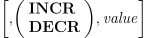
The INCR and DECR value option is used to indicate a variable lead thread. It specifies the change of the lead for each spindle revolution. For example, if the pitch at the start is 0.125 and the last pitch is 0.100, the resulting value would be 0.025 (assuming the change in pitch is for 1 revolution). Specify a value of zero to indicate a constant lead thread.
Specifying the Thread Contour
  GOTO / initial_point
[ RAPID ]
  THREAD / ON,...
  GOTO / start_of_thread
  GOTO / end_of_thread
[ GOTO / end_of_chamfer ]
  THREAD / OFF
In cutting a thread, the threading tool starts from the initial point
(i.e., where it was before THREAD/
If multiple starts are defined, the cut is repeated for each start by either advancing the tool slightly or using a phase offset register.
The entire process is then repeated for each cut, until the full depth is reached.