The POWER Command [PC]
The POWER command is used to control power settings on hybrid punch press machines with contouring attachments and contouring machines.


![\icamhsp{0.707mm}\raise0.03ex\hbox{$\,\Bigl[\,\bigl[\,\textbf{WATTS},\bigr]\,\mathit{w}\,\Bigr]$}](../../_images/math/b92155baf0ee3631603b49d4191138dadce44096.svg)
![\icamhsp{0.707mm}\raise0.05ex\hbox{$\begin{bmatrix},\!\begin{pmatrix}\!\begin{array}{l}\textbf{PULSE}\\\textbf{CONST}\end{array}\!\end{pmatrix}\,\bigl[,\mathit{a}\,\bigr]\end{bmatrix}$}](../../_images/math/3a1bf108c05279fe8dd7d08e7b4da647ed24a91c.svg)
![\icamhsp{0.707mm}\bigl[,\textbf{PERSEC},\mathit{freq}\,\bigr]](../../_images/math/0e8076277ae741d04f34ec8a1b398f300c3976f8.svg)
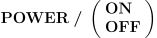
For flame cutting, the flow parameter specifies the flame intensity or power setting.
For laser cutting: WATTS specifies the power setting; PULSE and CONST indicate either a pulsed width or constant wave beam; and PERSEC specifies the pulse frequency.
Specify OFF to turn the laser or flame off. Specify ON to turn the flame or laser back on at the previously specified settings.