The PLOT Command [MLEPC]
The PLOT command is used to control GENER’s output to a backplotting file. The following PLOT command functions are available:
PLOT Activation
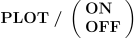
PLOT/
The user may select the output method and the coordinate type of the
backplot file. This is done by setting symbols in the ICAM.DEF file.
The method of output — ISO 3592 binary or APT file — is selected using
the plot_type symbol.
Valid choices are apt and binary.
The coordinate type — CL or Machine — is selected using
the plot_data symbol.
Valid choices are cl and machine.
For information about macro system variables pertaining to the manipulation of PLOT output, see “Backplot File Variables”.
PLOT Transformation


![\icamhsp{0.707mm}\bigl[,\textbf{LAST}\,\bigr]](../../_images/math/0301051590c693e9fa88b16a2c4dc67450aa7761.svg)
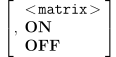
The PLOT/
Note
The PLOT/
Two separate transformations can be applied and removed individually.
PLOT/
The <matrix> defines the location and orientation of the resultant after-transformation coordinates on the machine, with respect to the normal coordinates. The matrix can be specified using the standard post-processor transformation syntax (see “The ORIGIN Command [MLEPC]”).
The ON and OFF keywords enable or disable plotting transformations. OFF ignores the effect of the matrix. ON re-establishes the previously specified matrix.