The MACHIN Command [MLEPCS]
The MACHIN command can been used to select the desired post-processor for creation of the final tape file. The GENER Launch Panel and command line parameters support the automatic selection of the post-processor from MACHIN commands in the CL file.
This command is valid for all machine types.


![\icamhsp{0.707mm}\bigl[,\mathit{post\_id}\,\bigr]](../../_images/math/2e0385c4331d6a9b2978a9767509a808f1913e24.svg)
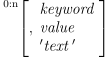
The post_name and post_id combination must match the responses given for the post-processor name and identification number in the “General Information” section in QUEST. The post_name parameter is the unquoted 1-32 character case insensitive name of the post-processor. The optional post_id specifies the post-processor identification number in the range 1-999999. Omit this for post-processors that do not have an identification number.
For example, if the post-processor was saved under the name
“MYPOST,
MACHIN/MYPOST,3
GENER ignores any parameters following the name specification.