The LPRINT Command [MLEPCS]
The LPRINT command is used to control output to the verification listing (.lst) file created by GENER. It is available for all machine types.

If OFF is coded, output to the verification listing is disabled. The ON keyword enables output to the verification listing. A number can be coded to skip a given number of lines. The line skip is terminated when the next page is reached. A value of 0 advances output to the next page, providing that pagination is active.


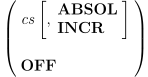
The LPRINT/
- 0:
Coordinates expressed in Joint frame
- 1:
Coordinates expressed in Machine frame
- 2:
Coordinates expressed in WCS frame
Specify OFF to reset the coordinate type to the default.