QUEST Inputs and Outputs
This section describes the various files that can be imported (input), maintained and exported (output) by QUEST.
The Icam Database
The database contains information about each control emulator that has
been defined using QUEST.
The database also contains information about post-processor and Virtual Machine models.
The default database is named campost.dbf and can be found in the work
subdirectory of the icam_appdata directory
(see “Configuration Storage and Application Data”).
This default can be changed by creating an environment variable named icam_dbf
that defines the path and filename of a different database. The database
is in an Icam proprietary format. Each database (there can
be more than one) can hold many control emulators. Each control emulator
in the database can in turn have many revisions, since by default
QUEST keeps all changed copies of a control emulator.
Inside the database, control emulators that have been deemed ready for production are “generated”. Generated control emulators are those that have been checked for inconsistencies while being saved by QUEST. This is indicated by a gold colored icon beside the control emulator name when viewed in the Database Navigator in QUEST. Only generated control emulators can be used with CERUN when emulating CNC programs (except for testing, but more on that later).
See the “Database Upgrade Procedure” section in the “Installation and Upgrade V27” manual for step-by-step details on upgrading the control emulator database to V27.
Exported/
Individual control emulators can be exported from (copied out of)
the database. This is done using QUEST. An exported control emulator is
an exact replica of the information stored in the database, stored in
its original binary format. The default file name for an exported
control emulator is the name of the control emulator itself, with a file
type of dmp (e.g., |file|_1.dmp for a control emulator named |File|,).
Exported control emulators can be imported (read) into another database using the Import button on the CERUN launch panel, or by dragging and dropping the exported control emulator file onto a running portal application or the portal desktop icon, or via the QUEST menu-bar selection.
Use the dmp file format when
transferring control emulators between databases or when e-mailing them to support@icam.com.
Dedicated Control Emulators
Dedicated control emulators are ready-made to user specifications and
are delivered by Icam or one of our representatives. Dedicated
control emulators are restricted for operation on specifically licensed
systems. Dedicated control emulators have a file extension of dp
(e.g., |file|_1.dp).
Dedicated control emulators are imported into the database using CERUN or QUEST in the same way as other exported control emulators. Once imported, the dedicated control emulator is ready-to-run (i.e., does not have to be generated).
Dedicated control emulators have special restrictions not placed on other control emulators. For example, they cannot be modified or printed. Do not change the name of a dedicated control emulator since the licensing system expects to find a control emulator with the as-delivered name.
Basic Control Emulators
Basic control emulators change the default responses for questions (in
QUEST) to more accurately reflect a particular controller or machine.
Basic control emulators are supplied for both machines and controls
(they reside in the basic subdirectory where Icam Productivity Tools is
installed). They can be easily selected when a new control emulator is
being created with QUEST.
The machine and controller basic control emulators
can also be selected using questions 4.00 and 5.00 of the General Information,
General Description section.
The QUEST Listing
Listings are created when the QUEST Print or Generate utilities are
run and whenever a macro is compiled. Two output formats are
supported: HTML and standard listing, controlled by the
use_html_list DEF file symbol. Listing files use the same
name as the control emulator, with an appropriate file extension
(“.lis” or “.htm”) depending on the output format (e.g.,
|file|_1.lis for a control emulator named |File|,).
HTML Listing Format
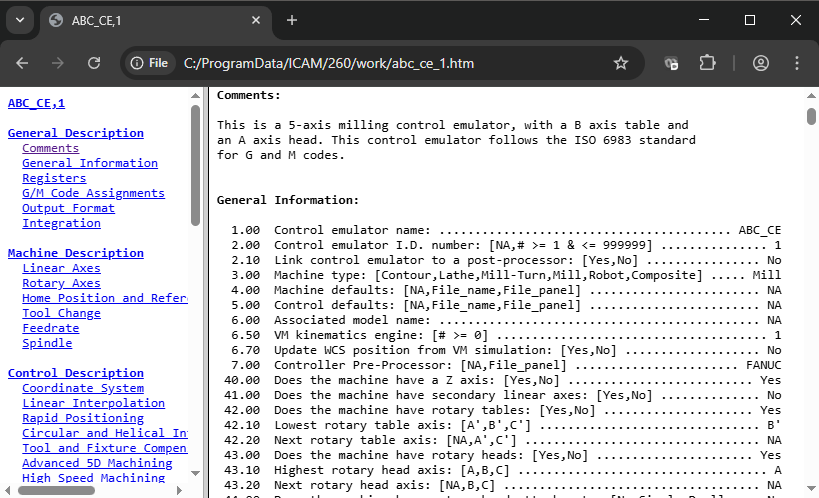
With HTML format, the control emulator listing is contained within 3 files.
The main file (e.g., |file|_1.htm) organizes the layout of the screen
using the <frameset> feature available on most browsers. This file includes
links to two other files:
One of these files contains the complete control emulator listing (e.g., |file|_1_list.htm), which is also
suitable for viewing or printing on its own.
The other file (e.g., |file|_1_nav.htm) acts like a table of contents,
providing a means of quickly navigating the control emulator listing.
By default, listing files are created with an extension of htm in
the same directory as the database that holds the control emulator. The
icam_lis environment variable
can be set to define a different directory where QUEST will write control emulator
listing files. The html_ext_list DEF file symbol can be set
to change the verification listing file extension default.
Macro compilation listings are always output in standard listing format, described immediately below.
Standard Listing Format
The standard listing format can use one of two carriage-control forms: FCC and list. The choice is controlled by the page_format DEF file symbol. The FCC form, which stands for Fortran Carriage Control, reserves the first character of each line for page formatting purposes. QUEST will output: a 1 in this position to advance to a new page; a 0 to double space an output line; and a blank for regular single spacing. This file can be printed on any printer or driver recognizing FCC output. The list form does not reserve a character for carriage control. Instead, a form-feed character is output at the start of a record to advance to a new page. All other records are output one per line.
The page length is set in the definitions file using the lines_per_page DEF file symbol.
By default, listing files are created with an extension of lis in
the same directory as the database that holds the control emulator. The
icam_lis environment variable
can be set to define a different directory where QUEST will write control emulator listing files.
The file_ext_list DEF file symbol can be set
to change the verification listing file extension default.