Control Emulator Processing
This section describes the flow of processing of CERUN. It shows how the various customization features of the control emulator are used at run-time. Simplified charts are used to aid in understanding the flow of processing. Diamond boxes indicate decisions, where the “yes” condition is always taken to the left or right and the “no” condition continues downwards.
CERUN Startup Processing
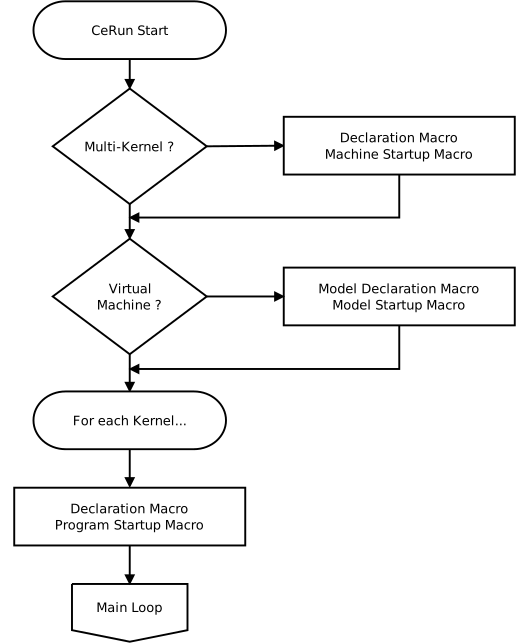
Image below shows the flow of processing when CERUN is started:
CERUN Startup Processing
Normal CE
When running with a Virtual Machine model to simulate the actions of the machine, the first step is to run the model Declaration and Startup macros, if there are any, to handle any model specific initialization.
If there is a CE Declaration macro, then it is run to define and optionally initialize global and object scope variables, along with external function declarations.
If there is a CE Program Startup macro, then it is run last, to perform any additional initialization necessary for the control emulator.
Control at this point branches to the main processing loop as described below.
Multi-Kernel CE
Merging lathes and composite CE’s with two or more channels have multiple instances of the CE kernel running; one kernel for each channel. The kernels in a multi-channel CE all run in parallel, and are synchronized by codes in the MCD as defined in the Questionnaire.
The multi-kernel CE Declaration macro is responsible for declaring global variables that are shared between the different kernels. The multi-kernel CE Machine Startup macro (not to be confused with a Program Startup macro) is responsible for setting multi-kernel system variables that will affect subsequent processing (see “Multi-Kernel Control Emulator Variables”).
When running with a Virtual Machine model to simulate the actions of the machine, the next step is to run the model Declaration and Startup macros, if there are any, to handle any model specific initialization. Model global variables are shared between all CE components.
At this point each of the kernels independently and simultaneously starts.
For a merging lathe, there are two kernels, one for the upper turret and another for the lower turret. The same Declaration macro and Program Startup macro is run once for each of the two kernels. If different variables must be declared for different kernels, then the $VMCHN system variable can be used (e.g., in a CASE statement) to keep the declarations separated.
For a composite CE there can be many kernels, one for each component CE definition. The component Declaration macro is run first, followed by the component Program Startup macro.
Control at this point branches to the main processing loop as described below.
CERUN Main Processing Loop
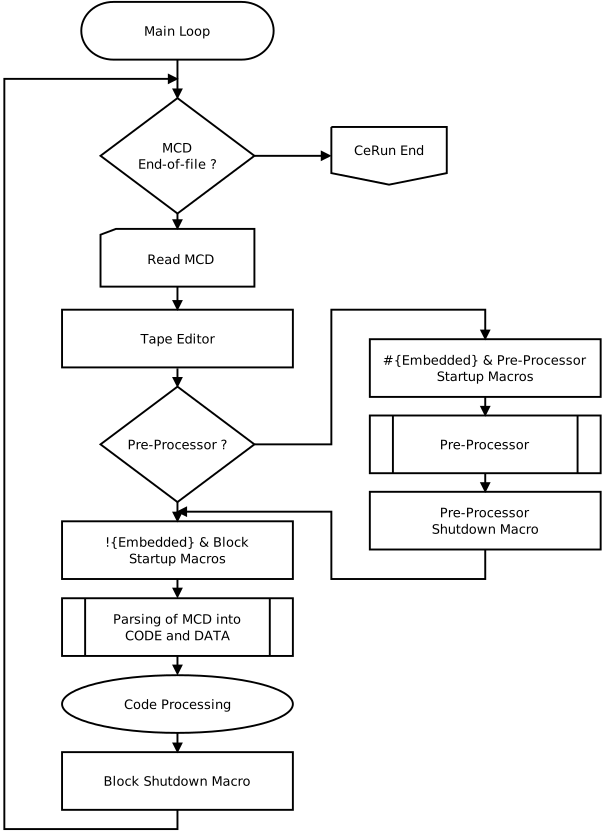
Image below shows the main processing loop of CERUN:
CERUN Main Processing Loop
The main processing loop continues as long as there is MCD to read and process. The first step after a block of MCD is read is to apply the Tape Editor actions to perform initial editing of the MCD.
If a pre-processor is being used then the block of MCD must be evaluated by the pre-processor so that it can perform expression analysis, variable substitution, as well as branching and looping. Pre-processing goes as follows:
If a pre-processor startup macro is defined, then that macro is run first. If the $P1 variable is set to zero in the startup macro, then pre-processing of the block and the pre-processor shutdown macro will both be skipped.
The pre-processor then examines the block of MCD, computing the value of expressions and processing looping and branching instructions (which will cause processing to jump back to the top to read more MCD). The pre-processor substitutes variables by their values in the block of MCD and removes any pre-processor specific MCD. If the pre-processor encounters variables or functions that it cannot handle, then the pre-processor identification event macro (not shown) will be called with the unrecognized MCD in the hope that this macro will return something that can be recognized (e.g., a value in place of an unknown variable).
If a pre-processor shutdown macro is defined, then it is run to allow any final editing of the MCD block.
If the block is empty then processing branches to the top to read the next block of MCD.
The block startup macro is then executed if one is defined. This macro can be used to perform edits of the MCD (as held in the $P2 variable). If the block startup $P1 variable is set to zero on exit, then processing of the current block is skipped and the next block of MCD is then read.
Control Emulator next examines the block and categorizes the data based on the registers that were defined in the control emulator. Some of these registers (typically G and M) have values that are recognized as code identifiers as listed in the Code Customization section. If there are one or more codes present on the block, then they are processed as described in the Code processing loop described below.
Once all the codes on the block have been processed, the block shutdown macro is activated if one is defined. This macro can examine the unrecognized data on the current block, as defined in the $P2 variable and blank it if desired to avoid CERUN diagnostics about unrecognized MCD.
After exiting the block shutdown macro, the next block of MCD is read (if there is any) and block processing repeats. Once there is no MCD remaining, CERUN begins the process of shutting down, as described here.
CERUN Code Processing Loop
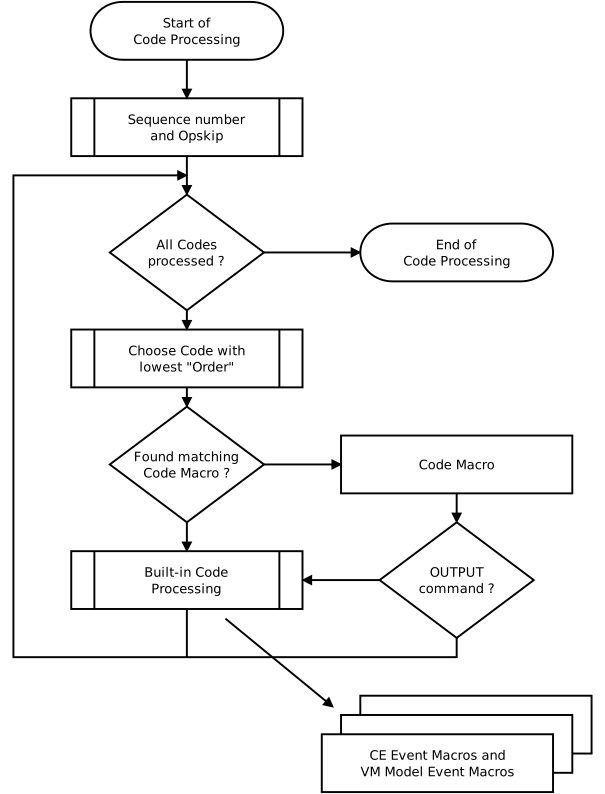
Image below shows how CERUN processes the code identifiers present on the current block:
CERUN Code Processing Loop
The first step in the code processing loop is to determine the sequence number (for informational purposes) and to apply the optional-skip (also known as “block delete”) settings present on the block. The initial optional-skip settings can be set in the CERUN Launch panel. They can be changed from the CERUN Controller window or via the $OPSKIP and $OPSKIPL system variables.
If there are one or more code identifiers present on the current block, CERUN will choose the code that has the lowest processing “Order” as defined in the Code Customization section. If two or more codes on the block have the same order value, then the leftmost code is processed. When a code is processed, it is removed from the block.
The first step when processing a code is to see if it matches any of the Code Macros defined in the control emulator. Only code macros that are not already running are looked at when checking for matches. If two or more code macros match the current code, the highest one in the list is activated. The following are typical functions of a code macro:
A code macro can add or remove code identifiers from the current block using the $FCEADD or $FCEGET functions, which will affect processing on the next iteration of the loop when the next code is selected.
A code macro can also add or remove data identifiers using these same functions, which will affect how built-in code functions are later processed.
A code macro can issue an OUTPUT command to tell CERUN to perform the built-in actions associated with the $P1 variable (initially set to the matched code). However, if there is another inactive code macro that matches the code identifier being “output”, then that macro is activated instead of built-in processing. If that newly activated macro in turn issues an OUTPUT and there are no other matching code macros, then built-in processing of the code will occur. If an OUTPUT command is omitted, then built-in processing of the matched code identifier will be skipped. Note that in the flow chart above the OUTPUT test is shown following the macro, but in fact the OUTPUT processing occurs at the point in the macro where the command is coded.
A code macro can issue an EXEC/
NOW command to interrupt current processing and execute the specified block of MCD. An EXEC/ NEXT command appends additional blocks of MCD after the current block, to be processed before reading the main MCD input file.
If the code macro issues an OUTPUT command, or if there is no matching code macro defined, then built-in processing of the code begins. Most actions require data, in the form of data identifiers. As the built-in action is executed, it will request any data necessary to perform that action in the form of data identifiers. For example, built-in motion processing will look for REG_AXIS… identifiers containing the axes coordinates of the move.
As each data identifier is obtained, the identifier is removed from the current block. If a data identifier matches a Data Macro, then the data macro is first executed to allow customization of the value being retrieved.
Certain types of built-in processing will cause Control Emulator Event Macros and Virtual Machine Event Macros to be executed if they are defined. An event macro provides an opportunity to perform any final customization of the action.
Once all code identifiers and their associated data identifiers have been processed, there should be no MCD remaining on the current block.
CERUN Shutdown Processing
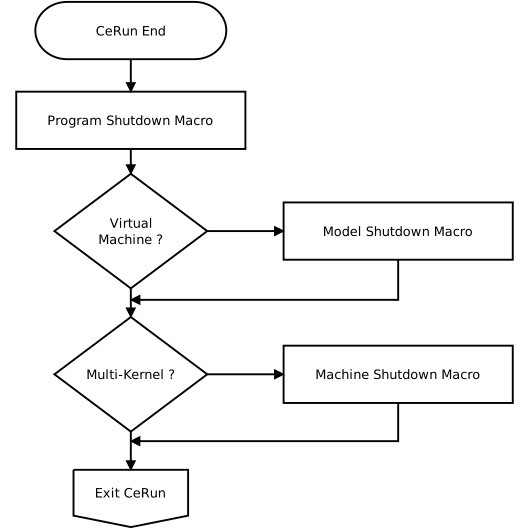
Image below shows the order of execution at the end of CERUN processing:
CERUN Shutdown Processing
Shutdown processing is the reverse of startup processing.
If there is a Program Shutdown macro, then it is run to perform any actions that should occur at the end of processing. For multi-kernel processing (i.e., merging lathes and composite CE’s with two or more channels) the program shutdown macro is run for each kernel.
When running with a Virtual Machine model, the next step is to run the model shutdown macro, if there is one, to handle any model specific termination.
For multi-kernel processing the Machine Shutdown macro is run last, if there is one.