Control Emulator Macro Samples
This appendix shows examples of Control Emulator macros.
“Macro Example #1” shows how tool description information, defined via a CNC (…) type 2 command (i.e., a message enclosed in parentheses), can be added to the CERUN tool table.
“Macro Example #2” shows how operation description information, defined via a CNC ;… comment (i.e., text following a semicolon), can be added to the CERUN operation table.
Macro Example #1
This example shows how tool description information, defined via a CNC (…) type 2 command (i.e., a message enclosed in parentheses), can be added to the CERUN tool table. Adding tool information is important when using the $FDOC feature, and very useful for progress tracking and tracing purposes. Tool description information is added to CERUN by setting the $TLNAME variable prior to a tool change.
This is an example of CNC code generated by the post-processor, which outputs the tool description as a type 2 operator message on the same block as the tool change:
;**************************************************************
;TL 43  POT 43 24.00 DIA DELTA DRILL
;DRILL 53 24MM DIA FLANGE HOLES
;**************************************************************
N46 T43 M6 (MSG,POT 43 24.00 DIA DELTA DRILL)
The following steps are necessary to harvest the tool description in the operator message:
Define the
(and)characters as the start and end of a type 2 operator message CNC command. This is done in the General Description / Output Format section. There are two ways to define the message delimiters. The first method sets question #2.6 “CONTROL-OUT code” to(and #2.7 “CONTROL-IN code” to). The second sets question #16 “Start of DISPLY message” to(and #17 “End of DISPLY message” to). In this example we use the second method, because this is how the post-processor chose to output operator messages. Note: the post-processor uses(MSG,as the start of the message, but in the control emulator, it is better to define the start delimiter as just(, to capture all type 2 messages.If using a pre-processor (i.e., General Description / General Information question #7 “Controller Pre-Processor” is set to an available pre-processor), then operator messages and comments are stripped by default from the MCD when a block is read. Add the following command to the Program Startup macro to allow operator messages to be processed in a macro.
%L01=$FCEPP('PROCESS','MESSAGES',.FALSE.)The $FCEPP function modifies the default actions of the pre-processor. The function call parameters
'PROCESS',tells the pre-processor not to process operator messages. The $FCEPP function returns a value indicating success or failure, which can be ignored.'MESSAGES',.FALSE. Create a Tool Event macro that sets the $TLNAME variable to the text defined on the last operator message encountered.
$$ Set tool name from the last "(MSG,tool name)" operator message
IF/$FTOUPER($FARGV(1,$DISPLY,',')).EQ.'MSG'
   $TLNAME=$FTRIM($FEDIT($DISPLY,'^[^,]*,'))
ENDOF/IF
OUTPUT
Operator messages are stored in the $DISPLY system variable by CODE_DISPLY processing (named after the DISPLY post-processor command that generates operator messages). The $FARGV function splits strings using a specified delimiter. Here, the parameters
1,return the portion of $DISPLY that appears before the first comma. The $FTOUPER function then converts this substring to uppercase, as string comparisons are case-sensitive. The IF command checks whether this first word equals “MSG”. If it does, the body of the IF block is executed. The $FEDIT function parameters$DISPLY, ', ' $DISPLY,return the contents of the $DISPLY string with the leading characters up to and including the first comma removed. The $FTRIM function strips leading and trailing spacing from the resulting string.'^[^,]*, ' In the example MCD above, the operator message appears to the right of the M6 tool change code. All things being equal, this would normally cause the tool change event to be processed before the operator message. However, in the Control Emulator Customization / Code Customization section, the CODE_DISPLY entry (which handles operator messages) has a default code order of 100, while CODE_TOOL_LOAD (which handles M6 tool changes) has a higher default code order of 700. As a result, operator messages are processed before the tool change, regardless of their position within the MCD block.
Below is the CERUN verification listing (with all trace options enabled) for the example MCD block shown earlier. Notable lines are highlighted. The code_disply entry in the trace indicates that an operator message was input. Later, in the Load Tool Event Macro, the $TLNAME variable is set. When the OUTPUT command executes, the tool description string is stored in $TLTAB(20,n).
Block:   ;**************************************************************
  code_comment (ignored)
Block:   ;TL 43  POT 43 24.00 DIA DELTA DRILL
  code_comment (ignored)
Block:   ;DRILL 53 24MM DIA FLANGE HOLES
  code_comment (ignored)
Block:   ;**************************************************************
  code_comment (ignored)
Block:   N46 T43 M6 (MSG,POT 43 24.00 DIA DELTA DRILL)
 N:46
 T:43
 M:6
    reg_seqno 46
  code_disply
Display: MSG,POT 43 24.00 DIA DELTA DRILL
  code_tool_load
    reg_tool 43
 Macro:* Entering Load Tool Event Macro
 Macro:  IF/$FTOUPER($FARGV(1,$DISPLY,',')).EQ.'MSG'
 Macro:  $TLNAME=$FTRIM($FEDIT($DISPLY,'^[^,]*,'))
 Macro:  ENDOF/IF
 Macro:  OUTPUT
      | load tool n=43
 Macro:  ENDMAC
 Macro:* Leaving Load Tool Event Macro, Returning to regular processing
Macro Example #2
This example shows how operation description information, defined via a CNC ;… comment (i.e., text following a semicolon), can be added to the CERUN operation table. Adding operation information is important when using the $FDOC feature, and very useful for progress tracking and tracing purposes. Operation description information is added to CERUN by setting the $OPNAME variable.
This is an example of CNC code generated by the post-processor, which outputs the tool and operation descriptions in a CNC comment block delimited by starred comment lines.
;**************************************************************
;TL 43  POT 43 24.00 DIA DELTA DRILL
;DRILL 53 24MM DIA FLANGE HOLES
;**************************************************************
N46 T43 M6 (MSG,POT 43 24.00 DIA DELTA DRILL)
The following steps are necessary to harvest the operation description (i.e., “DRILL 53…”) in the comment block:
Define the
;character as the start of a CNC comment. This is done in the General Description / Output Format section. There are two ways to define CNC comments. The first method sets question #2.6 “CONTROL-OUT code” to;and #2.7 “CONTROL-IN code” toNA(i.e., not applicable). The second sets question #16 “Start of DISPLY message” to;and #17 “End of DISPLY message” toNo Response(i.e., an empty string). In this example we use the first method, because this is how the post-processor chose to output CNC comments.If using a pre-processor (i.e., General Description / General Information question #7 “Controller Pre-Processor” is set to an available pre-processor), then operator messages and comments are stripped by default from the MCD when a block is read. Add the following command to the Program Startup macro to allow comments to be processed in a macro.
%L01=$FCEPP('PROCESS','COMMENTS',.FALSE.)The $FCEPP function modifies the default actions of the pre-processor. The function call parameters
'PROCESS',tells the pre-processor not to process comments. The $FCEPP function returns a value indicating success or failure, which can be ignored.'COMMENTS',.FALSE. CNC comments are stored in the $TPRINT system variable by CODE_TPRINT processing (named after the TPRINT post-processor command that generates CNC comments). In the example MCD above, there are 4 comment lines, and we must not define a new operation for each line. Instead, we will remember the last operation in a COMMENT global variable (any name could have been chosen), and define a new operation using the last non-starred comment line of a comment block. Add the following to a Declaration macro:
$$ Used for operation name processing
DECLAR/GLOBAL,STRING,COMMENT
The next step is to create a Code Macro (see here) that will be run each time a CODE_TPRINT CNC comment is read from the MCD.
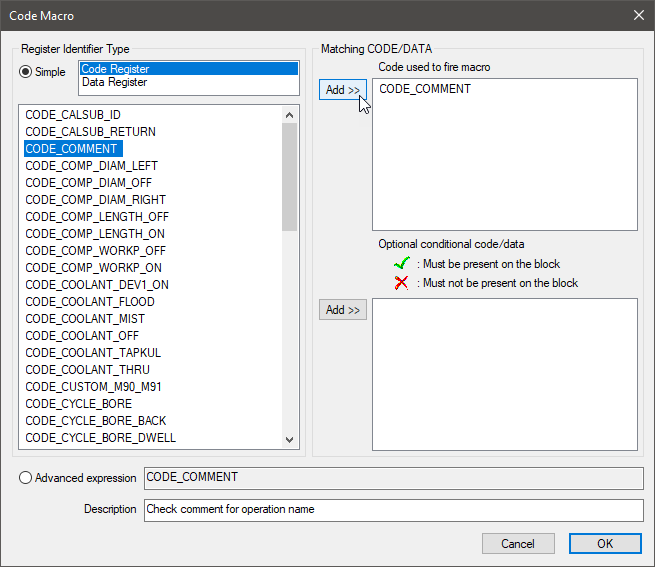
First select the Add button at the top of the Code Macros view. Select the “Code Register” type if it is not already selected. Scroll down through the list of code identifiers and select the CODE_COMMENT code. Press the upper Add button to make the selected code one of the conditions for running the macro. Next, enter a description of the code macro. When done, the code macro properties should look as shown below. Press OK to create the macro.
The macro editor view will now appear showing an empty macro. Enter the following macro, noting that spacing and comments ($$…) are not important. Once entered, press the Compile button to create the code macro.
$$ Treat the last comment before a '**' separator as the operation name.
$$ Ignore comments starting with a digit or 'TL' tool name descriptions.
%L01=$FTRIM($TPRINT)
IF/%L01(1:2).EQ.'**'
  IF/COMMENT.NE.''
    $OPNAME=COMMENT
    COMMENT=''
  ENDOF/IF
ELSEIF/$FINDEX('0123456789',%L01(1:1)).GT.0
  COMMENT=''
ELSE
  %L02=$FTOUPER(%L01)
  IF/%L02(1:3).EQ.'TL '
    COMMENT=''
  ELSE
    COMMENT=%L01
  ENDOF/IF
ENDOF/IF
A description of the macro follows:
%L01=$FTRIM($TPRINT)
IF/%L01(1:2).EQ.'**'
   IF/COMMENT.NE.''
      $OPNAME=COMMENT
      COMMENT=''
   ENDOF/IF
If the first two characters of %L01 are asterisks, then this comment is considered to be a starred comment line at the start or end of a group of comments. If the COMMENT global variable is not empty, then $OPNAME is set to that string value, and COMMENT is cleared so that we do not enter the same operation again when we encounter the next starred comment line. Setting $OPNAME causes a new operation to be created, with the operation description string stored in $OPTAB(5,n).
ELSEIF/$FINDEX('0123456789',%L01(1:1)).GT.0
   COMMENT=''
The $FINDEX is used to determine if the first character of the CNC comment is a number, and if so, this line is not a candidate for an operation description, and the COMMENT variable is cleared.
ELSE
   %L02=$FTOUPER(%L01)
   IF/%L02(1:3).EQ.'TL '
      COMMENT=''
   ELSE
      COMMENT=%L01
   ENDOF/IF
ENDOF/IF
The $FTOUPER is used to convert the comment to uppercase, so that it can be checked for a tool comment, which is ignored. Otherwise, this CNC comment is a candidate for the operation name, which will only be set at the next starred comment line.
Below is the CERUN verification listing (with all trace options enabled) for the example MCD block shown earlier. Input blocks are highlighted. The code_tprint entry in the trace indicates that a CNC comment was input. This causes the Code Macro created above to be executed.
Block:   ;**************************************************************
 Macro:* Entering Check comment for operation name (CODE_COMMENT)
 Macro:  %L01=$FTRIM($TPRINT)
 Macro:  IF/%L01(1:2).EQ.'**'
 Macro:  IF/COMMENT.NE.''
 Macro:  ENDOF/IF
 Macro:  ENDOF/IF
 Macro:  ENDMAC
 Macro:* Leaving Check comment for operation name (CODE_COMMENT), Returning to regular processing
Block:   ;TL 43  POT 43 24.00 DIA DELTA DRILL
 Macro:* Entering Check comment for operation name (CODE_COMMENT)
 Macro:  %L01=$FTRIM($TPRINT)
 Macro:  IF/%L01(1:2).EQ.'**'
 Macro:  ELSEIF/$FINDEX('0123456789',%L01(1:1)).GT.0
 Macro:  ELSE
 Macro:  %L02=$FTOUPER(%L01)
 Macro:  IF/%L02(1:3).EQ.'TL '
 Macro:  COMMENT=''
 Macro:  ENDOF/IF
 Macro:  ENDOF/IF
 Macro:  ENDMAC
 Macro:* Leaving Check comment for operation name (CODE_COMMENT), Returning to regular processing
Block:   ;DRILL 53 24MM DIA FLANGE HOLES
 Macro:* Entering Check comment for operation name (CODE_COMMENT)
 Macro:  %L01=$FTRIM($TPRINT)
 Macro:  IF/%L01(1:2).EQ.'**'
 Macro:  ELSEIF/$FINDEX('0123456789',%L01(1:1)).GT.0
 Macro:  ELSE
 Macro:  %L02=$FTOUPER(%L01)
 Macro:  IF/%L02(1:3).EQ.'TL '
 Macro:  ELSE
 Macro:  COMMENT=%L01
 Macro:  ENDOF/IF
 Macro:  ENDOF/IF
 Macro:  ENDMAC
 Macro:* Leaving Check comment for operation name (CODE_COMMENT), Returning to regular processing
Block:   ;**************************************************************
 Macro:* Entering Check comment for operation name (CODE_COMMENT)
 Macro:  %L01=$FTRIM($TPRINT)
 Macro:  IF/%L01(1:2).EQ.'**'
 Macro:  IF/COMMENT.NE.''
 Macro:  $OPNAME=COMMENT
 Macro:  COMMENT=''
 Macro:  ENDOF/IF
 Macro:  ENDOF/IF
 Macro:  ENDMAC
 Macro:* Leaving Check comment for operation name (CODE_COMMENT), Returning to regular processing