Macro Invocation
Macros are automatically invoked (i.e., called) by the macro processor when specific events happen, or when “matching” CNC codes or data words are processed from the MCD or from other macros. The types of macros and their execution timing are as follows:
Startup and Shutdown macros: Executed before and after key events.
Event Macros: Executed at key events.
Code Macros: Executed when matching code identifiers are processed in the MCD, or from EXEC or OUTPUT macro commands. Code macros are a feature of Control Emulator only.
Data Macros: Executed when matching data identifiers are processed in the MCD, or from EXEC or OUTPUT macro commands. Code macros are a feature of Control Emulator only.
User-Defined macros: Executed when matching CLDATA records are processed in the CLDATA file, or from other macros or by OUTPUT macro commands. User-defined macros are a feature of Icam Post only.
Enable/
The MATCH macro command can be given within a macro to turn Code and Data macro matching ON or OFF. Startup, shutdown and event macros are not affected by the MATCH command.
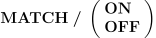
MATCH/
When macro matching is disabled, no attempt is made to invoke other Code or Data macros that match the code identifiers or data identifiers generated by EXEC or OUTPUT commands in the current macro.
Macro matching is always automatically turned back on when the current macro is exited.
Outputting the Identifier or Event (OUTPUT)
The OUTPUT command tells the macro processor to perform the action or event that caused the macro to be invoked. The syntax of the OUTPUT command is simply:

An OUTPUT command in a code macro causes the original matching code identifier to be processed. If the MATCH condition is ON (see above) then the macro processor will first look to see if any other inactive code macro matches the code identifier and if so will begin processing of the first available matched code macro. If the MATCH condition is OFF, or there are no inactive code macro matches the code identifier, then built-in processing of the code identifier is performed.
An output command in an event macro tells Control Emulator to perform the built-in processing of that event type.