Other Functions
The $FAPPLY Function
|
Activate composite control emulator component Returns: Logical |

The $FAPPLY function is used select the composite control emulator component to activate, as identified using the component designator keyword. A value of $TRUE is returned if a component change is made. When the component is changed, the program shutdown macro of the current active component is first executed, followed by the program startup macro of the newly activated component.
The $FDIALOG Function
|
Activate a dialog Returns: String |


![\icamhsp{0.707mm}\bigl[,\mathtt{\char39}\mathit{file\text{-}name}\,\mathtt{\char39}\,\bigr]\icamhsp{0.707mm}\textbf{)}](../../_images/math/b74a74fb07142a009094d171a546c326de91a5ad.svg)
The $FDIALOG function can activate a dialog that has been defined inside the control emulator, or one that has been saved to a file on disk. The dialog-name parameter is a string specifying the name of the dialog. The file-name parameter is optional. If present it specifies the name of the external file that contains the dialog. The $FDIALOG function returns a text string, which is the label of the button that was pressed to close the dialog (e.g., “OK”).
Each “control” in the dialog (e.g., checkbox, combobox, etc.) is associated with a macro variable when the dialog is created in QUEST. When the dialog is activated in a CERUN macro, each dialog control is initialized to an appropriate state based on the current setting of its associated macro variable. If a dialog control references a variable that has not yet been defined, a local variable is created and set to the default value defined within the dialog. When the dialog exits, the macro variables associated with each control take on whatever value the user may have entered. In cases where the user value’s type is ambiguous, the dialog processor will try to maintain the same variable type on exit as there was on input. Strongly typing variables with the DECLAR macro command will ensure the correct return value (the dialog processor will issue a diagnostic and keep the dialog active if the wrong type of data is entered, for example text in a numeric field).
Combobox and Drop-list controls can optionally have a second associated variable that defines the set of valid choices. These variables must be initialized as arrays or sequences. They must be set to appropriate values, before calling the $FDIALOG function.
There are three button types in a dialog: OK, Cancel and Reset. Buttons with OK and Cancel types cause the dialog processor to return control to the macro. Reset type buttons don’t return control to the macro, they instead reset the dialog controls to their initial values and keep the dialog active. OK type buttons return control with macro variables updated; Cancel type buttons return control with macro variables unchanged (but initialized if necessary). The $FDIALOG function returns the text string associated with the OK or Cancel type button that was pressed (buttons can be labeled with any text and there can be multiple buttons of the same type).
The $FDIST Function
|
Distance between points Returns: Numeric |


The $FDIST function the distance between two points defined by x1,
y1, z1 and x2, y2, z2.
The $FDK Function
|
Convert machine coordinates to workpiece coordinates Returns: Sequence |
![\textbf{{\char36}FDK}\textbf{(}\icamhsp{0.707mm}\bigl[\,\mathit{q}\,\bigr]\icamhsp{0.707mm}\textbf{)}](../../_images/math/0e1b7e2743060445445b759af9f2a7aa836820f6.svg)
The $FDK function returns the workpiece coordinate that represents the specified machine position (see the $FIK function for the reverse functionality). The return value is a sequence of length 6, representing the workpiece XYZIJK tool position. The input is a sequence q of length 6 representing the machine axes positions as defined by the current $AXES system variable. Sequence values for inactive axes are ignored, as are excess trailing zero sequence values. Missing trailing sequence values are replaced by the current machine position. Use the {} sequence operator to create an input machine coordinate sequence if necessary. For example, to obtain the workpiece equivalent position of the machine coordinate X=
0, Y= 0, Z= 10: W=$FDK({0,0,10})
The $FDOC Function
|
Generate custom documentation Returns: Numeric |


![\icamhsp{0.707mm}\bigl[,\mathtt{\char39}\mathit{document}\,\mathtt{\char39}\,\bigr]\icamhsp{0.707mm}\textbf{)}](../../_images/math/af719a1e6ac49ce2db45a3ff44df8805c4fb031e.svg)
The $FDOC function makes a copy of a Microsoft Word (2007 and later) template (.dotx) file, substituting the placeholder text of Content Controls with the result of macro processor expressions, and saving the final result as a Microsoft Word document (.docx) file.
If the input template filename is specified with a relative or missing path, then the $FDOC function looks first in the ICAM_APPDATA directory and next in the ICAM_LIB directory. The template file can also reside in the control emulator internal file space (i.e.,
/)./ ICAMFS The output document defaults to the same name and directory as the output listing file, with a file type of “.docx”.
The $FDOC function returns a value of 1 if the document was created and 0 (zero) otherwise.
Template Content Controls
The $FDOC function uses a Word template as the master file for the document creation process. Within the template, information to be extracted from the CERUN process can be visually organized using the standard functionality of Word (e.g., headers, footers, text, tables…). Word provides various Content Controls (accessible from the Developer menu[1]) that can be used to embed the contents of Icam macro expressions into the generated document. These content controls include:
Rich Text & Plain Text
Picture
Date Picker
Check Box (Word 2010 and later)
Combo Box & Drop-Down List
Group
The link to the macro processor is done by typing an Icam macro expression, variable name or constant into the “Tag” field of the content control[2]. The tag field macro code will only be compiled and executed when the template file is later processed in CERUN calling the $FDOC function. The macro expression return value will replace the “placeholder” text originally shown for the content control in the template file. Tag macros have access to external and built-in functions, system variables, CNC variables, GLOBAL and OBJECT variables, as well as the LOCAL variables of the macro that called $FDOC.
Tag macros are normally prefixed with the string “$V_=
” just before the macro is compiled. The $V_ system variable will hold the actual value to be substituted for the placeholder text in the content control when the tag macro is executed. If more complex macro logic is required, multi-line macros can be saved in a tag by using semicolons in place of line breaks (since these are not permitted in the Word Tag field). A multi-line macro must assign a value to the $V_ system variable before exiting. $FDOC Tag macros are listed in the Macro trace window. The $V_ variable can be watched in the debugger Variable window. The debugger Step-Into (F11) function can be used to step in tag macros. Breakpoints cannot be set on individual tag macros.
$FDOC unique range operators *, :: and ::: can be used with array variables and with sequences in Tag field macro expressions, to generate multiple rows of a table, one for each data element in the array or sequence. Range operators are only valid within Word tables and within areas grouped using the Group content control. All variables within a table or grouped area must have an identical range.
The * range operator selects all elements of the array or sequence. For example, $TLTAB(1,
*) would produce one table row for each tool number in the tooling table. The m::n range operator selects just those elements of the array or sequence starting at element m (default is 1 if omitted) and ending at element n (default is the array or sequence size if omitted). For example, $TLTAB(1,2::) would produce one table row for each tool number in the tooling table excluding the dummy tool. If the m or n components of a range expression contain characters other than digits, the range expression is separately compiled and executed to determine the range limits. These appear as $FDOC Range macros in the Macro trace window.
The ::: ditto range operator is provided as a convenience and selects the same range as the first range operator defined in the table or grouped area. For example, $TLSUM(5,:::) would list the corresponding maximum tool feed rate information in the same table or grouped area as other information requested.
Range operator expressions are replaced by the system variable “$I_” just before the tag macro is compiled. The $I_ system variable will hold the actual range value for the current table row or grouped area when the tag macro is executed. The $I_ variable can be watched in the debugger Variable window.
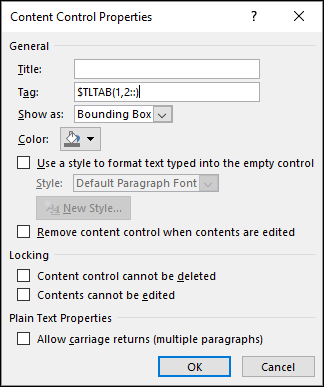
Rich Text and Plain Text controls
The Text and Rich Text controls are nearly identical; the Text control provides an additional option to output multiple lines. The Tag macro expression result is converted at run-time to a text representation and then output in replacement of the original placeholder text.
If “Use a style” is selected in the content control Properties, the selected style is applied to the resulting text. If “Allow carriage returns” is selected and the Tag expression evaluates to a sequence, then each element of the sequence appears on a separate line in the generated document, otherwise a single space will separate each element of the sequence. If “Remove content control” is selected, then the generated document will appear the same but the content control will no longer be present (this simplifies the generated document).
Picture control
The Tag expression must evaluate to a STRING defining a filename containing an image in a format that is supported by Word (e.g., png, jpg, gif, tif, bmp). A filename with a missing path is taken from the same directory as is used by the $FMSPIC function. The specified image is resized (maintaining aspect ratio) to fit within the placeholder image area.
Date Picker control
The Tag expression must evaluate either to a STRING in Icam date format (e.g., $DATE, $CEDATE…) or to a REAL value representing the number of seconds since an operating system specific “epoch” date (i.e., as returned by the $FSTAT function). The date is output in the generated document using the date picker Properties format string.
Check Box control
The Tag expression must evaluate either to a LOGICAL value where $TRUE specifies a checked state and $FALSE specifies an unchecked state, or to a REAL value where non-zero specifies a checked state and 0 (zero) specifies an unchecked state. The same font must be used for both the checked and unchecked character representations in the check box Properties.
Combo Box and Drop-Down List controls
The Tag expression must evaluate to a non-empty SEQUENCE, which will be used as the available choices that can be selected when later opening the generated Word document.
Group control
The $FDOC function will automatically repeat a single row of a table that includes macro variables with range operators. If two or more rows in the same table use range operators, then the $FDOC function will repeat the entire table for each instance of the range. If the repeated range must include more than just a single row or a single table, then the Group control can be used to identify the region of the template file to be repeated for each instance of the range.
Note that the Group control does not have a Tag field. The grouped region is repeated for each instance of the first range operator defined in the group. All other variables in the grouped region with range operators must specify the same range. The “:::” ditto operator can be used to ensure consistency.
The $FERSEV Function
|
Get or set severity of error number Returns: Numeric |
![\textbf{{\char36}FERSEV}\textbf{(}\icamhsp{0.707mm}\mathit{n_{1}}\,\bigl[,\mathit{n_{2}}\,\bigr]\icamhsp{0.707mm}\textbf{)}](../../_images/math/03e65e5a47cbd51cbeb2e7ead5c8910ce47cae12.svg)
The $FERSEV function returns the error severity (0 through 99) of error number n1. A severity of –1 (negative one) is returned if the error number is not known. The current severity can optionally be modified by specifying a second parameter n2 with the new severity value.
The $FERSTA Function
|
Get or set enabled/ Returns: Logical |
![\textbf{{\char36}FERSTA}\textbf{(}\icamhsp{0.707mm}\mathit{n}\,\bigl[,\mathit{a}\,\bigr]\icamhsp{0.707mm}\textbf{)}](../../_images/math/76bbe154097fad61b0172c00f731c4fe7d979df1.svg)
The $FERSTA function returns the current state (enabled or disabled) of error number n. A status of $TRUE is returned if the error number is enabled for output. A status of $FALSE is returned if the error number is disabled (i.e., a diagnostic will not be output even if that specific error condition occurs). The current state can optionally be modified by specifying a second parameter a with a logical $TRUE or $FALSE value giving the required state.
The $FERTXT Function
|
Get text of error number Returns: String |

The $FERTXT function returns the error text of error number n. A blank string is returned if the error number is not known.
The $FGETDEF Function
|
Get DEF file symbol definition Returns: String or $NULL |

The $FGETDEF function returns the value of the case insensitive DEF file symbol name. The name must be fully qualified with the names of all surrounding “begin” blocks in the DEF file (see the example below). The return value is a case sensitive string. $NULL is returned if the DEF file symbol has not been defined or if some other error occurs while attempting to obtain the definition.
The following example gets the value of the “interface_kit” DEF file symbol:
%L01=$FGETDEF('campost.interface_kit')
The $FGETENV Function
|
Get environment variable definition Returns: String or $NULL |

The $FGETENV function returns the value of the environment variable name, or $NULL if the variable is undefined or cannot be accessed. Note that environment variable names may be case-sensitive depending on the operating system.
The $FIK Function
|
Convert workpiece coordinates to machine coordinates Returns: Sequence |
![\textbf{{\char36}FIK}\textbf{(}\icamhsp{0.707mm}\,\Bigl[\,\bigl[\,\mathit{q},\bigr]\,\mathit{n}\,\Bigr]\icamhsp{0.707mm}\textbf{)}](../../_images/math/76dfa16c491ea668ba66ebd8f630f09451a7dc23.svg)
The $FIK function returns the machine coordinate that would be output given the specified workpiece coordinate (see the $FDK function for the reverse functionality). The return value is a sequence of length 6, representing the machine axes positions as defined by the current $AXES system variable. The input is a sequence q of length 6 representing the workpiece XYZIJK tool position. Excess trailing zero sequence values are ignored. Missing trailing sequence values are replaced by the current workpiece position or tool axis vector component. The vector need not be normalized.
On 5 axis machines there can be 2 different machine configurations that satisfy the tool-to-part relationship specified by a CL coordinate. A second parameter to $FIK specifies the solution number n, as follows:
- 0:
Return solution #2 if it is the only solution inside travel limits, otherwise return solution #1. (default)
- 1:
Return the solution that has the shortest rotary component, or if rotary components are equal the shortest linear component, or if linear components are equal the first component computed. This is equivalent to the solution that would be chosen when linearization (e.g. RTCP) is active.
- 2:
Return the opposite solution of #1 if there is one, otherwise return the only solution.
The $FKINCFG Function
|
Modify the position and orientation of a rotary axis or the tool axis Returns: Numeric |



The $FKINCFG function internally sets the position and the orientation of a rotary axis or a tool axis. The <axis> identifier is either a whole number index or a keyword, as listed in the table below. The position and orientation of the axis is given by xyzijk data. This function returns a value of 1 (one) if successful; otherwise a value of 0 (zero) is returned.
Index
Keyword
Axis
0
TOOL
Tool axis
7
AAXIS,
TABLE Rotary A table
8
BAXIS,
TABLE Rotary B table
9
CAXIS,
TABLE Rotary C table
10
AAXIS
Rotary A head
11
BAXIS
Rotary B head
12
CAXIS
Rotary C head
14
RAM,
1 Primary rotary on exchangeable head
15
RAM,
2 Secondary rotary on exchangeable head
|
Reset the position and orientation of a rotary axis or the tool axis Returns: Numeric |

The $FKINCFG function resets the specified <axis> (see table above) to its original position and orientation as defined in the Questionnaire. This function returns a value of 1 (one) if successful; otherwise a value of 0 (zero) is returned.
The $FKINROT Function
|
Specify the rotary axes used in RTCP inverse kinematics calculations Returns: Numeric |


![\icamhsp{0.707mm}\bigl[,\mathtt{<\!axis_{2}\!>}\,\bigr]\icamhsp{0.707mm}\textbf{)}](../../_images/math/dd3ed22e1a859eb696b5fbf5b449a523d3625b92.svg)
When a CNC machine has 3 or more rotary tables or rotary heads, the $FKINROT function selects the rotary axes which will be used by the motion processor to calculate the kinematics solution when the orientation of the tool is given by virtual axes under RTCP control. Specify the <axis1> and <axis2> identifiers using a whole number index or a keyword as listed above (excluding tool axis). This function returns a value of 1 (one) if successful; otherwise a value of 0 (zero) is returned.
The $FMACID Function
|
Find matching macro id’s Returns: Sequence |
![\textbf{{\char36}FMACID}\textbf{(}\icamhsp{0.707mm}\Bigl[\,\mathtt{\char39}\mathit{string}\,\mathtt{\char39}\,\bigl[,\mathit{mask}\,\bigr]\,\Bigr]\icamhsp{0.707mm}\textbf{)}](../../_images/math/d8180d9cf8063d5687f954b74287f2e959f50111.svg)
The $FMACID and $FMACSTA functions are used to enable or disable individual macros. The $FMACID function obtains numeric identifiers of the macros to be enabled or disabled. The $FMACSTA function then interrogates or changes the state of the specified macros.
The $FMACID function searches through all macros for a match with the string, and returns a sequence containing pairs of “id,
description” for each match. If the search string is blank or omitted, the current macro index and description is returned. Otherwise, the search string is compared against the descriptions of all CODE and DATA macros as well as the built-in names for startup, shutdown and event macros (including those of the Model). The search string can contain special characters in the form of a regular expression (RE). For example, the search string '.' will match all macros. See the $FEDIT function for description of RE’s.
The candidate macros to search can be restricted using combinations of the mask value, as follows. If mask is omitted, all macros are searched. Note that composite control emulators cannot match or modify macro states in another component, nor in the composite master (and vice versa).
Mask
Macros to search
1
control emulator macros
10
Model macros
If no macro matches the search string, then an empty sequence is returned. Otherwise, the sequence will contain two elements for each matching macro. The first element of the pair is the macro index number. The second element of the pair is the macro description. This return sequence can be used with the $FMACSTA() function to enable or disable the matched macros.
The $FMACSTA Function
|
Set or query enabled/ Returns: Sequence |
|
Set or query enabled/ Returns: Sequence |


![\icamhsp{0.707mm}\bigl[,\mathit{state}\,\bigr]\icamhsp{0.707mm}\textbf{)}](../../_images/math/0cdcbbbfa1dc1a6d7d98040b17067ab3e53ba782.svg)

The $FMACID and $FMACSTA functions are used to enable or disable individual macros. The $FMACID function obtains numeric identifiers of the macros to be enabled or disabled. The $FMACSTA function then interrogates or changes the state of the specified macros.
The $FMACSTA function returns the current enabled ($TRUE) or disabled ($FALSE) state of macros identified using the $FMACID function. If a logical state is specified, the macro states are changed accordingly (the returned value is the enabled/
disable state before applying the change). Macros can be specified either by a sequence seq containing macro id’s (non-numeric entities in seq are ignored) or by a simple numeric id. The returned sequence contains pairs of “id, state” for each macro, where id identifies the macro and state is a logical variable set $TRUE if the macro was enabled.
The $FMRU Function
|

The $FMRU family of functions are designed to simplify the saving and restoring of MRU “most recently used” information, such as user responses to interactive dialogs.
MRU data is stored on disk in XML format. When called from a control emulator macro, the MRU file will by default have the same name as the control emulator and be stored in the same directory as the control emulator database. When called from a model macro, the default name and directory are those of the model name and database respectively.
The MRU file is organized at the highest level using named keys. Key names are strings that uniquely identify the information stored with the key. For example, if MRU data should be remembered between runs of the same input file, then the key name should be based on the input file name (this is the default). If MRU data is to be remembered for individual users, then the string returned from $FGETENV('USERNAME') would make a good key. If information is to be remembered regardless of input file or user, then a key name such as '*' could be used (i.e., something that won’t conflict with a valid file or user name).
Each key in the MRU file can have zero or more parameters. Each parameter has a name that identifies the parameter and a value. Parameter names are strings that can be anything other than blank. Parameter values can be any macro data type, including sequences. Named parameters eliminate the requirement to know the order in which they are saved in the MRU file.
The following functions are available:
- Opening:
- Closing:
- Keys:
- Parameters:
$FMRU_GETPARAM, $FMRU_GETPARAMS, $FMRU_SETPARAM, $FMRU_DELPARAM, $FMRU_DELPARAMS
The following is an example of how to remember a user’s response to a dialog box entry. For demonstration purposes, the dialog is named “Startup” and the dialog box entry to remember is a logical variable named “DLG_X”. Defaults are used for both the MRU file and the key name. The parameter name is “X”.
DECLAR/LOCAL,REAL,H
H=$FMRU_OPEN()
DLG_X=$FMRU_GETPARAM(H,0,'X',$TRUE)
IF/$FDIALOG('Startup').EQ.'OK'
  %L01=$FMRU_SETPARAM(H,0,'X',DLG_X)
ENDOF/IF
%L01=$FMRU_CLOSE(H)
The $FMRU_CLOSE Function
Close an MRU file
Returns: Numeric or $NULL
The $FMRU_CLOSE function writes out all changes and then closes the MRU file identified by the numeric handle (returned from $FMRU_OPEN). The function returns a numeric status value of 1 if successful. A return value of 0 indicates an error where $ERRNO contains the actual error code. $NULL will be returned if handle does not point to an open MRU file.
The $FMRU_DELKEY Function
Delete a key in an MRU file
Returns: Numeric or $NULL
The $FMRU_DELKEY function deletes the specified key (string or numeric) from the MRU file identified by the numeric handle (returned from $FMRU_OPEN). If key is omitted, blank or zero, then the key name to delete is derived from the input file. The function returns a count of the number of keys deleted (i.e., either 0 or 1). $NULL will be returned if handle does not point to an open MRU file.
The $FMRU_DELKEYS Function
Delete multiple keys in an MRU file
Returns: Numeric or $NULL
The $FMRU_DELKEYS function deletes the key names and/
or key id’s specified in sequence from the MRU file identified by the numeric handle (returned from $FMRU_OPEN). If sequence is omitted, all keys are deleted. The function returns a count of the number of keys deleted. $NULL will be returned if handle does not point to an open MRU file. The $FMRU_DELPARAM Function
Delete a key/
parameter value in an MRU file Returns: Numeric or $NULL
The $FMRU_DELPARAM function deletes the parameter named param associated with the key in the MRU file identified by the numeric handle (returned from $FMRU_OPEN). If key is blank or zero, then the key name is derived from the input file. The function returns a count of the number of parameters deleted (i.e., either 0 or 1). $NULL will be returned if handle does not point to an open MRU file.
The $FMRU_DELPARAMS Function
Delete multiple key/
parameters values in an MRU file Returns: Numeric or $NULL
The $FMRU_DELPARAMS function deletes the parameters specified in sequence associated with the key in the MRU file identified by the numeric handle (returned from $FMRU_OPEN). If key is blank or zero, then the key name is derived from the input file. If sequence is omitted, all parameters of the key are deleted. The function returns a count of the number of parameters deleted. $NULL will be returned if handle does not point to an open MRU file.
The $FMRU_GETKEY Function
Get specified or default key in an MRU file
Returns: Numeric or $NULL
The $FMRU_GETKEY function looks in the MRU file identified by the numeric handle (returned from $FMRU_OPEN) for a key matching the name specified. If the key name is omitted or blank, then the key name to find is derived from the input file using $FBASNAM($TAPEN,
'.'). The function returns a numeric key identifier that can be used in all other $FMRU functions wherever a key name is required. A return value of 0 indicates that the key name does not exist. Note that when writing MRU information, a key id value of 0 will save the MRU information under the default key name derived from the input file. $NULL will be returned if handle does not point to an open MRU file. The $FMRU_GETKEYS Function
Get all keys in an MRU file
Returns: Sequence or $NULL
The $FMRU_GETKEYS function returns all of the keys in the MRU file identified by the numeric handle (returned from $FMRU_OPEN), either in order of when they were last updated (order=
0, the default) or in ASCII collating order (order = –1 descending, order = +1 ascending). The function returns a sequence of key name strings. An empty sequence will be returned if the MRU file is empty. $NULL will be returned if handle does not point to an open MRU file. The $FMRU_GETPARAM Function
Get a key/
parameter value in an MRU file Returns: Any
The $FMRU_GETPARAM function returns the value associated with the key-name/
parameter-name combination in the MRU file identified by the numeric handle (returned from $FMRU_OPEN). If key is blank or zero, then the key name to find is derived from the input file. The parameter name param must not be blank. The function returns whatever value was originally stored in the MRU file using the $FMRU_SETPARAM function. If the specified key or parameter name does not exist, then the function will return the default value if specified, or will return $NULL if a default is not specified. $NULL will also be returned if handle does not point to an open MRU file. The $FMRU_GETPARAMS Function
Get all parameters for the key in an MRU file
Returns: Sequence or $NULL
The $FMRU_GETPARAMS function returns all of the parameter names associated with the specified key in the MRU file identified by the numeric handle (returned from $FMRU_OPEN). If key is omitted, blank or zero, then the key name to find is derived from the input file. The function returns a sequence of parameter name strings. An empty sequence will be returned if the key does not exist in the MRU file or if the key has no parameter values. $NULL will be returned if handle does not point to an open MRU file.
The $FMRU_OPEN Function
Open an MRU file
Returns: Numeric
The $FMRU_OPEN function opens an MRU file. If filename is omitted or blank, then the default filename is the control emulator or model name (depending upon which object the macro processor is running from). If the path portion of the filename is missing, then the default path is the directory containing the control emulator or model database. An empty MRU file is created if one does not already exist.
The function returns a numeric handle value that must be used in all other $FMRU functions to identify the MRU file being used. A return value of 0 indicates an error where $ERRNO contains the actual error code.
The $FMRU_SETPARAM Function
Set a key/
parameter value in an MRU file Returns: Any
The $FMRU_SETPARAM function writes the new value to the key-name/
parameter-name combination in the MRU file identified by the numeric handle (returned from $FMRU_OPEN). If key is blank or zero, then the key name to write is derived from the input file. The parameter name param must not be blank. The function returns whatever old value was previously stored in the MRU file for the key-name / parameter-name combination being set. $NULL is returned if this is the first time writing this parameter data. $NULL will also be returned if handle does not point to an open MRU file.



![\icamhsp{0.707mm}\bigl[,\mathit{key}\,\bigr]\icamhsp{0.707mm}\textbf{)}](../../_images/math/8a7c33dc86d63fe4307ac75eee69729ed7cc2083.svg)

![\icamhsp{0.707mm}\bigl[,\mathit{sequence}\,\bigr]\icamhsp{0.707mm}\textbf{)}](../../_images/math/8bd474a194a066ca47597974356c26360bf62050.svg)






![\icamhsp{0.707mm}\bigl[,\mathtt{\char39}\mathit{key}\,\mathtt{\char39}\,\bigr]\icamhsp{0.707mm}\textbf{)}](../../_images/math/fd8aa0d4df69096b86100fcfce278fdab2457bfb.svg)

![\icamhsp{0.707mm}\bigl[,\mathit{order}\,\bigr]\icamhsp{0.707mm}\textbf{)}](../../_images/math/8846b4771df30d9d0bbf4cff0e822cfa2f76ecaa.svg)


![\icamhsp{0.707mm}\bigl[,\mathit{default\text{-}value}\,\bigr]\icamhsp{0.707mm}\textbf{)}](../../_images/math/6e28342ec5fee6a29cb1f1a5a9ef0a9bcfda4ac9.svg)

![\textbf{{\char36}FMRU\_OPEN}\textbf{(}\icamhsp{0.707mm}\bigl[\,\mathtt{\char39}\mathit{filename}\,\mathtt{\char39}\,\bigr]\icamhsp{0.707mm}\textbf{)}](../../_images/math/c623cc1f30f0b4014b0833068df898822151e121.svg)



The $FPAUSE Function
|
Pause processing with optional message Returns: Logical |
![\textbf{{\char36}FPAUSE}\textbf{(}\icamhsp{0.707mm}\bigl[\,\mathtt{\char39}\mathit{string}\,\mathtt{\char39}\,\bigr]\icamhsp{0.707mm}\textbf{)}](../../_images/math/7bbf1262b7f6869ed204fca81ad5add82a90d5a3.svg)
The $FPAUSE function will pause CERUN processing and display a message-box with the specified or default string. The user will be given a choice to either pause or continue processing. When paused, the full CERUN interface is made active. Once CERUN processing resumes, this function will return a logical value of $TRUE if the user chose to pause processing, or $FALSE otherwise.
The message-box is not displayed when running in background mode. Instead, the $FPAUSE function immediately returns a value of $FALSE and processing continues uninterrupted.
The $FREGFMT Function
|
Return $FSWRIT compatible output format for register Returns: String |

The $FREGFMT function takes as input either a register index number, or a text string matching one or more characters of a register’s descriptor. It returns a format string that can be used with the $FSWRIT() function to output a register value.
The $FREGPOS Function
|
Return a register index given a register descriptor Returns: Numeric |

The $FREGPOS function takes as input a text string matching one or more characters of a register’s descriptor. It returns the register index number or –1 if a match cannot be found.
The $FSORT Function
|
Sort records in a file Returns: Numeric |
|
Sort elements of a sequence Returns: Sequence |


![\icamhsp{0.707mm}\bigl[,\mathtt{\char39}\mathit{delimiters}\,\mathtt{\char39}\,\bigr]](../../_images/math/91810e6a0e913c839ca9b4db91384c2d729442b3.svg)
![\icamhsp{0.707mm}\raise0.03ex\hbox{$\;\icamrange{1.16}{0}\Bigl[,\mathit{field},\mathtt{\char39}\mathit{type}\,\mathtt{\char39},\mathit{order}\,\Bigr]$}\icamhsp{0.707mm}\textbf{)}](../../_images/math/a87da5e8a409a2ad03517c9348cdda058ff50912.svg)

![\icamhsp{0.707mm}\raise0.05ex\hbox{$\biggl[,\mathit{fields}\;\icamrange{1.16}{0}\Bigl[,\mathit{field},\mathit{order}\,\Bigr]\,\biggr]$}\icamhsp{0.707mm}\textbf{)}](../../_images/math/9b1fc61bd4ef8803f290172692a454cf4cf5eaec.svg)
The $FSORT function can be used to sort the contents of a file or the contents of a sequence variable.
When sorting a file, the contents of the input file are first read into memory, sorted, then written to the output file. The same file name can be specified for both input and output files. Sorting occurs on specific fields (or columns) of data in the file. By default, a run of spaces defines the boundary from one field to the next. Specify an optional delimiters string to define a different character or set of characters to be used as field separators (e.g., specify $FCHAR(9) to use a tab character as a delimiter). The default increasing ASCII text order of sorting can be changed by specifying a “field,
type, order” sort key parameter, where: field identifies a field number; type is a string 'N' or 'S' defining a numeric or string field type; and order is one of the keywords INCR or DECR. Additional sort keys can be specified to further sort records with matching sort key fields. If all sort keys are the same, then the original record order is maintained (i.e., a “stable” sort). The $FSORT function will return the number of records in the output file, or –1 if the sort failed. The $ERRNO system variable will be set to a non-zero value if the sort failed. When sorting a sequence, the input sequence is specified as the first parameter of the $FSORT function and the sorted result is returned as a sequence. If all elements of the sequence are the same type (e.g., all numbers or all strings), then $FSORT can be called with just the input sequence to sort the elements in increasing order. If the sequence represents a table (e.g., alternating pairs of number and string elements), then the fields parameter must be specified to tell the sort function the number of fields (or columns) that make up each record (or row) to be sorted in the sequence. The default increasing order of sorting can be changed by specifying a “field,
order” sort key parameter, where field identifies a field number and order is one of the keywords INCR or DECR. Additional sort keys can be specified to sort records with identical sort key fields. If all sort keys are the same, then the original record order is maintained. If the sort fails, a null sequence (i.e., $NULL) will be returned and the $ERRNO system variable will be set to a non-zero value.
The $FUNWIND Function
|
Reset rotary axis to modulo-360 value Returns: Numeric |

The $FUNWIND function internally resets one or more rotary axes to their modulo-360 value. No motion is generated. Specify the <axis> using either a whole number index or a keyword, as listed in the table below:
Index
Keyword
Axis
0
TOOL
Tool axis
7
AAXIS,
TABLE Rotary A table
8
BAXIS,
TABLE Rotary B table
9
CAXIS,
TABLE Rotary C table
10
AAXIS
Rotary A head
11
BAXIS
Rotary B head
12
CAXIS
Rotary C head
14
RAM,
1 Primary rotary on exchangeable head
15
RAM,
2 Secondary rotary on exchangeable head
An optional modifier keyword can be specified to control the 360-degree range of the final rotary axis position, as follows:
- NORMAL:
Range [–179.9999,180] (the default)
- PLUS:
Range [0,359.9999] forces a positive result
- MINUS:
Range [–359.9999,359.9999] respects the current axis sign
Multiple rotary axes can be reset by repeating the “<axis> [,modifier]” specification for each additional axis to be reset.
This function returns a value of 1 (one) if successful; otherwise a value of 0 (zero) is returned.