IcamID Utility
The Icam Identification (IcamID) utility provides tools to obtain the Icam system ID, test connectivity with license servers, locate servers on the local LAN, and perform other administrative tasks.
The IcamID utility may be started either from the Start menu or from the Icam Portal.
To start the IcamID utility from a client computer Start menu, locate the “Icam V27 x64” Start menu and select the “IcamID Utility”.
To start the utility from the Icam portal, select the Tools pane and click on the “IcamID Utility” tile or icon.
You will see a window that looks similar to the one shown below.
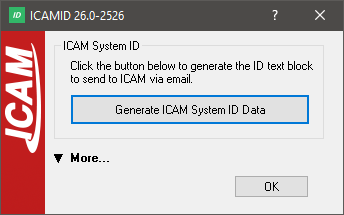
Icam System ID
The Generate Icam System ID Data button generates a text file containing all information required for Icam to issue a license for this computer. Only the data between the BEGIN and END lines needs to be sent to Icam.
To access the license server connectivity tools, click the "↓ More..." text. You will see the extended window shown below.
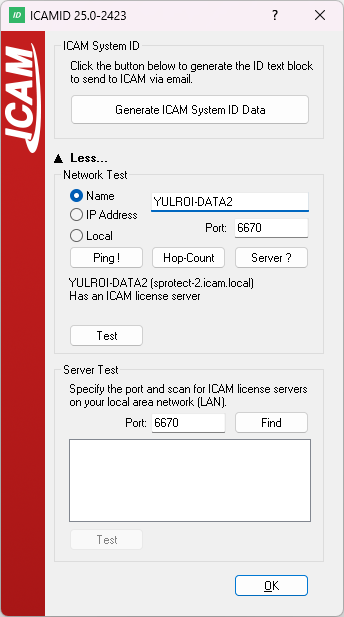
Network Test
The Network Test features allow you to specify a license server address and port to test connectivity.
Ping ! sends an ICMPv4 ping to the server. The server responds as long as ICMPv4 is allowed and enabled.
Hop-Count returns the number of hops from the client (computer running IcamID) to the license server. Each hop represents an intermediate device such as a router. ICMPv4 must be allowed and enabled for this test.
Server ? sends a request to determine whether the Icam license server software is running on the specified server.
Test performs a series of tests from client to server and back to verify communication. If any tests fail, it usually indicates blocked ports or firewalls preventing communication.
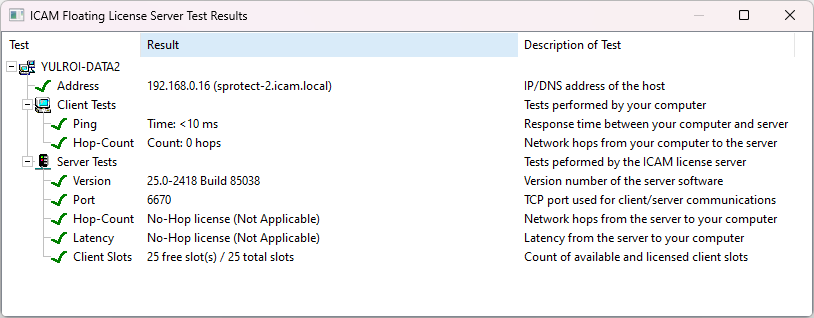
Server Test
The Server Test controls broadcast a message on the local area network (LAN) and lists all responding servers. The license server port must be specified for this test to work.
Port defines the port number on which the license server is listening.
Find broadcasts a message on the local area network (LAN) and lists all responding servers.
Test performs a series of tests on each listed server as shown above.